1 - Introduction:
序論:
FsPassengers was created from my passion for flying and with the user’s pleasure in mind.
FsPassengersは私の情熱から飛んで、ユーザの喜びをもって念頭に作成されました。
It is the result of more than a year of work and I hope you will enjoy the hard work I have put into it.
それは1年以上の仕事の結果です、そして、あなたが楽しんでくれることを願っています。
Daniel Polli (FsPassengers作者)
1A - Help text, first notes about FsPassengers
ヘルプテキスト、FsPassengersに関する注意
In addition to this documentation you will find help texts in several locations.
このドキュメンテーションに加えて、数個のヘルプテキストがあります。
Most options in FsP contain a help button, watch for them and use them at first.
FsPのほとんどのオプションヘルプボタンを備えており、初めて使用するときにご活用ください。
Many features are accessible by menus and by keyboard shortcuts.
多くの機能がメニューとキーボードショートカットによってアクセス可能です。
1B - How will FsPassengers modify your way of flying
FsPassengersでどのように今までのフライトが変更されますか
FS2004 lacks the feeling of responsibility:
FS2004は緊張感、責任感に欠けています:
the feeling that decisions, actions or mistakes have consequences on your flight performance.
FSPassengerを使用することにより、決定、動作または誤りがあなたの飛行実績に結果を持っているという感じになります。
FS2004 provides you with an empty and dead world where nobody cares if you do three loops in a 747, land on grass or crash every flight.
FS2004は空虚で死んだ世界です。あなたが747で3ループしようが、草地に着陸しようが、あらゆる飛行を墜落させようが、だれも気にもかけません。
Because of this, you really miss the feeling of flying a real airplane after a few FS2004 flights.
このために、本当にいくつかのFS2004飛行の後に本当の飛行機を飛ばす感じを逃します。
Some simulator pilots could fly for years making terrible flight errors without ever finding out that they were doing something wrong.
何人かのシミュレータのパイロットが、長年にわたりひどく間違ったフライトをしていることに気がつかず、飛ぶことができました。
FsPassengers fixes that.
FsPassengersはそれを正します。
The main goal of FsPassengers is to complement FS2004 by giving you a complete environment in which you will be penalized for poor procedures/decisions, and rewarded when you perform well.
FsPassengersの第一目的は、不十分な手順/決定をするとペナルティで報酬が減らされ、良い手順/決定では追加報酬を得られる完全な環境を整えることによって、FS2004の補足となることです。
Now, you have passengers in your aircraft and you are responsible for their safety and comfort… and they will let you know if you do something wrong!
今、あなたの航空機には乗客が乗っています。そして、あなたは彼らの安全と安らぎに責任があります。彼らはあなたが変なことをするとあなたにお知らせするでしょう!
With FsP the way you fly has a direct impact on your pilot’s rank and on your company’s income and reputation.
FsPにより飛行すると、あなたのパイロットランク、あなたの航空会社の収入と評判にダイレクトに衝撃を与えます。
Your career and company growth will depend on your ability to comply with most “real world” flight rules while satisfying your passengers’ needs and expectations.
あなたのキャリアと航空会社の成長は乗客の需要と期待を満たしているかどうか、「本当の世界」にも通じる飛行規則に従うあなたの能力に依存するでしょう。
If you want to push it one step further, you can create a company with the “instant record” setting.
より簡単にはじめたいと思ったら、「インスタント・レコード」セッティングで航空会社を作成することができます。
This means that your flights are automatically recorded when completed.
これを行うことにより、フライトが完了すると自動的に記録されます。
No more undo buttons and if you pilot dies in a crash, you must start over.
もしこのパイロットがクラッシュで死んだ場合は戻すボタンはありません。最初からはじめなければなりません。
With this setting enabled, your guts will turn when you will hear your copilot declare a failure or if you encounter bad weather on approach.
この設定が可能にされている状態で、副操縦士から故障報告を聞くか、またはアプローチのときに悪い天気に遭遇すると、あなたのやるきは萎えてしまうでしょう。
You now have everything to lose.
あなたには、今、失うすべてがあります。
Of course you can always disable the “instant record” and still enjoy the benefits of FsPassengers without the risk of losing your pilot (to say nothing of your passengers!).
もちろん、いつでも「インスタント・レコード」機能をはずして、あなたのパイロットを失うというリスクなしでFsPassengersの機能をまだ持つことができます(あなたの乗客は言うまでもなく!)。
FsPassengers also provides you with a number of features missing from FS2004 such as:
また、FsPassengersはあなたを以下のようなFS2004から欠けている多くの機能を提供します。
GPWS;
cabin announcements;
キャビンアナウンス;
random failures;
ランダムに発生する故障;
ATC chatter and;
ATCチャッター
the ability to enter autopilot values, radio frequencies or instrument values with the keyboard.
キーボードから直接オートパイロットの各種設定値や無線周波数などを入力する機能
These features were created with a unique behavior:
これらの特徴はユニークな振舞いで作成されました:
most sounds will not play in external view because, in reality, you would not hear cockpit sounds outside the aircraft.
航空機の外でコックピット音をほんとうは聞こえないはずなので、外部の視点ではほとんどの音は再生されません。
In FsPassengers, you will also be subjected to many unique failures that you would never encounter in FS2004.
また、FsPassengersでは、FS2004のデフォルトでは決して遭遇しない多くのユニークな故障が発生するでしょう。
FS2004 failures are set by users and you are aware of what and even when a failure will occur.
FS2004の機能の故障はユーザによって意識的に設定されたもので、発生時期も決まっています。
In FsP, failures are generated randomly.
FsPでは、ランダムに故障が発生します。
Most FsP failures will provide some advance warning.
ほとんどのFsPの故障が何らかの事前の警告を提供するでしょう。
Just like real world pilots, you now must continuously monitor your instruments panel to ensure that all is well.
まさしく本当の世界のパイロットのように、すべてが確実に順調に進んでいるかどうか絶え間なく計器パネルをモニターしなければなりません。
For example, an increase in engine oil temperature could lead to an engine failure on approach…
例えば、エンジン・オイル温度の増加はアプローチでのエンジン故障につながるかもしれません。
FsPassengers renews your approach to simflying.
FsPassengersは「シミュレーターでのフライト」に対するあなたのアプローチ(気持ち)を新たなものにします。
After many years of flying only on a simulator I personally took some flying lessons.
長い年月を経て、シミュレータだけの上に飛ぶのにおいて、私は個人的にフライングレッスンを受けました。
One of the greatest moments of my life was when I flew my first solo.
私の人生の最高の瞬間の1つは私が最初の単独飛行をした時です。
For the first time in the aircraft, I was solely responsible for my life.
航空機で初めて、私は唯一私の人生に責任がありました。
That is the feeling that I wanted to reproduce through FsPassengers.
それは私がFsPassengersを通して再生したかった「感じ」です。
FsPassengers for Microsoft Flight Simulator 2004 c2005 SecondReality Software s.a.r.l page 2
1C - An open add-on to fit everyone’s needs
みんなの必要にフィットするアドオン
Great care was taken to keep FsPassengers open and many things can be added, modified and fine-tuned by users.
FsPassengersの開発にかなりの注意が払われ、ユーザーによって多くのことが追加、変更、微調整することができます。
You can create and add new voice packs, payload models, maps, dangerous areas, passenger’s names, splash screens, and company and pilot logos.
あなたは、新しいボイスパック、ペイロードモデル、地図、危険区域、乗客の名前、スプラッシュスクリーン、航空会社とパイロットロゴを作成、追加することができます。
You can also set precise failure rates and difficulty to help you develop your skills.
あなたは技能を磨くことができます。故障率を設定することができ、困難は技能を磨く助けになります。
When you create a company, many settings such as penalties and behaviors can be customized to your needs.
会社を創設すると、必要に応じてペナルティーや振舞いなどの多くの設定をカスタマイズすることができます。
The goal was to please everyone and fit to anyone’s flying style.
目標は、だれの飛ぶスタイルにもあわせて、皆を喜ばせることでした。
Some may fly with all penalties ON and manage the altimeter settings and the lights as well as purchasing their aircraft and getting financial results for their flight;
それらの航空機を購入して、彼らの飛行のために財政的な結果を得ることと同様に、或るものは、すべてのペナルティONと共に飛んで、高度計設定とライトを管理するかもしれません;
others may perhaps want simpler penalties and fly only to get the report without taking care of managing their company’s economy.
他のものは、恐らくより簡単なペナルティ設定で飛ぶかもしれませんが、それらの会社の経済を管理するように注意しないで、レポートを得ます。
FsP allows you to fly like the most experience airline pilot or like uncle Bob who is taking you on a fishing trip.
FsPはあなたに大部分が定期航空パイロットを経験するように飛ぶか、または魚釣旅行のときにあなたを連れて行くボブおじさんのようにさせます。
A forum specially dedicated for FsPassengers customization was created on the website to help you get the most out of FsP.
特に、FsPassengers改造のために設けられたフォーラムは、あなたがFsPを最大限に活用するのを助けるためにウェブサイトで作成されました。
You can also upload your creations to the site and share them with the entire FsP community.
あなたの創造をサイトにアップロードして、全体のFsP共同体とそれらを共有することができます。
There is a special forum dedicated to FsPassengers tuning so don’t hesitate to pay a visit here http://www.FsPassengers/forum for more information.
FsPassengersのための特別なフォーラムがあるので、詳しい情報のために遠慮なく http://www.FsPassengers/forum を訪問してください。
The first way to fine-tune FsPassengers is of course through the Setup menu.
FsPassengersについて微調整する最初の方法はもちろんそうです。Setupメニューを通して。
However, you can also tweak FsP to your needs by editing the config files that are found in the various FsPassengers folders.
しかしながら、必要なことに、様々なFsPassengersフォルダーで見つけられるコンフィグファイルを編集することによって、FsPをひねることができます。
More information about this can be found in the “tuning FsPassengers” section of this document.
このドキュメントの「チューニングFsPassengers」セクションでこれに関する詳しい情報を見つけることができます。
1D - An add-on that is user friendly
ユーザフレンドリーなアドオン
If after your first flight you find FsPassengers simple to use, we have reached our initial goal.
最初の飛行の後にFsPassengersが使用するのが簡単であることがわかるなら、私たちは当初の目標に着きました。
But do not be misled.
しかし、誤らないでください。
As you will discover in subsequent flights, FsPassengers’ 50,000 lines of code will prove more challenging and complex than you might initially have thought.
その後の飛行ではFsPassengersの50,000行のプログラムが初めのフライトで思ったかもしれないより挑戦的であって、複雑であると判明するでしょう。
1E - Principle of FsPassengers
FsPassengersの本質、どうそれを使用するか
First, you must create a company.
まず最初に、航空会社を創設しなければなりません。
The settings used to define your company will determine how you will fly.
航空会社を定義するのに使用される設定は、「どのように飛ぶか」を決定するでしょう。
You can create a company with economic management enabled (you must purchase and manage your aircraft fleet) or not.
経済運営が可能にされている状態で(航空機船隊を購入して、経営しなければなりません)、会社を創設することができます。
You can either create a company with custom settings or choose a pre-defined scenario.
カスタム設定で会社を創設するか、または事前に定義されたシナリオを選ぶことができます。
In Scenario mode, you must meet a clear set of conditions to win.
Scenarioモードで得る明確なセットの条件を満たさなければなりません。
Scenarios also have predetermined conditions and failure settings.
シナリオも状態と故障設定を予定します。
The second step is to create one or more pilots.
第2ステップは1人以上のパイロットを作成することです。
Pilots are created with a company and can be transferred, for a fee, to another company later.
パイロットは、会社で作成されて、後で別の会社に有料で転勤になることができます。
You are now ready to use FsP.
これでFsPを使用する準備ができました。
Each time you want to fly simply start a FS2004 flight, with any aircraft of your choice (remember that your company must own the aircraft in an economic management environment) ready at the location of your choice.
あなたの選択(会社が経済運営環境で航空機を所有しなければならないのを覚えている)のどんな航空機も準備ができていた状態で、単に飛びたがっているたびに選択の位置でFS2004便を始めてください。
Make sure that the parking brake is set and go to “FsPassengers Flight/Start flight - load aircraft” menu, load your aircraft and click “OK - load immediately”.
サイドブレーキが設定されるのを確実にしてください。「FsPassengersフライト/スタート - 航空機読込」メニューを行ってください。航空機を読み込んでください。「OK--すぐに、ロードすること」をクリックしてください。
On the Flight datasheet dialog, click “Start flight”.
フライトデータシートダイアログでは、「スタートフライト」をクリックしてください。
You are now in a FsPassenger flight and you benefit from all in-flight features including crew and copilot sounds, GPWS, radio chatter and more.
現在FsPassengerフライトになっています。乗組員、副操縦士音、GPWS、ラジオチャッター、およびその他を含むすべての機内の特徴が現れます。
Once you land, set the parking brake and return to the “FsPassengers flight/End Flight” menu.
一度着陸して、サイドブレーキを設定し、「FsPassengersフライト/フライト終了」をメニューから行います。
You will get the end flight report.
エンドフライトレポートが出力されます。
Register your flight.
フライトを登録してください。
Congratulations, you have just completed your first FsPassengers flight.
おめでとうございます。あなたはちょうど最初のFsPassengers飛行を終了したところです。
1F - The flight report - The heart of FsPassengers
フライトレポート - FsPassengersの核心
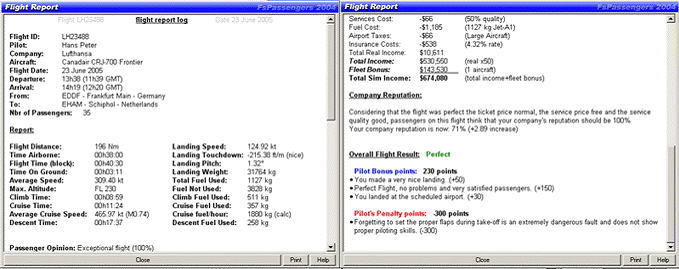
The end-of-flight report is the heart of FsPassengers.
フライト終了のレポートはFsPassengersの核心です。
Here you will find a comprehensive analysis of your flight performance.
ここで、飛行実績の包括的な分析を見ることができます。
The end-of-flight report will display your flight data, your passengers’ opinion, your mistakes, the failures that you have encountered, the income generated by your flight, your fines and your pilot bonuses and penalty points.
フライト終了レポートはフライトデータを表示します。乗客の意見、あなたの誤り、遭遇した故障、飛行、ペナルティ、パイロットボーナス、およびペナルティポイント発生による収入。
The end-of-flight report is a marvelous tool to help you identify what was good, bad and simply ugly with your flight.
フライト終了レポートは、何が飛行において良かった/悪かったかを特定するのを助ける驚異のツールです。
Armed with this report, you can now correct your mistakes.
このレポートを得ることにより、誤りを修正することができます。
The end-of-flight report comes first when you end a FsPassengers flight but, once your flight is recorded, you can review any of your flight reports at any time.
最初に、FsPassengersフライトを終わらせると、フライト終了レポートは来ますが、飛行がいったん記録されているといつでも飛行レポートのどれでも再検討することができます。
FsPassengers can store about 1,000,000 flight reports in its database.
FsPassengersは 1,000,000 回のフライトをデータベースに格納することができます。
FsPassengers for Microsoft Flight Simulator 2004 c2005 SecondReality Software s.a.r.l page 3
You can also print the flight reports, export them to a virtual airline VA database, open them in MS-Word or another text editors, or send them to your friends.
飛行レポートを印刷するか、それらを仮想のエアラインヴァージニアデータベースにエクスポートするか、MS Wordか別のテキストエディタでそれらを公開しているか、またはそれらを友人に送ることができます。
End-of-flight report example top (left) and bottom (right):
フライト終了レポート例、2枚出力され、左が1枚目、右が2枚目:
FsPassengers for Microsoft Flight Simulator 2004 c2005 SecondReality Software s.a.r.l page 4