FsPassengers for Microsoft Flight Simulator 2004 c2005 SecondReality Software s.a.r.l page 7
マイクロソフトフライト・シミュレータ2004c2005 SecondReality Software s.a.r.l7ページのためのFsPassengers
Instant Record is a great way to enhance your flight experience.
インスタントレコード機能は飛行経験をアップするかなりの方法です。
As said earlier the goal of FsPassengers is to increase the realism and the accountability of your flights.
最初に言ったように、FsPassengersの目標は飛行のリアリズムと責任を増加させることです。
While a company in economic mode is affected by your flight performance, you still have the option of not saving your flight if you made a mistake, if you crashed your plane or if your pilot dies.
あなたの飛行実績でエコノミックモードにより会社が影響されている間、間違いを犯したなら飛行を救わないオプションがまだあります。飛行機を墜落させたか、またはパイロットが死ぬなら。
With Instant Record, your flight will be recorded automatically at the end of your flight.
インスタントレコード機能を使っていた場合は、フライトの終了と同時に自動的にフライトの内容が記録されます。
You no longer have the option of not saving a flight to dismiss your mistakes.
間違いを帳消しにする方法、フライトを保存しないためのオプションはもうありません。
This makes your more accountable for your actions.
これで、あなたの動作がより責任の重いものになります。
This being said you might want to leave this option unchecked until you are confident in your flying abilities.
前述のこのオプションのチェックを外せば、休暇に欲しいかもしれない飛ぶ能力に自信がつくまでの存在。
Fleet income is solely intended to reward you for building a fleet.
フリート収入がフリートを造るために報酬を与えるのが唯一意図されます。
For each flight that you fly, each aircraft that you own will generate some additional revenue based on your flight performance.
各フライト単位で、所有している各航空機は飛行実績に基づく何らかの追加収入を発生させるでしょう。
These are not real flights made by these aircraft or by “AI” pilots.
これらは各航空機によるフライトまたは、「AI 」のパイロットによってされた本当のフライトではありません。
If you perform well, you will get a higher fleet income;
これらがよく働いてくれると、より高いフリート収入を得ることができるでしょう;
if you perform poorly, you will have no fleet income.
不十分な働きの場合は、フリート収入が全くないでしょう。
In addition, FsP takes the state of your other aircraft into account and you will not receive an income from an aircraft that is in bad condition or in need of maintenance.
さらに、FsPは他の航空機の状態を考慮に入れます。そして、これら航空機が不調であったり、メンテナンスが必要であったりして収入を受け取れない場合があります。
3B - Create company by scenario setting
シナリオ設定による航空会社作成
A scenario is a configuration file that allows you to create a company with predefined settings.
シナリオは事前に定義された設定で会社を作成するときの構成ファイルです。
The difference between custom setting and scenario setting is that in a scenario setting, companies are created with pre-established victory settings and configuration.
カスタム設定とシナリオ設定の違いはシナリオ設定では、会社がプレ確立した勝利設定と構成で作成されるということです。
This gives your company a goal to reach:
これは目標に達することができるように会社に与えられます:
a minimum income level, a company status or reputation level, a minimum number of missions in dangerous or war areas, a minimum number or type of aircraft to own, a maximum crash allowed and much more.
最低所得レベル、会社の状態または評判レベル、危険地域または戦闘空域ミッションの最小回数、所有する航空機の最小機数またはタイプ、許容されるクラッシュの最大回数、その他
You now have a goal to reach and you can win or lose the game.
これにより、達成するべき目標ができて、ゲームに勝つか、または負けることができます。
After you complete (or fail to complete) a scenario, you can keep flying with you company and your pilots.
シナリオを完了(または失敗)した後でも、それまでの会社とパイロットと共に飛び続けることができます。
You can create a new scenario by writing a new scenario file with the Windows notepad and saving it in the “FsPassengers/config/MissionGamesCfg” folder.
新しいシナリオファイルをウィンドウズのメモ帳でつくり、「FsPassengers/config/MissionGamesCfg」フォルダーに保存することにより作成することができます。
A help file is in the folder to help you create a new scenario.
新しいシナリオを作成するのを助けるために、ヘルプファイルがフォルダーにあります。
You can also define custom splash screens in jpg and sounds in wav format.
また、wavファイルとjpgファイルを用意することで音とカスタムスプラッシュスクリーンを定義することができます。
The appropriate file will then play when you create your company, complete the scenario or when you fail to complete the scenario.
シナリオをコンプリートした時またはシナリオのコンプリートに失敗したとき、適切なファイルを作成し会社を作成します。
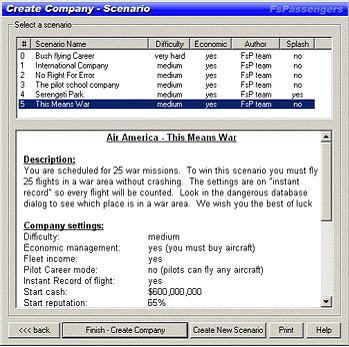
FsPassengers comes with a list of 6 predefined scenarios.
FsPassengersには6つの事前に定義されたシナリオのリストが用意されています。
Company creation scenario selection dialog:
会社の創造シナリオ選択ダイアログ:
FsPassengers for Microsoft Flight Simulator 2004 c2005 SecondReality Software s.a.r.l page 8
3C - Create company by custom setting
カスタム設定による航空会社作成
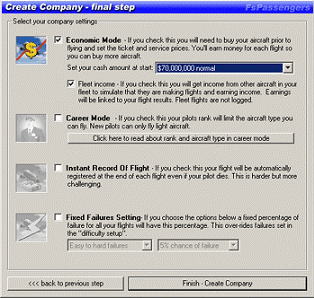
Custom settings allow you to create a company custom fit to your needs and criteria.
カスタム設定により、必要性と評価基準への会社の特徴を決定します。
However, you cannot set predefined victory goals.
しかしながら、事前に定義された勝利目標を設定することはできません。
Create company by custom setting:
カスタム設定で会社を作成してください:
FsPassengers for Microsoft Flight Simulator 2004 c2005 SecondReality Software s.a.r.l page 9