SAVING FMC DATA
The FMC has the capability to store LEGS page data for recall as a flight plan, SID, STAR or Approach procedure.
FMC は LEGS ページに蓄えられたデータをフライトプラン、SID、STAR、アプローチプロシージャーの再呼び出しのために持っている能力があります
In the case of a flight plan, the route is recalled using the CO ROUTE data block on the ROUTE page.
フライトプランのケースでは、ルートは ROUTE ページでの CO ROUTE データブロックを使用して呼び出します
In the case of SIDS, STARs and Approach procedures, the data is recalled using the DEP/ARR key and menus.
SID、STAR、アプローチプロシージャーのケースでは、データは DEP/ARR キーとメニューを使用して呼び出します
The Database that comes with the PIC product has only limited SIDs, STARs and Approach procedures programmed.
767PIC に付属のデータベースは SID、STAR、アプローチプロシージャーのプログラムの限られた数しか持っていません
These serve as examples to allow our customers to program their own procedures for their favorite airports.
これらの役に立つ例として、カスタマーが彼らの好きな空港のプロシージャーをプログラムすることを許しており、説明します
Using aviation charts (real or sim versions), anybody can program and save these procedures.
航空チャート ( 現実またはシムバージョン ) を使用して、だれでもこれらのプロシージャーをプログラムし、保存することができます
Programming these procedures is a good way for pilots to become more familiar with their routes and also allows for user-based control of the database.
これらのプロシージャーのプログラミングはパイロットにとって良い方法となります。なぜならば、さらなるそれらのルートとユーザーが作ったデータベースが許されるからです
These procedures can be easily traded among pilots who wish to share their programmed procedures.
これらのプロシージャーは簡単にそれらのプロシージャーのプログラムを共有し、欲しいデータをパイロット間でやり取りできます
We will explain how to do this later in this chapter.
この章の後にそのやり方を説明します
The MENU key on the FMC keyboard is used to access the SAVE ROUTE menu.
FMC キーボードの MENU キーを使って SAVE ROUTE メニューを呼び出します
Pressing the MENU key brings up a screen with a “SAVE ROUTE>” prompt at the 5R LSK.
MENU キーを押すと 5R LSK に "SAVE ROUTE >" プロンプトが表示されます
Pressing this prompt takes you to the menus used to save route data.
このプロンプトを押すとルートデータの保存メニューを使えるようになります
There are two pages of SAVE ROUTE menus that allow the pilot to specify what type of data is being saved.
SAVE ROUTE メニューには 2 つのページがあり、保存するデータは、どのタイプかをパイロットが指定します
In the next sections we will explain how to program route data and use these menus to save the data in the proper format.
次のセクションで、ルートデータのプログラムの方法とこれらのメニューを使用した保存するデータの正しいフォーマットについて説明します
Saving Route as a Flight Plan
After programming a route manually using the FMC ROUTE and LEGS pages, all route information can be saved for future recall using the CO ROUTE data block on the ROUTE page.
FMC ROUTE と LEGS ページを使用してマニュアルでルートのプログラミングをした後、全てのルートの情報はのちに ROUTE ページの CO ROUTE データブロックを使って呼び出すために保存することができます
First, start by programming a route into the route page.
最初に、ルートページでルートのプログラミングから始めます
Make the necessary modifications on the LEGS pages (such as speeds and altitudes for each waypoint).
LEGS ページでの必要な修正を行います ( それぞれのウェイポイントでのスピードと高度など )
Activate and execute the route.
ルートをアクティブにして実行します
Then press the MENU key on the FMC keyboard and press the “SAVE ROUTE>” prompt at the 5R LSK.
FMC キーボードの MENU キーを押して、5R LSK "SAVE ROUTE >" プロンプトを押します
Page one of the SAVE ROUTE menu will be displayed (shown at right).
SAVE ROUTE メニューのページ 1 が表示されます ( 右の絵をご覧下さい )
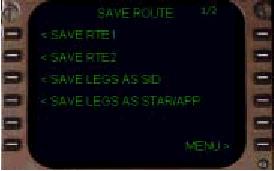
If you are working with RTE1, press the “<SAVE RTE1” prompt at the 1L LSK.
もし RTE 1 を行いたいなら、1L LSK "< SAVE RTE1" プロンプトを押します
If you are working with RTE2, press the “<SAVE RTE2” prompt at the 2L LSK.
もし RTE 2 を行いたいなら 2L LSK "< SAVE RTE2" プロンプトを押します
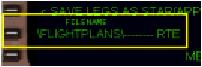
Pressing either of these prompts opens up a FILENAME prompt abeam the 5L LSK.
これらのうちのどちらかを押すと 5L LSK の真横に FILENAME プロンプトが表示されます
078
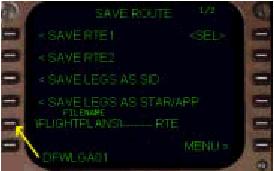
To save the route, enter a name in the scratchpad using the FMC keyboard.
ルートのセーブのために FMC キーボードを使ってスクラッチパッドに名前を入力します
The name must be 10-characters or less for the FMC to accept it.
名前は FMC が受け入れるために 10 文字またはそれ以下で半角英数字にで入力しなければなりません
For example, to save the example flight discussed in this manual, a name like “DFWLGA01” would work well.
例えば、このマニュアルで説明しているフライトの例をセーブするなら、"DFWLGA01" とかが良いでしょう
Numbering the flight plan allows for saving additional flight plans with numbers like “02”, “03”, etc.
フライトプランの保存名にナンバーをつけることも許されています。例えば "02", "03" などのように
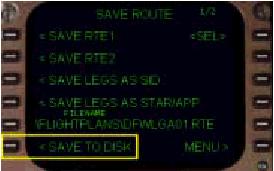
Once the flight plan name is in the scratchpad, press the 5L LSK to enter the flight plan name into the FILENAME box.
いったんフライトプランの名前をスクラッチパッドに入力したら、5L LSK を押してフライトプラン名を FILENAME ボックスに入力します
This transfers the scratchpad contents into the 5L data line and also causes the “<SAVE TO DISK” prompt to appear at the 6L LSK.
これでスクラッチパッドから 5L データラインに名前が送られ、6L LSK に "< SAVE TO DISK" プロンプトが表示されます
To finally save the route, press the 6L LSK.
最後に 6L LSK を押してルートを保存します
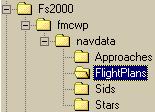
The route is then saved to your hard-drive in the “FS2000\fmcwp\navdata\FlightPlans” folder.
ルートは自分のハードディスクの "FS2000\fmcwp\navdata\FlightPlans" フォルダーに保存されます
To recall the flight plan in the future, use the CO ROUTE data block on the route page as explained in the “FMC Programming” portion of this manual.
あとでフライトプランを呼び出すことは、このマニュアルの "FMC Programming" で説明しているようにルートページの CO ROUTE データブロックを使用して行います
To refresh, type the saved flightplan name into the scratchpad and go to the ROUTE page.
リフレッシュするためスクラッチパッドに保存したフライトプランを入力し、ROUTE ページに行きます
Press the 3R LSK to transfer the flightplan name to the CO ROUTE data block.
3R LSK を押してフライトプラン名を CO ROUTE データブロックに送ります
The saved flight plan is then loaded into the FMC.
保存したフライトプランを FMC に読みこみます
Loading a flight in this way wipes out any other route data already programmed.
フライトを読みこむこの方法はその他のすでにプログラムされたルートデータをきれいに除きます
The following information is offered as “FYI” for hard-core users.
次の情報はハードコアユーザーのための "FYI" を提供します
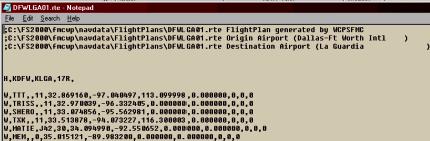
The flight plan is saved as a *.rte file.
フライトプランは *.rte ファイルとして保存されます
You can easily view the contents of the flight plan file by using Windows Notepad to open up the file.
ウィンドウズのノートパッドを使ってこのファイルを開くことによりフライトプランのファイルは容易に見ることができます
This is not necessary, but might be handy for those who wish to manually edit the flight plan file.
これは必要ではありませんが、マニュアルでフライトプランファイルをエディットすることができるということです
Each waypoint is listed with lat/long data as well as some other important FMC data.
それぞれのウェイポイントは他の重要な FMC データと同じように緯度/経度データでリスト表示されます
Waypoints can be removed by cutting out the entire line that has the waypoint name.
ウェイポイントはウェイポイント名のある行を消すことで削除することができます
Also, waypoints from other files can be added to the flight plan by cutting and pasting waypoint data from another flight plan.
他のファイルのフライトプランからウェイポイントをカットアンドペーストで持ってきてフライトプランに追加したりもできます