MAIN PANEL (1)
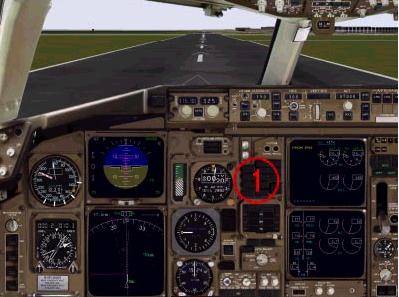
The main panel contains almost all of the controls necessary to properly fly the 767.
このメインパネルは 767 を適切に飛行させるために必要なほとんどすべてが含まれています
We have placed a tremendous amount of information onto the main panel in an effort to minimize the use of “windowed” panel components and maximize the overall cockpit feel.
これ以上無い努力のすえ、最小限のパネルウィンドウ使用で最大限のすべてのコックピット感覚を得られる配置をいたしました
During high workload periods of takeoff and landing there is almost no need to switch panel windows to determine the aircraft configuration or to access essential switches.
特に高い作業負荷のかかる離陸と着陸時には飛行機の設定を確定したり、必須のスイッチ類を操作するためにパネルウィンドウの切替を行うことはほとんど必要ありません
Most of them are all right here on the main panel.
それらの大部分はメインパネルのみで行えます
The panel is completely accurate in its layout of the basic flight instruments and autopilot controls.
パネルは基本航法計器とオートパイロット装置が完璧にレイアウトされています
The panel is patterned after 767’s found at most major US airlines.
パネルは現在のほとんどの主要な US 航空会社の 767 をかたどって作られています
Some components have been shrunk and adjusted to fit in the main panel.
いくつかの部品はメインパネルにフィットさせるため縮めたり調整したりしています
The only creative liberty invoked during the design of the main panel was the removal of the standby flight instruments from the main panel to make room for the warning annunciators and controls.
メインパネルのデザインの際に勝手にやった唯一の独創的な点はワーニング表示機とコントロールの場所を空けるためにスタンバイ航法計器をメインパネルから取り外 したことです
The standby flight instruments are now windowed in a separate panel and can be accessed by pressing <shift><3>.
スタンバイ航法計器は別のパネルにウィンドウ化されていて Shift + 3 で呼び出すことができます
They will be displayed on top of the warning annunciators and “blend” into the panel nicely.
それらはワーニング表示の上にパネルに上手にブレンドされて表示されます
The basic flight instruments are the focal point of the panel.
基本航法計器はパネルの中心です
They where designed for maximum readability while maintaining the maximum cockpit feel.
それらは最大限コックピットの感じに近くなるように、また最大限読みやすくなるようにデザインされています
Those who are not familiar with the 767 might wonder why the Vertical Speed gauge has a grey housing: it is one of the many options that carriers can choose from when equipping their 767’s.
灰色のハウジングで作られた昇降計は 767 であまり見かけないので不思議に思うかもしれませんが、これは 767 のたくさん有る装備のオプションの中のひとつです
This particular VSI is integrated with the TCAS on the real plane.
この特別の VSI は実機では TCAS と統合されたものになっています
In the real plane there is a separate screen for the display of TCAS information while TCAS “commands” to the pilot are displayed on the VSI.
現実の航空機ではパイロットへの TCAS 情報と TCAS 命令を表示する別々のスクリーンがあり、VSI に表示されます
Some carriers have the TCAS co-located with the VSI and display traffic data and VSI data together on a small LCD screen.
いくつかのキャリアーは VSI の TCAS co-located を持っており、トラフィックデータと VSI データはいっしょに小さな LCD スクリーンに写されます
Some may have seen this style of VSI on older versions of our 767.
いくつかの私達の古い 767 バージョンではこの VSI のスタイルが見られます
This version of the VSI was chosen because it is the style found in the aircraft currently flown by the designer.
この VSI のバージョンが選ばれた理由はこのソフトのデザイナーが良く乗る航空機がこのスタイルだったからです
There are four CRT screens on the main panel.
メインパネルには4つの CRT スクリーンがあります
The two on the left are part of the flight instruments and are referred to as the EADI and EHSI described in the Flight Instrument section).
左側の2つは航法計器であり、EADI 計器と EHSI 計器です ( Flight Instrument section 参照)
The EADI replaces the standard attitude indicator and the EHSI replaces the standard compass gauge.
EADI 計器は標準の姿勢表示計の代わりになります。そして EHSI 計器は標準のコンパスの代わりになります

The EADI and EHSI brightness controls are on the main panel.
EADI 計器と EHSI 計器はメインパネルで明るさの調整ができます
This picture shows the knobs used for this task.
この絵はこの操作に使用するノブを示しています
Below the knobs are the buttons needed to quickly call up the other panel windows.
ノブの下にあるボタンは素早く他のパネルウィンドウを呼び出すために必要なボタンです
One that will be used quite often is the FMC button.
ひとつは FMC ボタンでかなり頻繁に使われるはずです
Pressing it or using the keyboard combination <shift><6> brings up the FMC (described in the FMC/NAV section).
このボタンを押すか、キーボードで Shift + 6 を押すことにより FMC が呼び出されます ( FMC/NAV section 参照 )
The FMC will display over the two CRT screens on the right side of the panel.
FMC はパネルの右側の2つの CRT スクリーンの上に呼び出されます
Pressing the PDST key or using the keyboard combination <shift><5> will bring up the pedestal.
PDST キーを押すか、キーボードで Shift + 5 を押すことによりペデスタルが呼び出されます
Pressing the OVHD key or using the keyboard combination <shift><4> will bring up the overhead systems panel.
OVHD キーを押すか、キーボードで Shift + 4 を押すことによりオーバーヘッドシステムパネルが呼び出されます
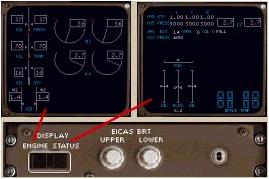
The two screens on the right side of the panel are called the EICAS screens (described in the Engine section).
パネルの右側の2つのスクリーンは EICAS スクリーンと呼ばれる計器です ( Engine section 参照 )
They provide engine indications, warning/caution messages and other system information.
それらはエンジンの状況表示を提供し、ワーニング/コーション表示やその他のシステム情報を表示します
Brightness controls for these two screens are located directly below the lower screen.
これら2つのスクリーンの輝度調整はスクリーンのすぐ下に付いています
The lower screen has three display modes that are controlled by the two toggle switches labelled “ENGINE” and “STATUS”.
スクリーンの下には3つの表示モードがあり、"ENGINE" と "STATUS" と書かれた2つのトグルスイッチで操作します
Pressing the ENGINE button will toggle between the engine indications screen and a blank screen.
ENGINE ボタンを押すたびにエンジン状況表示スクリーンとブランクスクリーンが切り替わります
Pressing the STATUS button will toggle between the status page and a blank screen.
STATUS ボタンを押すたびにステータスページとブランクスクリーンが切り替わります
Normally the engine screen is displayed at all times.
標準ではいつもエンジンスクリーンが表示されています