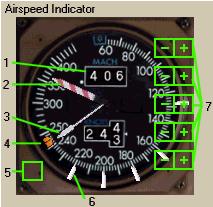
1- Mach Display: It displays current airspeed in Mach.
マッハ表示:現在の対気速度がマッハで表示されます
If the Mach airspeed is less the .400 the window is blank.
もしマッハ対気速度が .400 以下の場合は表示されません
2- MMO/VMO Pointer: It displays airspeed/mach limit.
MMO/VMO ポインター:対気速度/マッハ限度の表示
Above this speed you receive an overspeed warning.
この速度を超えるとオーバースピードの警告が出ます
3- Airspeed Pointer: It points to the current indicated airspeed in knots.
対気速度ポインター:現在の対気速度をノットで指し示しています
It is not active below 60 knots.
60 ノット以下では動作しません
Digital readout of the airspeed is also shown in the box labelled “KNOTS”.
対気速度のデジタル表示も "KNOTS" と表示されたボックスに表示されます
4- Airspeed Command Bug: It displays the currently selected AFDS airspeed.
対気速度設定バグ:現在 AFDS で設定されている対気速度が表示されます
If VNAV is in use it displays the airspeed commanded by the FMC.
もし VNAV が使用されていると表示されている場合は FMC によって対気速度が制御されます
5- Speed Bug Quick Set: An invisible mouse click area resides here.
対気速度設定バグのクイックセット:見えないですがここをマウスでクリックしてください
When clicked it sets all of the speed bugs to the correct speeds based on FMC INIT REF page.
ここをクリックするとスピードバグを FMC INIT REF ページで設定されているスピードに即座に変更することができます
When clicked on the ground, it sets takeoff bug speeds.
地上でここをクリックすると離陸時のスピードにバグが設定されます
When clicked in the air, it sets approach speeds based on current aircraft weight.
上空でここをクリックすると飛行機の現在の重量に適したアプローチスピードに設定されます
6- Airspeed Reference Bug: Manually settable reference speed bugs.
対気速度参照バグ:手動で速度参照バグを設定可能です
There are a total of 5 bugs that can be set automatically (see 5 above) or manually (see 7 below).
全部で 5 つのバグがあり、自動設定 ( 上の 5 参照 ) または手動設定 ( 下の 7 参照 ) ができます
7- Speed Bug Click Areas: Invisible mouse click areas along the right side of the airspeed gauge that can be used to manually set the airspeed reference bugs.
速度バグ変更のクリック場所:見えませんが、対気速度計の右側のここをマウスでクリックすることにより速度参照バグを手動で変更することができます
There are no markers for them so you must use trial and error to find them.
これはマーカーがありませんので試してみてください

