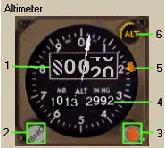
1- Altitude Readout: It displays current aircraft altitude in feet based on altimeter setting.
高度の読み取り:現在の飛行機の高度を基本的な高度計の設定であるフィートで表示します
The white pointer rotates to indicate altitude changes in hundreds of feet.
白いポインターが回って 100 フィートごとの表示がされます
2- Altimeter Setting Control: Mouse click area used to change the current altimeter setting.
高度計設定コントロール:現在の高度計の設定をマウスクリックで変更します
Both MB and IN HG are changed simultaneously.
MB と IN HG のどちらも同時に変更されます
3- Altitude Reference Bug Control: Mouse click area used to control the amber altitude reference bug.
参照高度バグコントロール:アンバー色の高度参照バグをマウスクリックで変更します
4- Altimeter Setting: It displays selected altimeter setting.
高度設定:高度計の設定で選択された高度が表示されます
5- Altitude Reference Bug: Set manually using the control knob (3).
高度参照バグ:コントロールノブ ( 3 ) を手動で設定します
This bug is a reference bug only that can be optionally used by the pilot as a reminder of engine-out acceleration altitudes for takeoff or decision altitudes for landing.
このバグは参照バグで、パイロットが離陸の時にエンジンの加速出力を終了させる高度や、着陸の決心高度を覚えておくために任意に使うことができます
6- Altitude Alert Light: It comes on with an aural warning when you are within 900 feet of the AFDS selected altitude.
高度警告ライト:AFDS で高度設定された高度 900 フィート以内の時に音といっしょに警告として出されます
The light extinguishes when the aircraft is within 300 feet of the selected altitude.
飛行機が高度選択された 300 フィート以内になるとライトは消えます
Once the AFDS altitude is captured the light and warning comes on again to warn that you have deviated from the selected altitude.
いったん AFDS 高度によりライトとワーニングが出たあとは設定高度からそれると再び警告が出されます

