033
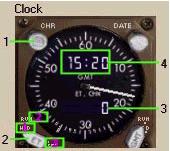
1- Chronometer Control: Mouse click area that controls the chronometer
function of the clock.
クロノメーターコントロール:時計のクロノメーター機能はここをマウスでクリックしてください
The chronometer is basically a timer that
counts up until reset.
クロノメーターは元来リセットするまでカウントを続けるタイマーです
Click once to start the timer and the white
needle clicks off the seconds and the digital
CHR displays the minutes.
1 回クリックするとタイマーが開始され白色の針が回り秒を表し、
CHR デジタル表示に分が表示されます
Click a second time to stop the chronometer.
2 回目のクリックでクロノメーターのタイマーが停止します
Click a third time to reset the chronometer.
3 回目のクリックでクロノメーターがリセットされます
2- Elapsed Timer (ET) Control: Mouse click areas that control the elapsed
timer function of the clock.
経過タイマー ( ET ) コントロール:経過タイマーの機能はここをマウスでクリックします
The elapsed timer can run unaffected in the
background while the Chronometer is in use.
経過タイマーはクロノメーターの使用中も関係無くバックグランドで動いています
The ET is normally selected to RUN just prior
to takeoff to keep track of total flight
time.
ET は標準的 RUN が選択されており、離陸してからの全フライと時間が表示されています
|
1: HLD |
- |
This is the default position of this switch.
これはデフォルトのスイッチ位置です
This is called the HOLD function.
これは HOLD 機能と呼ばれています
When the clock is running, if you select
HLD the ET will pause.
時計が動いているとき HLD を選択すると ET
は一時停止します
|
|
2: RUN |
- |
When set to run the ET is started.
これをセットすると ET がスタートします
The elapsed time in hours:minutes is then
displayed in the ET.CHR window.
経過時間は ET.CHR ウィンドウに 「時間:分」
で表示されます
When in the run position, you can stop the
elapsed time temporarily without resetting
the ET by selecting HLD and then restart
by reselecting RUN.
RUN ポジションのとき HLD を選択し、RUN を再び選択するまで経過時間を一時的にリセットすることができます。
|
|
3: RESET |
- |
When pressed, it resets the ET to zero and
blanks out the ET display.
このボタンを押すと ET が 0 にリセットされ、ET
表示が消えます
The ET knob then springs back to HLD.
ET ノブは HLD に戻ります
|
3- ET/CHR Display: Display used for the chronometer and the
ET.
ET/CHR 表示:クロノメーターと ET を表示するために使います
If the ET is in use when the chronometer
is used, the chronometer display has priority.
もしクロノメーターが ET に使われていたらクロノメーターが優先して表示されます
When the chronometer is reset, the ET is
then redisplayed.
クロノメーターがリセットされたら、ET は再表示されます
If neither the ET nor the chronometer is
in use, the display stays blank.
もし ET もクロノメーターも無い場合は表示が消えます
4- Time Display: Time display can be set using mouse clicks
located on top of the digital readout.
時間表示:時間表示はデジタル表示のところをマウスでクリックすると使用できます

