Flap Controls
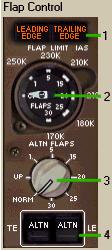
1- Flap Problem Cautions:They Illuminate anytime there is a flap position problem.
フラッププロブレムコーション:それらはフラップポジションに問題がある場合、いつも点灯します
104
Flap Controls
1- Flap Problem Cautions:They Illuminate anytime there is a flap position
problem.
フラッププロブレムコーション:それらはフラップポジションに問題がある場合、いつも点灯します
| LEADING EDGE | - | The leading edge flaps are not in the commanded
position. リーディングエッジフラップがコマンデッドポジションにありません |
|
| TRAILING EDGE | - | The trailing edge flaps are not in the commanded
position. トレーリングエッジフラップがコマンデッドポジションにありません |
2- Flap Indicator: It indicates the actual position of the
flaps.
フラップインジケーター:フラップの現在のポジションを表示します
3- Alternate Flap Selector: It is used to electrically position flaps
to the desired position.
オルタネートフラップセレクター:望むポジションにフラップを電気ポジションを使って行います
They are used only if normal hydraulic power
is not available to the flaps.
それらはもしフラップへの通常の油圧パワーが供給できない時のみ使用されます
Flaps only move to the commanded position
when the TE and LE ALTN buttons are pressed.
フラップはコマンデッドポジションに動きます。TE
と LE ALTN ボタンが押されたとき
4- TE and LE Alternate Flap Select Buttons: When both buttons are pressed and display
ALTN the flaps move to the position dialed
into the Alternate Flaps selector.
TE と LE オルタネートフラップセットボタン:両方のボタンが押され
ALTN が表示されたとき、フラップはオルタネートフラップセレクターでダイアルされたポジションに動きます
Note: When using the alternate flap system you
should place the flap handle to agree with
the alternately selected flap setting.
ノート:オルタネートフラップシステムを使用した時、フラップハンドルをフラップセッティングのオルタネートに代替します
 |
 |