Fire Handles
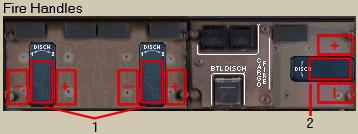
1- Engine Fire Handle Mouse Clicks: Pressing the blank area will “PULL” the fire handle.
エンジンファイアーハンドルマウスクリック:ブランクエリアを押すとファイアーハンドルが "PULL" されます
This action shuts down the engine.
このアクションはエンジンをシャットダウンします
Once pulled, the fire handle can be rotated left or right by pressing on the ‘+’ or ‘-‘ area.
一度引っ張り出すと、ファイアーハンドルは '+' または '-' エリアを押すことにより左または右に回すことができます
Pressing the ‘+’ rotates the handle to the right and discharges bottle #1.
'+' を押すとハンドルは右に回され、ボトル 1 が噴射されます
Pressing the ‘-‘ rotates the handle to the left and discharges bottle #2.
'-' を押すとハンドルは左に回され、ボトル 2 が噴射されます
2- APU Fire Handle Mouse Clicks: Operation is identical to the engine fire handles.
APU ファイアーハンドルマウスクリック:エンジンファイアーハンドルと同じ操作です
There is only one APU fire bottle, so rotating the APU fire handle to the left or right will discharge it.
APU ファイアーボトルはただ 1 つだけあります。APU ファイアーハンドルを左または右に回すと噴射されます
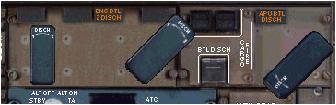
This graphic shows the fire handles rotated and the respective fire bottles discharged.
このグラフィックはファイアーハンドルが回され、それぞれのファイアーボトルが噴射されているところです
Once discharged, the fire handles can be reset by pressing on the blank mouse click area.
いったん噴射されると、ファイアーハンドルはブランクマウスクリックエリアを押すことでリセットすることができます
The first click will rotate the handle to neutral and the second click will push in the fire handle.
最初のクリックではハンドルが回され自然の位置になります。2 度目のクリックではファイアーハンドルは押しこまれます
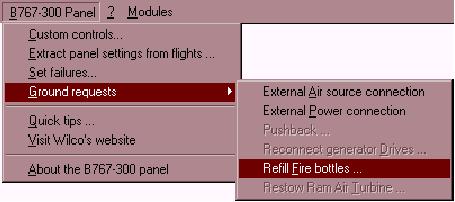
The fire bottles can be refilled on the ground by accessing the “B767-300 Panel” menu as shown below.
ファイアーボトルは下のように "B767-300 Panel" メニューを使って再び充填することができます