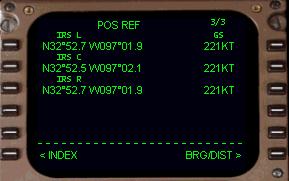
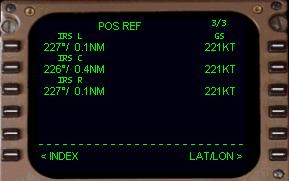
POS INIT Page
The first page in the preflight sequence after the IDENT page is the Position Initialization page (or POS INIT page).
IDENT ページの後のプリフライトシーケンスの最初のページはポジションイニシャライゼーションページ ( POS INIT ページ ) です
This page is selected from the IDENT page by pressing the 6R LSK labeled POS INIT.
このページは 6R LSK ( POS INIT と書かれた ) を押すことで IDENT ページから選択されます
It can also be selected from the INIT/REF INDEX page (6L LSK) via the “<POS” prompt at the 2L LSK.
"< POS" プロンプトの 2L LSK を通して INIT/REF INDEX ページ ( 6R LSK ) から選択することができます
The POS INIT page has two primary purposes.
POS INIT ページは 2 つの主な目的があります
First, it is used to enter the current aircraft latitude/longitude position into the FMC during IRS initialization.
第一は、IRS の初期化のため、FMC に現在の飛行機の緯度/経度情報を入力するために使用します
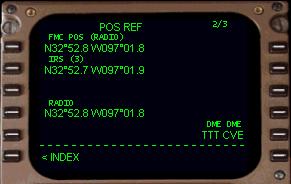
Second, it is used to verify FMC and IRS positions while on the ground or in flight.
2 つめは、地上または飛行中、FMC と IRS ポジション情報を比較するために使用します
The FMC determines aircraft position differently while in the air.
FMC は上空では飛行機のポジションの違いを確定します
For this reason it is important to understand how the FMC determines aircraft position while on the ground versus while in the air.
この理由は、地上と上空での FMC の飛行機ポジションの確定方法について理解することが重要です
When on the ground, the FMC uses the average of the three IRU positions to determine exact aircraft location.
地上では、FMC は 3 つの IRU ポジションの平均を使って正確な飛行機の位置確定を行います
Therefore, while on the ground the FMC position will be exactly the same as the IRS positions.
その結果、地上では FMC ポジションは IRS ポジションのいくつかよりも正確になります
If the IRS positions have been entered incorrectly, the FMC displays the aircraft position incorrectly on the EHSI.
もし IRS ポジションが不正確になっていたら、FMC は EHSI 上に飛行機のポジションを不正確に表示します
This situation is referred to as a “Map Shift”.
このシチュエーションについては "Map Shift" で説明します
This means that the EHSI map is not displaying your aircraft in its proper position.
この意味は、EHSI マップは飛行機の正確なポジションを表示していないということです
010
A map shift can occur while airborne as well.
マップシフトはエアボーンしたときに発生することがあります
This concept is explained further below.
この概要は以下で説明します
Once airborne, the FMC automatically receives a “radio update” of its exact position using automatically tuned VOR stations.
いったんエアボーンすると、FMC は自動的に "radio update" その正確な位置での、VOR ステーションの自動チューニングで受信します
Remember from the explanation of the NAV1 radio that it has an AUTO and a MAN position.
NAV1 は、AUTO と MAN ポジションを持っていることを覚えてください
When the NAV1 receiver is in the AUTO position, the VOR frequency is under the control of the FMC.
NAV1 レシーバーが AUTO ポジションの時、VOR 周波数は FMC のコントロール下にあります
The FMC automatically tunes to nearby VORs to find a suitable signal to crosscheck its position.
FMC は自動的に適当なクロスチェックポジションのシグナルのすぐ近くの VOR にチューンします
Once this crosscheck is accomplished, the FMC establishes a “radio position” that is used instead of the IRS position.
いったんこのクロスチェックが完了すると、FMC は IRS ポジションの変わりに使って "radio position" を確立します
The radio position established by the FMC is generally more accurate than the IRS position because the IRS position is subject to “drift” (explained in the IRS section of the manual).
レディオポジションは FMC が一般的に IRS ポジションよりもっと正確に確定されます。なぜならば IRS ポジションは "drift" の影響があるからです ( マニュアルの IRS セクションで説明しています )
As long as the NAV1 receiver remains in the AUTO position and a suitable radio signal is received, the FMC continues to use this radio position.
NAV1 が AUTO ポジションで適当なレディオシグナルを受信中である限りは、FMC はこのレディオポジションを使いつづけます
If the NAV1 receiver is placed in MAN, or no suitable radio signal has been received for more than 12 minutes, the FMC generates an “IRS NAV ONLY” message in the scratchpad.
もし NAV1 レシーバーが MAN になっているか、または適当なレディオシグナルが 12 分間以上受信できていない場合は FMC は "IRS NAV ONLY" メッセージをスクラッチパッドに表示します
This indicates that the FMC is no longer using its radio position and is now using the average of the three IRS positions.
この表示は FMC がレディオポジションを長い間使っておらず、現在 3 つの IRS ポジションの平均値を使用しているということです
As discussed previously, the IRS position is subject to drift and the pilot may experience a map shift.
以前に説明しましたが、IRS ポジションはドリフトの影響下にあり、パイロットはマップシフトを経験します
Placing the NAV1 receiver back to AUTO causes the FMC to re-calculate and use the radio position in lieu of the IRS position (provided an adequate VOR signal is received).
NAV1 レシーバーを AUTO に戻すと、FMC が再計算し、IRS ポジションの代わりにレディオポジションを使用します ( 十分な VOR シグナルが受信できた時 )
With this understanding of how the FMC determines aircraft position during the different phases of flight, we can now explain how to use the POS INIT pages operationally.
フライトの異なるフェーズの間、飛行機のポジションを FMC が確定する方法を理解するため、POS INIT ページの操作と使い方を説明しましょう
If the IRS is already aligned when you load the panel, the FMC requires no additional setup and its position is already determined from current IRS positions.
もしパネルをロードして IRS がすでにアラインされている場合、FMC はそれ以上のセットアップを必要としません。ポジションはすでに現在の IRS ポジションから確定されています
The important concept to remember here is that the FMC position is the same as the average of the three IRU positions when the aircraft is on the ground.
重要なコンセプトなので覚えておいてください。FMC ポジションは飛行機が地上にあるとき、3 つの IRU ポジションの平均と同一のものです
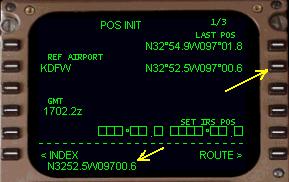
The lat/long listed at the 1R LSK (LAST POS) is the current FMC position when the IRS is fully aligned.
1R LSK ( LAST POS ) にリスとされている緯度/経度は IRS がフルアラインされている時は現在の FMC ポジションです
If this is the case, you may continue to the ROUTE page by pressing the 6R LSK.
このケースでは、6R LSK を押すことにより ROUTE ページになります
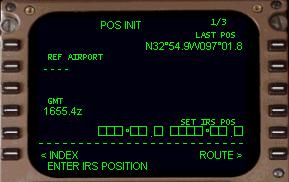
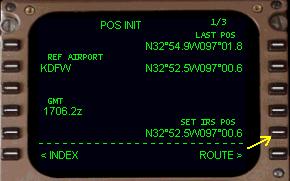
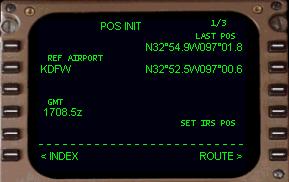
In the picture at right you see a scratchpad message “ENTER IRS POSITION” along with boxes abeam the 5R LSK labeled “SET IRS POS”.
絵の中で、スクラッチパッドメッセージ "ENTER IRS POSITION" と、右側に 5R LSK の真横にボックスといっしょに "SET IRS POS" が表示されています
This is displayed during alignment of the IRS.
これは IRS のアライメントの間、表示されます
During the alignment period, the current lat/long position of the aircraft is entered into the scratch pad and then placed into the boxes at the 5R LSK.
アライメント中、現在の飛行機の緯度/経度はスクラッチパッドに入力し、5R LSK のボックスに入力します
This position is transferred to the IRS during alignment.
このポジションはアライメント中の IRS に送られます
011
After IRS alignment is completed, the FMC position and the position of all three IRS units will be exactly the same.
IRS のアライメントが終了した後、FMC ポジションと全ての 3 つの IRS ユニットのポジションは正確に同じになります
The following examples demonstrate how to enter coordinates into the FMC during IRS alignment.
デモの例にそって、IRS アライメント中の FMC へのコーディネート入力の方法を見てみましょう
These examples assume you understand how to align the IRS as explained in the IRS section.
これらの例は IRS セクションの説明を読んですでに IRS のアライン方法を理解しているものとしています
Starting with the IRS selectors in the OFF position, place all three knobs to the NAV position.
IRS セレクターが OFF ポジションで、全ての 3 つのノブが NAV ポジションからはじめます
Notice that the POS INIT page looks exactly like it does in the picture above.
POS INIT ページが上の絵のように見えることに注意してください
Clear out the ENTER IRS POSITION message in the scratchpad by pressing the CLR key on the FMC keyboard.
スクラッチパッドの ENTER IRS POSITION メッセージを FMC キーボードの CLR キーを押してクリアしてください
Now we must enter the aircraft lat/long position into the scratchpad.
飛行機の緯度/経度ポジションをスクラッチパッドに入力しなければなりません
There are 4 methods to find the coordinates for your current aircraft position.
現在の飛行機のポジションのための座標は 4 つあります
First we will discuss how to find the current aircraft position coordinates.
最初は、現在の飛行機のポジション座標を見つける方法です
Then we will discuss how to use these coordinates to set the IRS position.
それから IRS ポジションをセットするこれらの座標の方法について説明します
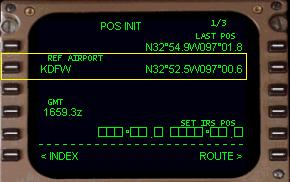
The first method to find your current position is a general method that uses departure airport coordinates.
最初の現在の飛行機のポジションを見つける方法は、一般的な方法であり出発飛行場の座標を使用します
The 2L LSK has a data block listed as REF AIRPORT.
2L LSK は REF AIRPORT データブロックをリストします
This block initially contains “----“ to indicate it is waiting for data input.
このブロックは最初に "----" と表示され、データの入力を待っています
Notice in the picture at right we have entered “KDFW” into the data block.
絵の右側のデータブロックに "KDFW" が入っていることに注意してください
You do this by entering “KDFW” into the scratchpad using the FMC keyboard and then pressing the 2L LSK to transfer it into the data block.
FMC キーボードを使用してスクラッチパッドに "KDFW" を入力して、2L LSK を押すことによりデータブロックに送ります
After entry, lat/long coordinates are listed abeam the 2R LSK.
エントリーの後、緯度/経度座標は 2R LSK の真横にリストされます
These coordinates represent the airport coordinates for KDFW.
これらの座標は KDFW 空港の座標に相当します
These coordinates can be used to set the IRS position to the general vicinity of the aircraft (explained later).
これらの座標は一般的に飛行機に近く、IRS ポジションのセットに使用することができます ( あとで説明します )
The second method to find your current position is to simply use the LAST POS listed on the POS INIT page at the 1R LSK.
2 番目の現在の飛行機のポジションを見つける方法は POS INIT ページの 1R LSK にリスとされている LAST POS を使用する方法です
Most of the time the LAST POS will be the current aircraft position.
LAST POS はたいてい現在の飛行機のポジションです
If you are sure that this is the case, you can use these coordinates to set the IRS position (explained later).
もしこのケースを使用する場合は、これらの座標を IRS ポジションに使用することができます ( 後で説明します )
The third method to find your current position involves using sim charts.
3 番目の現在の飛行機のポジションを見つける方法はシムチャートを使用して現在のポジションにします
If you have sim charts from a third party that list “gate coordinates” for the airport you are departing, you can use these gate coordinates to initialize the IRS position.
もしサードパーティからの出発飛行場 "gate coordinates" リストのあるシムチャートを持っている場合は、これらのゲート座標を IRS ポジションの初期化に使用することができます
If you know the exact gate that the aircraft is sitting at, these coordinates (if listed on the chart) may be used.
もし飛行機の駐機している正確なゲートを知っているならば、これらの座標 ( もしチャートにリストされていれば ) を使用することができます
If you do not know your exact gate, any coordinates listed on the chart is sufficient to position the IRS and FMC close to the current aircraft position.
もし正確なゲートを知らないならば、チャートがリストしているいくつかの座標が現在の飛行機のポジションと近いなら IRS と FMC には十分です
The forth method to find your current position is to use the FS2000 <shift><z> feature.
4 番目の現在のポジションを見つける方法は FS2000 の <shift> <z> を押して調べる方法です
Pressing <shift><z> displays current lat/long position across the top of the screen.
<shift> <z> を押すと現在の緯度/経度ポジションがスクリーンの左上に表示されます
012
You will have to move the overhead display down a bit to reveal the following information (this is an example of what you find):
オーバーヘッドディスプレイを少し下げて情報が見えるようにする必要があります ( これは表示を見るための説明です )

This gives you the exact position of the aircraft according to the sim.
これはシム内における飛行機の正確なポジションを与えます
It is important that you enter the coordinates into the FMC in the correct format.
ここで重要なことは FMC への座標の入力は正しいフォーマットで入力するということです
Notice the format of the lat/long listed in the REF AIRPORT data block in the previous pictures (abeam 2R LSK).
前の絵のデータブロックの REF AIRPORT のリストされている緯度/経度のフォーマットに注意してください ( 2R LSK の真横 )
You need to use this exact format for entering the coordinates manually.
手動にて座標を入力するには正確にこのフォーマットを使用する必要があります
In our example above, we would translate the FS2000 coordinates to “N3254.9W09701.8” and enter this into the scratchpad.
上の例では、FS2000 座標は "N3254.9W09701.8" と変換されスクラッチパッドに入ります
Notice that the “N” coordinate was rounded off and that the “W” coordinate needed to be rounded and interpreted.
"N" 座標は概数にされ、"W" 座標は解釈され概数にされることに注意してください
This is necessary because FS2000 does not list lat/long in the same format as the FMC.
これは FS2000 の緯度/経度のリストを FMC に同じフォーマットでいれるためです
To convert the FS2000 coordinates we did the following:
以下に沿って FS2000 の座標を変換します