ROUTE Page
The ROUTE page can be accessed at any time by pressing the RTE function key on the FMC keyboard.
ROUTE ページはいつでも FMC キーボードの RTE ファンクションキーを押すことによりアクセスできます
The ROUTE page is used to program the departure airport, departure runway, arrival airport, and route of flight data.
ROUTE ページは出発空港、出発滑走路、到着空港、フライトデータのルートのプログラムに使用されます
The route of flight data consists of “waypoints” that the FMC uses to navigate.
フライトデータのルートは FMC がナビゲートを使用すると "waypoints" になります
A waypoint can be a VOR, an intersection, lat/long coordinates, or a custom made point defined by VOR radials.
ウェイポイントは VOR 、インターセクション ( 交叉点 )、緯度/経度座標、またはカスタムメイドのポイントが VOR レディオにより確定されます
Custom waypoints are discussed in the LEGS page section.
カスタムウェイポイントは LEGS ページセクションで説明します
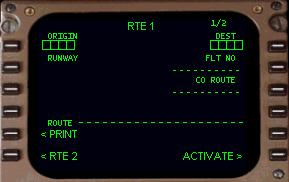
The FMC is capable of accepting two routes into memory: RTE 1 and RTE 2.
FMC は 2 つのメモリーされたルートにアクセプトする容量を持っています:RTE1 と RTE2 です
Only one route is “active” (or in use) at any given time, with the other route remaining inactive in the FMC memory.
どちらかひとつのルートが "active" ( または使用 ) として与えられ、その他のルートは FMC メモリー内にインアクティブとして残ります
Notice that on the top of the ROUTE page it says “RTE 1”.
ROUTE ページの上に "RTE 1" と表示されていることに注意してください
This indicates that these pages are for entry of ROUTE 1.
この表示はこれらのページが ROUTE 1 になっていることを意味しています
At the bottom of the screen at the 6L LSK is a prompt labeled “<RTE 2”.
スクリーンの下に 6L LSK プロンプト "< RTE 2" があります
Pressing the 6L LSK accesses the ROUTE 2 pages for entry of a second route.
6L LSK を押して第 2 のルートの ROUTE 2 ページにアクセスします
Entry of a second route into RTE 2 is optional.
RTE 2 の第 2 のルートの入力はオプションです
One of the uses for RTE 2 includes the programming of an alternate route.
RTE 2 の使用はオルタネート ( 代替 ) ルートのプログラミングとなります
This is helpful when planning a diversion routing if arrival at your original destination is not possible.
これはヘルプフルで、オリジナルの行き先空港が不可能な場合のダイバートルートのプランの時などに使えます
It can also be used for saving the active route prior to executing a change (described later).
ルートのチェンジを実行する前に、アクティブルートのセービングに使用したりもできます ( 後で説明します )
Our example utilizes RTE 1 for all programming explanations.
この例では RTE 1 を全てのプログラミング説明に使用しています
Keep in mind that programming a route into RTE2 follows the exact same procedure as programming a route into the RTE1 pages.
心配しないでください。RTE 2 のルートプログラミングは RTE 1 ページのルートプログラミングプロシージャーとまったく同じです
The first ROUTE page has data boxes for the insertion of the origin (1L LSK) and destination (1R LSK) airports.
最初の ROUTE ページは出発 ( 1L LSK ) と行き先 ( 1R LSK ) 空港を入力するためのデータボックスがあります
Also located on this page are data blocks to enter the departure runway (2L LSK), flight number (2R LSK), and the company route name (3R LSK).
このページには出発滑走路 ( 2L LSK ) 、フライトナンバー ( 2R LSK ) 、カンパニールート名 ( 3R LSK ) を入力するデータブロックもあります
The company route name is used to load a pre-programmed route into the FMC (explained below).
カンパニールート名は FMC ( 以下で説明 ) でプリプログラムされたルートのローディングに使用されます
The “ACTIVATE>” prompt at the 6R LSK is used to “activate” the programmed route.
"ACTIVATE >" プロンプトの 6R LSK はプログラムルートを "activate" するために使用します
It is always displayed at the 6R LSK prior to activation of the displayed route.
表示されているルートがアクティブになる前にいつも 6R LSK が表示されています
Only one route can be activated at any one time.
ただひとつのルートがいつもアクティブにすることができます
Activation of a route is accomplished after programming the route and is explained later in this section.
ルートのアクティブはルートのプログラミングのあとで完了されます。このセクションのあとで説明します
The “<PRINT” prompt at the 5L LSK is for future use and does not work at this time.
"< PRINT" プロンプト 5L LSK は未来のためのもので、今は使用しません
There are two ways of entering a route into the FMC; by manually programming the route using the FMC ROUTE page, or by recalling a previously saved route created by the FMC or other flight planning software.
FMC にルートを入力するための 2 つの方法があります:FMC ROUTE ページを使ってマニュアルでルートをプログラムする方法、または前に FMC またはその他のフライトプラン作成ソフトにより作成して保存しているルートを呼び出す方法
Lets begin our discussion of FMC route programming by talking about importing a flight plan from a flight planner.
フライトプランナーからのフライトプランを読み込むことによる、FMC ルートプログラミングをやってみましょう
We will discuss how to manually program the route using the ROUTE page of the FMC in just a moment.
FMC の ROUTE ページを使ってマニュアルでルートのプログラムをする方法についてみてみましょう

