TAKEOFF Page
The Takeoff page is a reference page that displays the Vspeeds used for takeoff.
テイクオフページは離陸のために使用される Vspeed を参照するためのページです
This page is also used to select a temperature for calculation of reduced power takeoffs.
このページは離陸時のパワーの減少の計算のために温度を選択するためにも使用されます
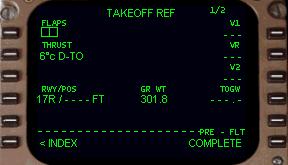
The permissible flap settings for takeoff in a 767-300 are 5 and 15 degrees.
767-300 の離陸の時に許されているフラップ位置は 5°と 15°です
Putting either 5 or 15 into the 1L data block causes the Vspeed column along the right side of the CDU to update with the takeoff Vspeeds for the current aircraft gross weight.
5 または 15 を 1L データブロックに入力します。これによりCDU の右側の Vspeed カラムが現在の飛行機のグロスウェイトによる離陸の Vspeed にアップデートされます
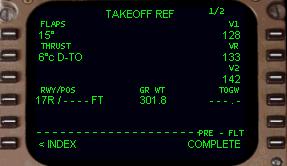
Once a takeoff flap setting has been entered, the Vspeeds can be automatically set on the airspeed gauge.
いったん離陸時のフラップセッティングが入力されると、Vspeeds は対気速度計上に自動的に設定されます
Pressing on the invisible mouse click area at the bottom left corner of the airspeed gauge updates the airspeed bugs based on FMC data.
対気速度計の左下隅にある見えないマウスクリックエリアを押すとエアスピードバグが FMC データでアップデートされます
For more information about this feature, see the “Flight Instrument” section of the systems manual.
この特徴についてもっと情報が欲しい場合は、システムマニュアルの "Flight Instrument" セクションを見てください
To set up the FMC for a reduced power takeoff, enter into the THRUST data block (2L LSK) a temperature value between the current outside temperature and 64°.
減少パワーでの離陸のための FMC のセットアップで、THRUST データブロック ( 2L LSK ) に現在の外部温度と 64°との温度差値を入力します
This is called the assumed temperature.
これはアシューム温度と呼びます
A higher assumed temperature results in a greater reduction in takeoff power.
高いアシューム温度では離陸時のパワーを大きく減らすことができます
The Vspeeds are also updated with the selection of reduced power thrust.
Vspeeds は減少パワースラストの選択とアップデートもします
The temperature entered in the THRUST data block is reflected on the upper EICAS screen along with a reduction in target takeoff thrust (for more information, see the “Engine” section of the systems manual).
温度の THRUST データブロックへの入力は上側の EICAS スクリーン上にターゲットテイクオフスラストの減少に従って反映されます ( さらなる情報を知りたい場合はシステムマニュアルの "Engine" セクションをご覧下さい )
The calculations involved in determining the temperature on which a reduced thrust takeoff is based are rather complicated.
計算はリデューススラストテイクオフの温度の確定と深い関係があり、かなり複雑です
There are many variables taken into account including runway length, slope, altitude, and departure path obstacles just to name a few.
多くの変化する値、滑走路長、勾配、高度、デパーチャーパスを考慮に入れ、なお障害があります
Airlines use computer printouts generated by a load agent to determine the reduced power setting for each takeoff.
エアラインはそれぞれの離陸のために減少パワー設定の確定を代理ロードしてコンピューターで印刷して使用しています
For this reason it is rather impossible to supply guidance for determining reduced power temperatures for each airport in FS2000.
この理由はかなり FS2000 のそれぞれの空港毎に減少パワー温度の確定を供給するのは不可能だからです
The use of reduced power is therefore at “pilot discretion”.
減少パワーの使用はゆえに "pilot discretion" パイロットの判断となります
Since the Takeoff page is the final page in the pre-flight programming of the FMC, the “pre-flight status” is indicated at the 6R LSK.
Takeoff ページの次は FMC のプリフライトプログラミングの最終ページです。"pre-flight status" は 6R LSK に表示されています
If the data required by the FMC for proper operation has been entered successfully, “COMPLETED” is displayed at the 6R LSK position.
もし FMC により要求されたデータや、適切な操作で全て成功なら 6R LSK に "COMPLETED" が表示されます
If the data entry required by the FMC has not been completed, “INCOMPLETE” is displayed at the 6R LSK position.
もし FMC により要求されたデータ入力が完了していなければ 6R LSK 位置に "INCOMPLETE" と表示されます
To go back and review all preflight pages in sequence, press the “<INDEX” prompt (6L LSK) and then select the IDENT page using the 1L LSK.
戻って全てのプリフライトページを次々に見なおして、 "< INDEX" ( 6L LSK ) を押して次に 1L LSK を使って IDENT ページを選択してください
Starting with the IDENT page, cycle through the preflight pages using the 6R LSK until you find a page with missing data.
IDENT ページを始めて、プリフライトページを順に 6R LSK を使って、間違っているデータを見つけてください
Then continue through as before until “COMPLETED” is displayed on the TAKEOFF page at the 6R LSK position.
それらを続けて "COMPLETED" が TAKEOFF ページの 6R LSK 位置に表示されるまで行ってください

