LEGS Page
The legs page for our KDFW to KLGA example flight is shown below.
ここでの例のKDFW から KLGA までのフライトの LEGS ページは右のようになっています
The LEGS page is called up by pressing the LEGS key on the FMC keyboard.
LEGS ページは FMC キーボードの LEGS キーを押すことにより呼び出されます
The title of the LEGS page is displayed across the top.
LEGS ページのタイトルが上に表示されます
“ACT RTE 1 LEGS” indicates that we are looking at waypoints for the “active” route in RTE 1.
"ACT RTE 1 LEGS" が表示されています。いま RTE 1 "active" ルート上のウェイポイントを見ています

This is page 1 of 7 pages available as indicated in the upper right corner.
これは 1 of 7 ページで、ページ番号が右上隅に表示されています
To cycle through the LEGS pages, use the NEXT/PREV PAGE key on the FMS keyboard.
FMC キーボードの NEXT/PREV PAGE キーを使って LEGS ページの変更ができます
You can easily return to page 1 of the LEGS pages by pressing the LEGS key at any time.
いつでも LEGS キーを押せば簡単に LEGS ページのページ 1 になります
The active waypoint in the route is always displayed on LEGS page 1 abeam the 1L LSK.
ルート上のアクティブウェイポイントはいつも LEGS ページ 1 の 1L LSK の真横に表示されます
In our example, TTT VOR is the active waypoint.
ここでの例では TTT VOR がアクティブポイントです
Subsequent waypoints are listed below TTT abeam the remaining left LSKs in the proper sequence.
あとのウェイポイントは TTT の下にリストされ、左の LSK に正しい順序で残ります
These are the inactive waypoints.
これらはインアクティブウェイポイントです
Above the TTT waypoint is the magnetic route course to fly toward the TTT waypoint.
TTT ウェイポイント上に書かれている数字は TTT ウェイポイントに向かって飛ぶ時の磁方位のルートコースです
In our example, the course is 251°magnetic.
ここでの例では 251°磁方位コースです
The course listed for the active waypoint is usually the course from the current aircraft position to the waypoint.
アクティブウェイポイントのコースの表示はたいてい現在の飛行機の位置からウェイポイントへのコースです
For subsequent waypoints, the course listed above the waypoint is the magnetic course between waypoints.
あとに続くウェイポイントでは、そのウェイポイントからその次のウェイポイントまでの磁方位コースが表示されます
In our example, the magnetic bearing from the TTT VOR to the TRISS intersection is 075°.
ここでの例では、TTT VOR から TRISS インターセクションまでのマグネット方位は 075°です
The distance between waypoints is listed down the middle of the LEGS page.
ウェイポイント間の距離は LEGS ページの真中に表示されます
In our example, the distance between the aircraft position and the TTT VOR is 2 miles (NM stands for Nautical Miles).
ここでの例では、飛行機の位置と TTT VOR との間の距離は 2 マイルです ( NM は海里を表します )
The distance between the TTT VOR and the TRISS intersection is 36 miles.
TTT VOR と TRISS インターセクションの間の距離は 36 マイルです
The data abeam the right LSKs are used for VNAV operation.
右側の LSK の真横のデータは VNAV 操作のために使われます
The airspeed/altitude to cross each waypoint is listed in the corresponding data block.
それぞれのウェイポイント上の対気速度/高度はそれに相当するデータブロックに表示されます
In our example, we are forecast to cross the TTT VOR at 250 knots and an altitude of 2,533 feet.
ここでの例では、TTT VOR を対気速度 250 ノット、高度 2,533 フィートで通過すると予測されます
Subsequently, we are forecast to cross the TRISS intersection at 308 knots and an altitude of 22,200 feet.
続いて、TRISS インターセクションを対気速度 308 ノット、高度 22,200 フィートで通過すると予測されます
How to use and modify this data is explained later in the VNAV section of this manual.
このデータの修正と使用方法は、このマニュアルの後ろのほうの VNAV セクションで説明します
Notice that at the 6L LSK there is a “<RTE 2 LEGS” prompt. Pressing the 6L LSK takes you to the RTE 2 LEGS page for viewing.
6L LSK には "< RTE 2 LEGS" プロンプトがあることに注意してください。6L LSK を押すと RTE 2 LEGS ページが表示されます
As explained previously, the active route (RTE 1 in our example) remains unchanged while working with the inactive route.
前の説明で、アクティブルート ( ここでの例では RTE 1 ) はインアクティブルートの働きでは変更されず残ることを説明しました
The use of RTE 2 is optional during normal FMC operations and is explained later in this section.
RTE 2 の使用は通常の FMC 操作の間、自由に選択でます。このセクションのうしろで説明します
At the 6R LSK there is a “RTE DATA>” prompt.
6R LSK には "RTE DATA >" プロンプトがあります
Pressing the 6R LSK takes you to the “route data” page.
6R LSK を押すと "route data" ルートデータページが表示されます
This page shows predictive data for each waypoint in the LEGS page.
このページは LEGS ページのそれぞれのウェイポイントの予測データを表示します
This page is for reference only and cannot be used to make LEGS modifications.
このページは参照のみで、LEGS の修正などには使用できません
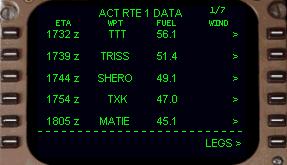
The ETA data block lists the predicted time that the aircraft will cross each waypoint.
ETA データブロックは飛行機がそれぞれのウェイポイントを通過する時間を予測し表示します
This is based on current winds and airspeed.
これは現在の風と対気速度を基本にしています
The WPT data block lists the waypoint.
WPT データブロックはウェイポイントをリストします
The FUEL data block lists the predicted amount of fuel remaining when crossing the waypoint.
FUEL データブロックはウェイポイントを通過する時の燃料の残り量を予測し表示します
The WIND data block does not work at this time and is for future development.
WIND データブロックは今回の 767 PIC では働いていません。未来のバージョンアップに期待してください。
In the real aircraft, predictive wind data is uploaded to the FMC for the route of flight and would be listed here.
実際の飛行機では風データの予測はフライトのルートのために FMC がアップデートし、ここに表示します
To return to the LEGS page, press the 6R LSK labeled “LEGS>”.
6R LSK "LEGS >" を押して LEGS ページに戻ってください

