Direct Intercept Course
Suppose you receive a clearance to fly a heading to intercept a VOR radial.
もしクリアランスを受信していたら、VOR ラディアルにインターセプトするヘディングを飛行します
Let’s consider the following clearance using our present route example.
ここでの現在のルートの例を使用してクリアランスに従うことを考えてみましょう
The clearance is to fly a 090-degree heading to intercept the Texarkana (TXK) 210° radial and fly inbound.
クリアランスは 090°ヘディングで Texarkana ( TXK ) 210°ラディアルのインターセプトコースにインバウンド飛行します
The rest of the route remains unchanged.
残りのルートは変更無しです
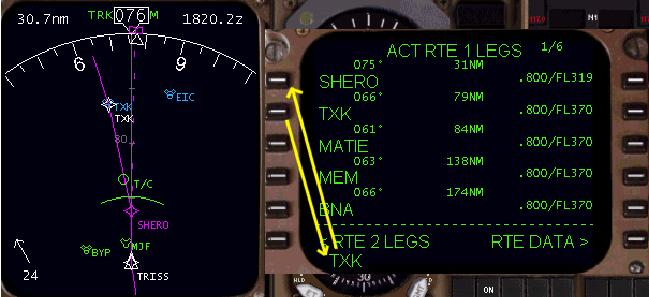
Start by placing the AFDS in HDG SEL mode and selecting a 090° heading.
AFDS を HDG SEL モードにして、ヘディングを 090°に選択してスタートします
We must then instruct the FMC to go direct to TXK.
FMC に TXK にダイレクトに行くよう指示しなければなりません
Pressing the 2L LSK puts the TXK waypoint into the scratchpad.
2L LSK を押して TXK ウェイポイントをスクラッチパッドに入れます
Pressing the 1L LSK makes the TXK VOR the active waypoint (this deletes the SHERO waypoint) and the FMC calculates a course
line direct to TXK on the EHSI.
1L LSK を押して、TXK VOR をアクティブウェイポイントにして ( これは SHERO ウェイポイントを消します ) 、FMC は計算したコースラインを EHSI 上に TXK へダイレクトに引きます
Notice the INTC CRS prompt located at the 6R LSK.
6R LSK に INTC CRS プロンプトが出ていることに注意してください
The 070 course listed is the FMC calculated course from aircraft present position direct to the TXK VOR.
070 コースは FMC の計算した飛行機の現在位置から TXK VOR へのダイレクトコースを表示します
Since we need to intercept the 210° radial, we need to manually change the INTC CRS for the FMC to follow.
そのあと、210°ラディアルのインターセプトが必要になります。FMC に追従させるためマニュアルでの INTC CRS の変更が必要です
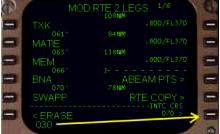
040
To track a radial inbound to a waypoint, the reciprocal course must be calculated.
ウェイポイントへのラディアルインバウンドの進路は相互のコースが計算されます
From the aircraft’s present position, tracking the 210° radial inbound to TXK requires a 030° track.
飛行機の現在位置から TXK へ 210°ラディアルインバウンドで 030°の進路が要求されます
Therefore, type “030” into the scratchpad and press the 6R LSK to create the new course.
ゆえに、"030" をスクラッチパッドに入力し、6R LSK を押して新しいコースを作ります
This causes the FMC to draw the 210° radial from the TXK waypoint.
これによって FMC は TXK ウェイポイントから 210°ラディアルの線を引きます
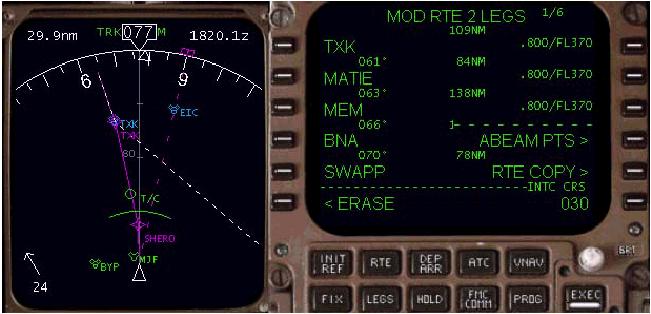
The resultant display is pictured above.
その結果が上の図に表示されています
The word “MOD” in the LEGS page title indicates that the route displayed is a modification and needs to be executed to become active.
"MOD" が LEGS ページタイトルに表示され、ルート表示は修正され、アクティブにするための実行が必要であることを示しています
The dashed course line on the EHSI represents the route modification and thus the TXK 210° radial.
EHSI 上の点線のコースラインはこのように TXK 210°ラディアルのルート修正に相当します
To activate the route modifications, press the EXEC key.
ルート修正をアクティブにするには EXEC キーを押します
Pressing the EXEC key and placing the AFDS in LNAV mode results in the setup shown below.
EXEC キーを押すと LNAV モードの AFDS はセットアップされ下の図のようになります
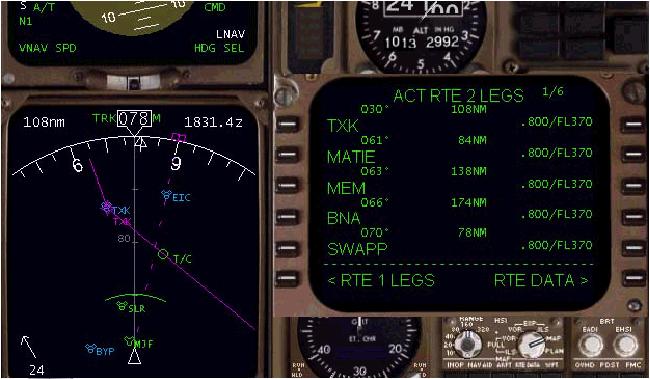
Pay close attention to the AFDS mode annunciators shown in the picture above.
上記の図に見えるように AFDS は表示されます
The aircraft is in HDG SEL mode with LNAV “armed”.
飛行機は HDG SEL モードで LNAV は "armed"アームドです
The AFDS is turning to fly the 090° heading until intercepting the TXK 210° radial.
AFDS は TXK 210°ラディアルにインターセプトするまで 090°ヘディングで飛行をさせます
When the pink track line is reached, LNAV becomes active and the aircraft navigates inbound toward TXK on the 210° radial.
ピンクのトラックラインに届いた時、LNAV はアクティブになり、飛行機は TXK 210°ラディアルインバウンドに向かってナビゲートされます
This type of clearance is one of the more complicated to execute because the pilot must manually calculate the inbound track for the FMC to follow using the intercept radial.
このクリアランスのタイプはより複雑な実行のうちの一つです。なぜならばパイロットは FMC がインターセプトラディアルを使って追従するようにマニュアルでインバウンドトラックを計算しなければならないからです
In our example, the reciprocal course for the 210° radial is a 030° inbound course.
ここでの例では、210°ラディアルは 030°インバウンドコースと相互コースです
To further illustrate this concept, consider another quick example.
この概念に付いては他のクイック例にて考えます
If we were cleared to turn left to a heading of 030° to intercept the TXK 270° radial, we would follow the same procedure used in the previous example.
もし TXK 270°ラディアルへのインターセプトで 030°のヘディングへ左旋回がクリアーなら、前の例で使った同じ手順に従います
To track the 270° radial inbound requires a 090°course.
270°ラディアルインバウンドの進路は 090°コースを要求します
Therefore, when prompted for the INTC CRS, place “090” into the INTC CRS boxes at 6R.
ゆえに、INTC CRS のプロンプトの時、6R の INTC CRS ボックスに "090" を入力します
The FMC now displays the 270° radial inbound to TXK.
FMC は TXK への 270°ラディアルインバウンドを表示しています

