Route Discontinuities
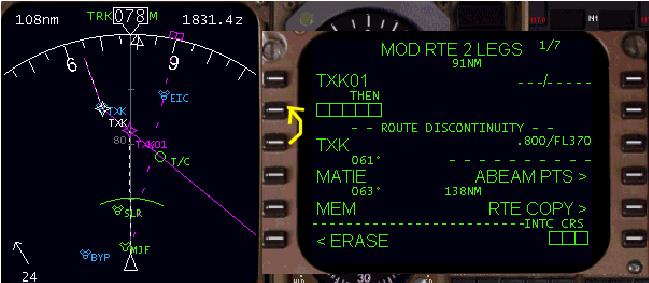
The picture above shows how the FMC and EHSI look after creating the new waypoint from the previous example.
上記の図で FMC と EHSI は前の例から新しいウェイポイントが作られたあとの表示です
“TXK01” represents the newly created waypoint.
"TXK01" は新しく作られたウェイポイントを表しています
Notice also that a ROUTE DISCONTINUITY message is displayed in the LEGS page along with boxes abeam the 2L LSK.
ROUTE DISCONTINUITY メッセージが LEGS ページの 2L LSK の横のボックスのところに表示されていることにも注意してください
This discontinuity message is displayed on the LEGS page anytime you enter a new waypoint into the active route that is not a point currently in the route.
このディスコンティニュイティー ( 途切れ ) メッセージはいつでも新しいウェイポイントがアクティブルート内で入力され、これがルート上のポイントでなければ LEGS ページに表示されます
Because the TXK210/25 waypoint created is not part of our active route, the FMC is asking, “where do I go from here”?
なぜならば、TXK210/25 ウェイポイントの作成はアクティブルート上の部分ではなく、FMC は "ここからどこに行けば良い?" とたずねているのです
To answer the FMC’s question, the discontinuity must be “closed” by telling the FMC which waypoint to navigate to after reaching TXK01.
FMC に TXK01 にとどいた後のナビゲートウェイポイントを教えて FMC の質問に対して答えることで、ディスコンティニュイティー ( 途切れ ) は無くなります
In our example, we want to rejoin the original route.
ここでの例ではオリジナルルートにつなぎなおします
Therefore, press the 3L LSK to put TXK into the scratchpad and then press the 2L LSK to place TXK into the ROUTE DISCONTINUITY boxes.
ゆえに、3L LSK を押して TXK をスクラッチパッドに入れ、2L LSK を押して TXK を ROUTE DISCONGINUITY ボックスに入れます
This closes the discontinuity and tells the FMC to navigate to TXK after reaching the TXK210/25 waypoint.
これでディスコンティニュイティー ( 途切れ ) は閉じられ、FMC に TXK210/25 ウェイポイントに到着後は TXK にナビゲートするように指示したことになります
The resulting route after execution is shown below.
実行の結果、ルートは下のようになります

Here are a few things to keep in mind about a ROUTE DISCONTINUITY.
ROUTE DISCONTINUITY について注意することがいくつかあります
A discontinuity on the legs page is the FMC’s way of asking you where to go after a new point is added to the original route.
LEGS ページのディスコンティニュイティーは FMC の質問で、新しいポイントのあと、オリジナルルートに追加する場所を教えます
When a discontinuity exists on the legs page, the FMC route is basically split into two parts.
LEGS ページにディスコンティニュイティーが存在する時、FMC ルートは基本的に 2 つのパートに分割されています
The route above the discontinuity boxes is the active route.
ディスコンティニュイティーボックスの上のルートはアクティブルートです
The route below the discontinuity line is inactive and must be rejoined to the active route by closing the discontinuity.
ディスコンティニュイティーラインの下のルートはインアクティブで、ディスコンティニュイティーをクローズしてアクティブルートに再接続しなければなりません
New waypoints placed in the discontinuity boxes are connected to the previous points above the boxes.
ディスコンティニュイティーボックスの新しいウェイポイントはボックスの上の前のポイントにつながれます
As new waypoints are added using the discontinuity boxes, the discontinuity line (and all waypoints below it) continues to drop down to make room for the newly added waypoints.
新しいウェイポイントはディスコンティニュイティーボックスを使って追加され、ディスコンティニュイティーライン ( そして全ての下に続くウェイポイント ) は新しく追加されるウェイポイントに続きます
The discontinuity continues until finally “closed” by placing a waypoint from below the discontinuity line into the discontinuity boxes (as shown in our previous example).
ディスコンティニュイティーはディスコンティニュイティーラインの下からディスコンティニュイティーボックスにウェイポイントを入力することにより最後の "closed" するまで続きます
This effectively connects the new waypoints to the original route.
これは実際上は新しいポイントがオリジナルルートにつながります
If the aircraft is allowed to navigate up to a point where a route discontinuity exists, the FMC generates a scratchpad message and the AFDS LNAV mode is discontinued.
もし飛行機がルートのディスコンティニュイティーの存在するポイントにナビゲートされたら、FMC はスクラッチパッドにメッセージを出し、AFDS LNAV モードは中止されます
The AFDS then enters HDG HOLD mode.
AFDS は HDG HOLD モードになります
The active waypoint in the FMC is then listed as the discontinuity boxes.
FMC 上のアクティブウェイポイントはディスコンティニュイティーボックスが表示されます
To reinstate LNAV to continue navigating the programmed route, a new active waypoint must be designated.
プログラムルートへのナビゲーションを続けるため LNAV を復帰させるには新しいアクティブウェイポイントを指定しなければなりません
Line selecting a waypoint from the original route and placing it in the 1L data block creates a new active waypoint.
オリジナルルートからウェイポイントを選択して 1L データブロックに入力し、新しいアクティブウェイポイントを作成します
Once executed, the AFDS LNAV mode may be reselected to navigate the route.
いったん実行したら、AFDS LNAV モードはルートのナビゲーションを再び行います

