New Waypoint Addition
The previous waypoint discussion showed how to add new waypoints to the active route and close the resulting discontinuity.
前のウェイポイントの話しはアクティブルートへの新しいウェイポイントの追加方法とディスコンティニュイティーの閉め方を見ました
This example re-enforces the concept using less fancy type waypoints.
この例では少ないタイプの仮想のウェイポイントについてみてみます
We are cleared to the LIT VOR, which is not on the original route.
オリジナルルート上には無い LIT VOR へ向かいます
After LIT, we are cleared to MEM, which is on our original route.
LIT のあと、オリジナルルート上にある MEM に向かいます
To start this modification, type “LIT” into the scratchpad and press the 1L LSK.
"LIT" をスクラッチパッドに入力し、1L LSK をおしてこの修正をスタートしましょう
The FMC draws a course line from present position to the LIT waypoint and presents the discontinuity in the LEGS page.
FMC は現在の位置から LIT ウェイポイントまでのコースラインを引き、LEGS ページにディスコンティニュイティーがあることを表示します
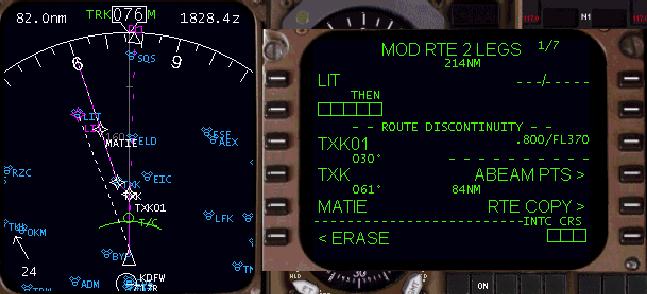
044
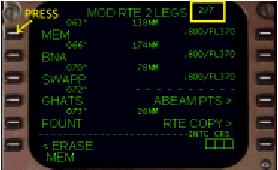
To close the discontinuity, we must find the MEM waypoint in our original route.
ディスコンティニュイティーのクローズのため、オリジナルルートの MEM ウェイポイントを見つけなければなりません
Press the NEXT PAGE key on the FMC keyboard to display page 2 where the MEM waypoint is listed.
FMC キーパッドの NEXT PAGE キーを押して MEM ウェイポイントがリスト表示されているページ 2 を表示します
Press the 1L LSK to place MEM into the scratchpad.
1L LSK を押して MEM をスクラッチパッドに入力します
Then press the PREV PAGE key to return to LEGS page 1.
そのあと PREV PAGE キーを押して LEGS ページ 1 に戻ります
Press the 2L LSK to place MEM into the discontinuity boxes.
2L LSK を押してディスコンティニュイティーボックスに MEM を入力します
This closes the discontinuity and results in a modified route that looks like the one pictured below.
これでディスコンティニュイティーはクローズされ、結果、下の図のように修正ルートが見えます
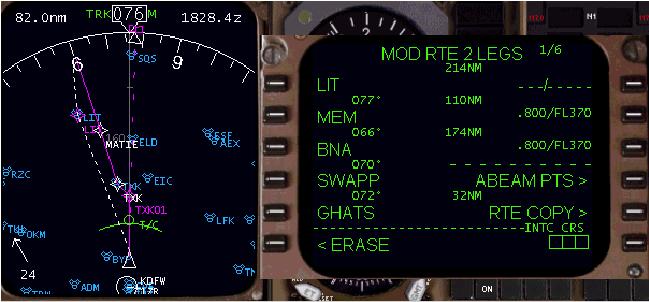
In this example, the FMC has been instructed to skip some waypoints listed in the legs page.
この例では、FMC は LEGS ページにリスト表示されているいくつかのウェイポイントをスキップするように指示を出します
The TXK01, TXK, and MATIE waypoints are skipped by navigating direct to LIT and then on to MEM.
TXK01, TXK, MATIE ウェイポイントは LIT から MEM へのダイレクトナビゲートによってスキップされます
Upon pressing the EXEC key to make the modifications active, the skipped waypoints are removed from the EHSI and LEGS page in favor of the new route.
EXEC キーを押すことにより修正はアクティブになります。スキップされるウェイポイントは EHSI と LEGS ページから新しいルートにより削除されます
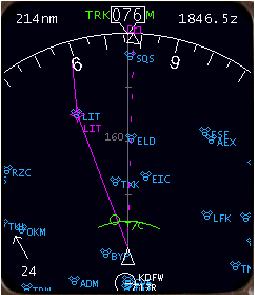
In this example, you may be curious as to why we went to LEGS page 2 to find the MEM waypoint and retrieved it by pressing the adjacent LSK.
この例で、なぜ LEGS ページ 2 で MEM ウェイポイントを見つけ、LSK を押すことにより試したのでしょう
Why not just enter MEM into the scratchpad using the FMC keyboard to close the discontinuity?
なぜ MEM を FMC キーパッドを使って直接スクラッチパッドに入力してディスコンティニュイティーをクローズしなかったのでしょうか?
To close a route discontinuity for the purposes of continuing on the original route, the waypoint used from the route below the discontinuity must be selected using the LSK.
オリジナルルートを続ける目的のためディスコンティニュイティーをクローズするには、ディスコンティニュイティーの下に続くルートからウェイポイントを LSK を使って選択しなければなりません
Otherwise, a manually entered waypoint is treated by the FMC as a new waypoint, even if this waypoint already exists in the route.
別の方法では、たとえすでにルート上に存在するウェイポイントであっても、FMC にて新しくウェイポイントをマニュアルで入力していきます

