Along Track Waypoints
Along track waypoints are distance fixes measured to or from a waypoint along the active route.
トラックウェイポイントに沿ってフィックスまでのアクティブルート上のウェイポイントで to または from の距離です

For example, suppose you are asked to report crossing 75 miles west of the LIT VOR.
たとえば、もし LIT VOR の西 75 マイルを通過したらレポートするとします
We can add an along track waypoint that is exactly 75 miles west of the LIT waypoint as follows.
トラックにそったウェイポイントを LIT から正確に 75 マイル西に追加します
Press the 1L LSK to place LIT in the scratchpad.
1L LSK を押して LIT をスクラッチパッドに入力します
Then using the FMC keyboard type in “/-75” so that the scratchpad contains “LIT/-75”.
そのあと、FMC キーボードを使って "/-75" とスクラッチパッドに入力し "LIT/-75" と続けます
Then press the 1L LSK to enter the along track waypoint into the route.
そのあと 1L LSK を押してルートにトラックに沿ったウェイポイントを入力します
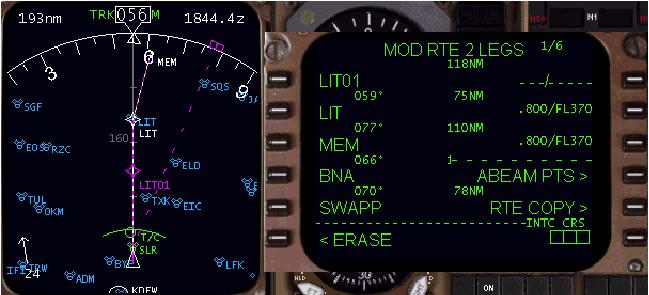
It is important that the scratchpad entry used to create the along track waypoint (LIT/-75) be placed on top of the waypoint to which it is referenced (LIT).
( LIT ) の参照のウェイポイントの一番上にトラックウェイポイント ( LIT/-75 ) をスクラッチパッドを使用して作成のため入力することが重要です
The “LIT/-75” entry tells the FMC to create a waypoint that is 75 miles prior to LIT.
"LIT/-75" を FMC に入力することにより LIT より手前の 75 マイルの地点にウェイポイントを作ります
Notice that the FMC has added “LIT01” into the route as the active waypoint.
アクティブウェイポイントのルート上に FMC が "LIT01" を追加することに注意してください
This represents a point 75 miles prior to the LIT VOR that is along the present FMC track.
これは現在の FMC トラック上で LIT VOR より 75 マイル手前の地点を表します
Also notice that there is no “route discontinuity” presented because the waypoint added is an along track point and the route is not altered.
"route discontinuity" ルートの途切れも無いことに注意してください。なぜならば、ウェイポイントはトラック上への追加でありルートに変更が無いためです
The next example shows how to add an along track waypoint that occurs after the waypoint in question.
次の例では、トラック上のウェイポイントの後にウェイポイントを作る方法について見てみましょう
For example, if you were asked to report 25 miles east of the LIT VOR you would enter the following.
たとえば、もし LIT VOR の東 25 マイルでリポートするならば次のようにします
Press the 1L LSK to put LIT into the scratchpad.
1L LSK を押して LIT をスクラッチパッドに入れます
Then using the FMC keyboard, type “/25” so that the scratchpad contains “LIT/25”.
そのあと、FMC キーバッドを使って "/25" と入力してスクラッチパッドに "LIT/25" と入力します
Then press the 1L LSK to enter the along track waypoint into the route.
そのあと、1L LSk を押して、ルートにトラックに沿ったウェイポイントを入力します
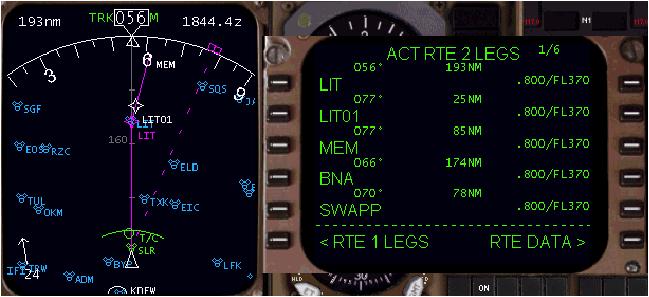
Notice that this time the waypoint has been added after the LIT waypoint.
このときウェイポイントは LIT ウェイポイントの後に追加されることに注意してください
Also notice that once again no discontinuity exists since the point added is along track.
トラックに沿ってポイントが追加されてもディスコンティニュイティーが無いことにも注意してください
Along track waypoints can be added for any waypoint in your route, not just the active waypoint.
トラックに沿ったウェイポイントはルート上のどのウェイポイントでもアクティブウェイポイントでなければ追加することができます
Follow the same procedure outlined above, except use the LSK that corresponds to the waypoint in question.
上記の手順と同じように要求されたウェイポイントの LSK を使用せず行えます
For instance, to create an along track point using the MEM waypoint in the example above, type “MEM/distance” into the scratchpad and then press the 3L LSK (abeam the MEM entry) to create the along track waypoint.
たとえば、上記の例のように MEM ウェイポイントを使ってトラック上のポイントを作成しようとすると、"MEM/distance" ( distance = 距離 ) とスクラッチパッドに入力し 3L LSK ( MEM の横 ) を押してトラックに沿ったウェイポイントを作成します

