Removing Waypoints
There are numerous ways to remove waypoints from the route.
ルートからウェイポイントを取り除くには多くの方法があります
The easiest is to go direct to one of the inactive waypoints by moving it up to the 1L data block (previously discussed).
一番簡単な方法はインアクティブウェイポイントのひとつを 1L データブロックに移動させて、ダイレクトに行く方法です ( 前に説明していますね )
This removes all skipped waypoints by going direct to the selected point.
これはダイレクトに飛行するよう選択したポイントまでの全てのウェイポイントをスキップします
However, what if one of the inactive waypoints needs to be removed from the route?
しかしながら、もしルートからひとつのインアクティブポイントをのぞくことだけが必要だったらどうしましょう?
Do this by pressing the LSK of the waypoint to be moved up in the route and place it on top of the waypoint that you want to remove.
これはルートの除きたいウェイポイントを LSK を押すことにより選択し、除きたいウェイポイントの上に置きます
Consider the following example.
次の例のようにします
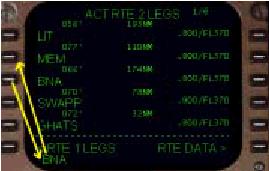
After LIT you are cleared direct to BNA.
LIT の後、BNA にダイレクトに飛行したいときをかんがえます
This requires that the MEM waypoint be removed from the LEGS listing.
これは LEGS リストから MEM ウェイポイントを削除することを要求しています
To do this you press the 3L LSK followed by pressing the 2L LSK.
3L LSK を押し、続いて 2L LSK を押します
This places the BNA waypoint in place of the MEM waypoint.
これで BNA ウェイポイントが MEM ウェイポイントのところに入ります
This effectively deletes the MEM waypoint.
これで MEM ウェイポイントが削除されました
There is no discontinuity presented for the waypoint shuffle because BNA is in the original routing.
こうやってウェイポイントを組替えた場合ディスコンティニュイティーはありません。なぜなら、BNA はオリジナルルートの一部だからです
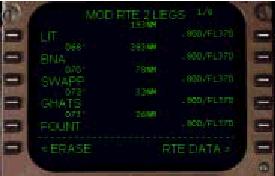
There is no limit to the number of waypoints that can be skipped using this method.
この方法によってスキップできるウェイポイントの数には制限はありません
For example, it is possible to find a waypoint on page 5 of the LEGS page and move it up to a position on page 1 of the LEGS page.
たとえば、LEGS ページのページ 5 のウェイポイントを LEGS ページ 1 のところに持ってくることも可能です
In this case, all waypoint in between the two positions would be eliminated upon execution.
このケースでは 2 つのポジション間の全てのウェイポイントが取り除かれることになります
An alternate and more cumbersome method to skip a single waypoint is to use the FMC keyboard “DEL” key.
他の方法としては、ちょっと複雑な手順ですが、FMC キーボードの "DEL" キーを使ってひとつのウェイポイントをスキップする方法もあります
When pressed, the word DELETE appears in the scratchpad.
"DEL" キーを押すとスクラッチパッドに "DELETE" と表示されます
If an LSK containing a waypoint were subsequently pressed, the waypoint in that data block would be deleted.
その後にウェイポイントの対応する LSK を押すことにより、データブロックのウェイポイントは削除されます
In our example, if the 2L LSK is pressed with the words DELETE in the scratchpad, the MEM waypoint is removed and a ROUTE DISCONTINUITY appears in the 2L data block.
ここでの例では、もしスクラッチパッドに DELETE と表示されている時に 2L LSK を押すと。MEM ウェイポイントが削除され、2L データブロックには ROUTE DISCONTINUITY が表示されます
It would then be necessary to manually close the discontinuity by moving the BNA waypoint up into the discontinuity boxes in the 2L data block.
BNA ウェイポイントを 2L データブロックのディスコンティニュイティーボックスに入れてマニュアルでディスコンティニュイティーをクローズする必要があります

