PLACE/RADIAL/PLACE/RADIAL Waypoints
Another custom waypoint that can be entered into the FMC is created using two cross radials from different fixes.
他の FMC に入力できるカスタムウェイポイントは異なるフィックスポイントからの 2 つのクロスラディアルを使って作ることができます
For example, in our scenario we are navigating toward LIT.
たとえば、ここでのシナリオは LIT に向かってナビゲートする場合を考えます
We now want to navigate towards the intersection of the LIT 150° radial and the SQS 270° radial.
LIT 150°ラディアルと SQS 270°ラディアルの交叉点に向かってナビゲートしたい場合を考えます
After passing this point, we want to rejoin the original route at the MEM waypoint.
このポイントを通過したあとはオリジナルルートの MEM ウェイポイントに接続します
The format for entering this type of custom waypoint is as follows:
このタイプのカスタムウェイトを入力するフォーマットは次の通りです:
(place)(radial)/(place)(radial)
Type “LIT150/SQS270” into the scratchpad and press the 1L LSK to go direct to this point.
スクラッチパッドに "LIT150/SQS270" と入力し、1L LSK を押してこのポイントにダイレクトに飛行するようにします
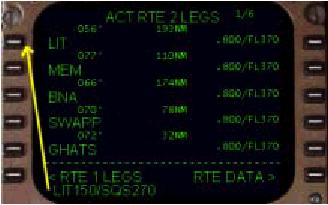
This entry breaks down as follows: “LIT” (place), “150” (radial), “/”, “SQS” (place), “270” (radial).
これは次のように分類されます:“LIT” (place), “150” (radial), “/”, “SQS” (place), “270” (radial).
This forms an intersection that the FMC draws on the EHSI as a waypoint.
FMC のこのフォームのインターセクションは EHSI 上にウェイポイントとして描かれます
The new waypoint is named using the first anchor point.
新しいウェイポイントは最初のアンカーポイントの名前を使います
In this case, the “LIT” point is used because it is the first fix used to form the new waypoint.
このケースでは "LIT" ポイントが使われます。なぜならば新しいウェイポイントを作るための最初に使用されているからです
Since this is the first custom waypoint using “LIT”, the waypoint is called “LIT01”.
ゆえに、これはカスタムウェイポイントの最初に "LIT" が使用されて、ウェイポイントは "LIT01" となります
048
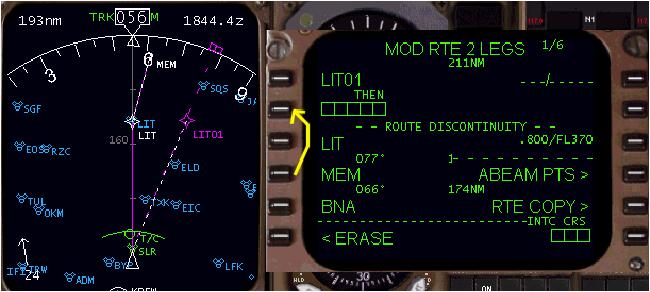
We see on the EHSI that a new waypoint has been created and named LIT01.
EHSI に先ほど作った新しいウェイポイント LIT01 が見えます
This is the exact point where the LIT 150° radial crosses the SQS 270° radial.
これは正確に LIT 150°ラディアルと SQS 270°ラディアルの交叉するポイントとなります
Since this is a modification to the route, the title of the LEGS page changes to “MOD”.
ルートが修正されると LEGS ページのタイトルが "MOD" に変わります
The aircraft continues to navigate towards LIT until this modification is executed by pressing the EXEC key.
EXEC キーを押してこの修正を実行するまでは飛行機は LIT に向かってナビゲートを続けます
A discontinuity is presented because the FMC wants to know where to go after the newly added waypoint.
ディスコンティニュイティーが発生します。なぜなら FMC は新しく追加されたウェイポイントの後の行き先を知らないからです
In our example, we want to go to the MEM waypoint.
ここでの例では MEM ウェイポイントに行きたいとします
Do this by pressing the 4L LSK to place MEM into the scratchpad.
4L LSK を押して MEM をスクラッチパッドに入れます
Then press the 2L LSK to put MEM into the discontinuity boxes.
そのあと、2L LSK を押してディスコンティニュイティーボックスに MEM を入れます
This deletes the LIT waypoint and connects the “LIT01” waypoint to the MEM waypoint.
これにより LIT ウェイポイントが削除され、"LIT01" ウェイポイントが MEM ウェイポイントに接続されます
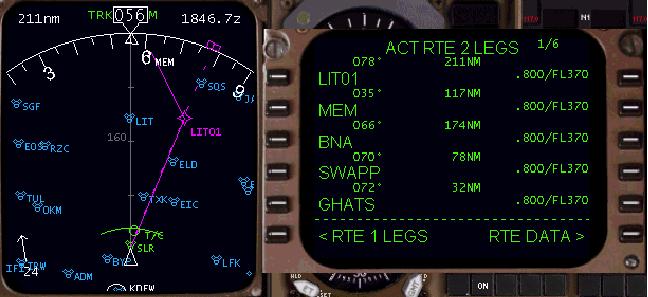
After executing the route modification, the display should look like the picture above.
ルート修正の実行の後、上の絵のように表示されます
With the AFDS is LNAV, the autopilot navigates toward the newly created place/radial/place/radial waypoint (LIT01) and then continues on to the MEM waypoint.
AFDS は LNAV モードで、オートパイロットはあたらしく作成した place/radial/place/radial ウェイポイント ( LIT01 ) に向かってナビゲートを行い、そのあとMEM ウェイポイントに接続されます

