ABEAM Points
Whenever making a route modification, prompts are displayed at the 4R and 5R positions on the CDU.
ルートの修正が行われると、プロンプトが CDU 上の 4R と 5R ポジションに表示されます
At the 4R LSK is the “ABEAM PTS>” prompt.
4R LSK には "ABEAM PTS >" プロンプト
At the 5R LSK is the “RTE COPY>” prompt (discussed in the next section).
5R LSK には "RTE COPY >" プロンプト ( 次のセクションで説明します )
Whenever a route modification is made, the FMC presents the opportunity to create waypoints that represent points that are “abeam” waypoints that may have been skipped.
ルートの修正が行われると、FMC はスキップされるウェイポイントの "abeam" 真横のウェイポイント作成を行います
Abeam waypoints are useful for time and fuel calculations when flying a route.
真横のウェイポイントはこのルートを飛行した時の時間と燃料の計算のために使用されます
This concept is best explained using our example.
この考え方はここでの例を使用して一番良く説明できます
To demonstrate abeam points, we must first go direct to a waypoint in our route that causes waypoints to be skipped over.
デモのアビームポイントへは、ウェイポイントをスキップされてしまったので最初にルート上のウェイポイントへダイレクトに飛行しなければなりません
On page two of our current route we find the BKW waypoint.
ここでのルートのページ 2 に BKW ウェイポイントがあります
Pressing the 6L LSK transfers BKW to the scratchpad.
6L LSK を押して BKW をスクラッチパッドに入れます
To go direct to this point we scroll back to page 1 of the LEGS page and press the 1L LSK to place BKW into the 1L data block.
このポイントにダイレクトに行くには、LEGS ページをページ 1 に戻して、1L LSK を押して BKW を 1L データブロックに入れます
The FMC draws a dashed route modification line on the EHSI to the BKW waypoint.
FMC は点線で BKW ウェイポイントへの修正ルートの線を EHSI 上に描きます
Also, all waypoints between aircraft present position and the BKW waypoint are removed from the LEGS page.
また飛行機の現在位置と BKW ウェイポイント間の全てのウェイポイントは LEGS ページから削除されます
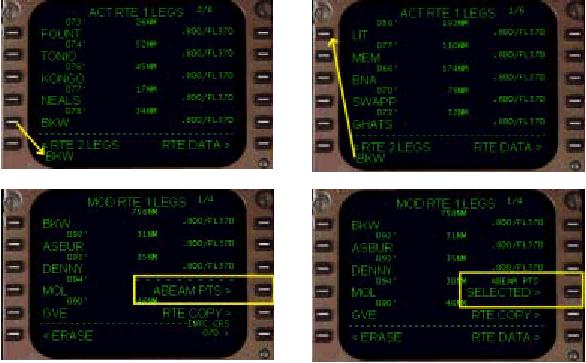
Notice in the above pictures that at the 4R LSK the “ABEAM PTS>” prompt is displayed.
上の絵で、4R LSK に "ABEAM PTS >" プロンプトが表示されていることに注意してください
Pressing the 4R LSK causes the FMC to calculate waypoints along the direct routing that represent all skipped waypoints.
4R LSK を押すと、FMC は全てのスキップされるウェイポイントを除き、ウェイポイントまでのダイレクトルートを計算します
The 4R LSK prompt also changes to “SELECTED” to indicate that the FMC will create these abeam points once the modification is executed.
4R LSK プロンプトはまた、"SELECTED" と表示変更され、FMC はいったん修正が実行されると、これらのアビームポイントを作成します
When you execute the route modification by pressing the EXEC key, the FMC updates the LEGS page with intermediate points that represent the abeam waypoints.
EXEC キーを押してルート修正を実行した時、FMC はアビームウェイポイントに相当する中間のポイントを LEGS ページにアップデートします
The results are shown in the picture below.
その結果は下の絵のようになります
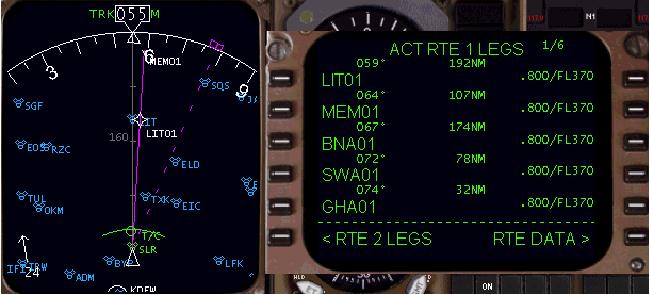
Notice on the LEGS page that the abeam waypoints have been added.
LEGS ページ上にアビームポイントが追加されていることに注意してください
The names for these waypoints are created using the names of the waypoints being skipped.
これらのウェイポイントの名前はスキップされたウェイポイントの名前を使って作られます
A straight line direct to BKW has been created using these abeam points.
BKW へのダイレクトのストレートラインはこれらのアビームポイントを使って作られます
In the example above, we executed a route modification that substantially changed the route.
上の例ではルートの修正を実行し、ルートが変更されています
It is possible to save a copy of the active route prior to making the route modifications active.
ルートの修正をアクティブにする前にアクティブルートをコピーして保存しておくことも可能です
The “RTE COPY >” prompt abeam the 5R LSK is used to save a copy of the original route prior to executing any changes.
"RTE COPY >" の 5R LSK は変更を実行する前にオリジナルルートをコピーして保存することに使えます
The next section explains how the RTE COPY function works.
次のセクションで RTE COPY 機能の働きについて説明します

