LAT/LONG Waypoints
The FMC is capable of accepting directly entered latitude/longitude coordinates as a waypoint.
FMC はウェイポイントを緯度/経度座標でダイレクトに位置を入力して行うことも受け入れることができます
The format for this type of point is exactly the same format used for position initialization.
ポイントのこのタイプのフォーマットは正確にポジションイニシャライズの時と同じフォーマットを使います
Review the “POS INIT” section of this manual for more details on lat/long format.
緯度/経度フォーマットの更なる詳細についてはこのマニュアルの "POS INIT" セクションをご覧下さい
To place a lat/long coordinate into the route, type the coordinates into the scratchpad and press the left LSK at the place in the route where the point is required.
ルート内の緯度/経度座標を入れるためには、スクラッチパッドに座標を入力し、要求に合うポイントをさす左側の LSK を押して入力します
For example, there is a departure point called “AVRON” that is used when departing KJFK out over the ocean.
たとえば、海側へ KJFK から出発する場合は "AVRON" デパーチャーポイントが使われます
This point is not part of the FMC database.
このポイントは FMC データベースにはありません
If you attempt to enter AVRON into the LEGS page, an FMC message “NOT IN DATABASE” is generated.
もし LEGS ページに AVRON を入力しようとした場合は FMC は "NOT IN DATABASE" とメッセージを発生させます
To overcome this problem, enter the lat/long coordinates for the AVRON waypoint.
この問題を解決するには、AVRON ウェイポイントの緯度/経度座標を入力します
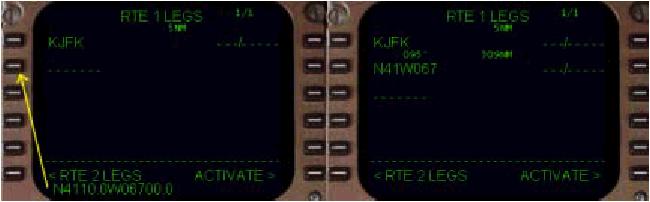
Type “N4110.0W06700.0” into the scratchpad and press the appropriate left LSK on the LEGS page to insert the point into the route.
"N4110.0W06700.0" とスクラッチパッドに入力し、LEGS ページでルート上の挿入したいところの左側の LSK を押します
The new waypoint is created at the exact lat/long position entered.
新しいウェイポイントは正確に入力した緯度/経度座標に作られます
This point is the same as the AVRON point listed on the departure chart for KJFK.
このポイントは KJFK のデパーチャーチャート上に書かれている AVRON ポイントと同じです
The FMC names the new waypoint by abbreviating the lat/long coordinates as shown in the picture below.
FMC は下の絵のように短縮した緯度/経度座標から名前を付けます
This type of waypoint is used extensively for oceanic routings.
このウェイポイントのタイプは海上ルートにおいて広く使われています
Also, if the FMC cannot find a waypoint in the database, the lat/long coordinates can be used to represent the missing waypoint (as demonstrated in the above example).
もし FMC がデータベースからウェイポイントを見つけることができなかった時も、失敗したウェイポイントに相当する緯度/経度座標を使うことができます ( 上記例のデモのように )
LEGS Page Summary
That completes the overview of how to use the LEGS page to navigate the programmed route using LNAV.
プログラムされたルートのナビゲートにLNAV を使っての LEGS ページを使った方法の概要はこれで完了です
The next sections describe the remaining pages in the FMC as well as a comprehensive explanation of VNAV.
次のセクションでは FMC の VNAV を含めた残ったページについて今まで同様に説明します
The final section describes how to save FMC data for future use.
最後のセクションでは未来に使うための FMC データのセーブの方法について説明します

