HOLD Page
The HOLD page allows programming a holding pattern at any waypoint in the LEGS page.
HOLD ページは LEGS ページのどのウェイポイントでのホールディングパターンのプログラミングも許します
To create a hold, press the HOLD key on the FMC keyboard.
ホールドの作成するには FMC キーボードの HOLD キーを押します
This action takes you to the LEGS page that has two holding prompts at the 6L and 6R LSK data blocks.
この動作で LEGS ページと同じような表示画面になり、2 つのホールディングプロンプト 6L と 6R LSK データブロックが表示されます
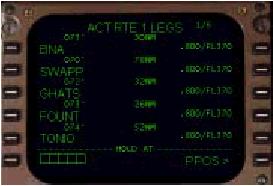
The box prompt at the 6L LSK allows for the entry of any waypoint currently in the route.
6L LSK のボックスプロンプトは現在のルート上のどのウェイポイントでも許します
Line selecting a waypoint into the scratchpad and then pressing the 6L LSK creates a hold at the selected waypoint and displays the hold page.
スクラッチパッドにウェイポイントを選択して入力し、6L を押すことでホールドするウェイポイントが選択され、ホールドページが表示されます
To demonstrate, let’s create a hold at the BNA waypoint.
BNA ウェイポイントにホールドを作成してみましょう
Press the 1L LSK to place BNA in the scratchpad and then press the 6L LSK to create the hold.
1L LSK を押して BNA をスクラッチパッドにいれ、6L LSK を押してホールドを作成します
The picture below shows the resulting display.
その結果が下の絵に表示されています
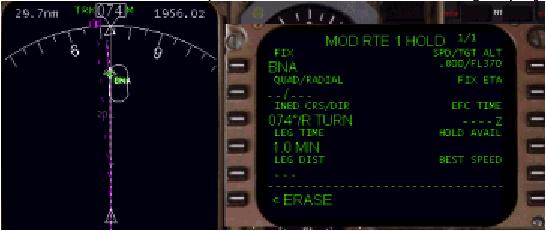
The other method of entering a hold is to use the “PPOS>” prompt at the 6R LSK.
ホールドを入力する他の方法としては、6R LSK "PPOS >" を使う方法があります
Pressing the 6R LSK creates a waypoint at the aircraft’s present position and creates a hold.
6R LSK を押して飛行機の現在位置にウェイポイントを作成しホールドを作ります
The hold page is then presented with this newly created waypoint as the holding point.
ホールドページはこの新しく作られたウェイポイントをホールディングポイントとして表示されます
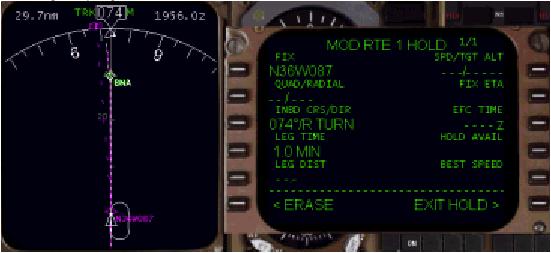
Pressing the 6R LSK in our example results in the following display.
6R LSK を押した結果が下の表示です
057
When using the PPOS prompt to create a hold, the present position waypoint is entered in LAT/LONG format.
PPOS プロンプトを使ってホールドを作成した時、現在の位置のウェイポイントが LAT/LONG ( 緯度/経度 ) フォーマットで入力されます
This point is also entered into the LEGS page as the active waypoint upon executing the hold.
このポイントは LEGS ページに挿入され、ホールドを実行するとアクティブウェイポイントになります
If you wish to erase the hold and the new waypoint prior to execution, just press the “<ERASE” prompt at the 6L LSK.
もしホールドと新しいウェイポイントを実行する前に消したい場合は、6L LSK "< ERASE" を押すだけで行えます
This restores the LEGS page and route to normal.
これは LEGS ページとルートを元に戻します
Regardless of how the hold is created, the HOLD page is the same.
ホールドの作成方法に関係無く、HOLD ページは同じです
The HOLD page permits manual manipulation of the holding pattern.
HOLD ページではホールディングパターンのマニュアルでの修正が行えます
Along the left side of the page are data prompts that allow changing the size and direction of the holding pattern.
ページの左側に沿った、データプロンプトでホールディングパターンのサイズと方向を変更することができます
Initially, the FMC draws a 1-minute direct entry holding pattern with right turns.
最初、FMC は 1 分の直線と右回りのホールディングパターンを描きます
There are a few different methods to change the type and size of holding pattern presented.
ホールディングパターンのタイプとサイズの変更にはいくつかの違った方法があります
Using the BNA holding pattern as an example, we can change the holding pattern in the following ways.
BNA ホールディングパターンを使った例で、次の方法によりホールディングパターンを変更することができます
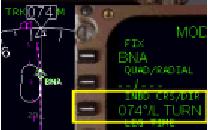
1. Type “L” into the scratchpad and press the 3L LSK to change the holding pattern from a right pattern to a left pattern.
スクラッチパッドに "L" を入れ、3L LSK を押してホールディングパターンを右回りから左回りに変更します
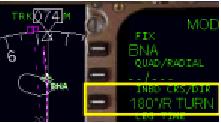
2. You can change the inbound course of the holding pattern by typing a new course into the scratchpad and pressing the 3L LSK.
新しいコースをスクラッチパッドに入れ、3L LSK を押すことにより、ホールディングパターンのインバウンドコースを変更することができます
For example, to change the holding pattern to hold on a 180° track inbound to BNA, type “180” into the scratchpad and press the 3L LSK.
たとえば、BNA へのインバウンドコースを 180°のホールディングパターンに変更するには、スクラッチパッドに "180" を入力し、3L LSK を押します

3. You can change the holding radial by entering a quadrant/radial into the 2L data block.
4 分儀/ラディアルを 2L データブロックに入力することによりホールディングのラディアルを変更することができます
For example, to hold south on the BNA 180° radial, type in “S/180” and press the 2L LSK.
たとえば、BNA 180°ラディアルの南へのホールドなら "S/180" と入力し 2L LSK を押します
This creates the holding pattern south of BNA on the 180° radial.
これは BNA の南に 180°ラディアルのホールディングパターンを作成します
Manipulation of the size of the holding pattern is accomplished in two ways.
ホールディングパターンのサイズの扱いは 2 つの手順で完了します
First, by specifying a different inbound holding time in the “LEG TIME” data block.
最初は "LEG TIME" データブックに異なるインバウンドホールディング時間を指定します
The FMC defaults to a 1.0-minute holding pattern.
FMC はデフォルトでは 1.0 分のホールディングパターンです
To increase or decrease the length of the inbound holding leg, type in a new time and press the 4L LSK.
インバウンドホールディングレグの長さを伸ばしたり縮めるには、新しい時間を入力し 4L LSK を押します
Alternatively, it is possible to specify a distance for the inbound holding leg using the “LEG DIST” data block at the 5L LSK.
もうひとつの方法は、インバウンドホールディングレグの距離の指定を "LEG DIST" データブロック ( 5L LSK ) を使用することもできます
Type in a leg distance and press the 5L LSK.
レグの距離を入力し 5L LSK を押します
Please note that you can only specify one type of holding leg size.
ホールディングレグのサイズの入力はどちらか 1 つのタイプのみ使用できることを覚えておいてください
Changing the leg size using a distance value causes the time value to drop out, and vice-versa.
距離の値を使ってレグサイズを変更すると、時間の値が消えます。また逆も同じです
058
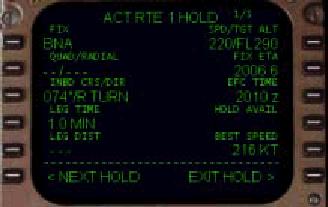
The right side of the hold page contains information that is helpful during holding.
ホールドページの右側にある情報はホールディング中、役に立つ情報です
Entry of a target airspeed and altitude in the 1R data block refines the FMC holding calculations.
FMC がホールディング計算したターゲット対気速度と高度が 1R データブロックに表示されます
Entry of an “Expected Further Clearance” time (EFC) in the 3R data block tells the FMC how long holding is planned for.
"Expected Further Clearance" ( クリアランスが出る時間の予測 ) 時間 ( EFC ) が 3R データブロックに表示されます。これは FMC が計画したホールディングの長さです
Based on these numbers the FMC calculates holding time available (HOLD AVAIL) and a fix estimated time of arrival (FIX ETA).
これらの数字は FMC の利用できるホールディング時間 ( HOLD AVAIL ) と到着にかかる時間 ( FIX ETA ) の計算を基本にしています
The BEST SPEED number displayed in the 5R data block is the minimum safe speed for holding.
5R データブロックの BEST SPEED 数はホールディングの最小安全スピードです
As with any FMC route modification, the holding pattern must be executed by pressing the EXEC key to make it active.
FMC ルート修正もいっしょに、ホールディングパターンは EXEC キーを押すことでアクティブになり、実行しなければなりません
Pressing the EXEC key completes the holding pattern programming.
EXEC キーを押すとホールディングパターンのプログラミングは完了します
Once executed, the AFDS LNAV mode enters and follows the holding pattern when encountered on the LEGS page.
いったん実行すると、AFDS LNAV モードは LEGS ページ上で出会ったときホールディングパターンを実行、従います
Even though the FMC is programmed to enter the holding pattern correctly it can (and will) make mistakes.
FMC は正確にホールディングパターンを入力しプログラムします。ミスしてもそのまま
It is up to the pilot to monitor holding pattern entry carefully and make necessary adjustments using the AFDS HDG SEL mode if
necessary.
パイロットはホールディングパターンへの進入を注意深くモニターし、必要なら AFDS HDG SEL モードを使って調整を行います
Following the FMC plotted course on the EHSI using the AFDS HDG SEL mode is a perfectly acceptable method of executing a holding pattern.
FMC は AFDS HDG SEL モードを使用して EHSI 上のプロットしたコースに従い、ホールディングパターンの実行の方法を完全に行います
Once a hold has been programmed, it is possible to program more holding points along the route.
いったんホールドがプログラムでも、ルートに沿った更なるホールディングポイントをプログラムすることも可能です
Pressing the “<NEXT HOLD” prompt at the 6L LSK displays another HOLD selection page.
6L LSK "< NEXT HOLD" を押して他の HOLD セレクションページを表示します
There is no limit to the number of holds the FMC can accept.
FMC が受け入れるホールドの数に制限はありません
This is useful if creating missed approach holding patterns while holding for an approach.
これはもしミストアプローチの時でも、アプローチのためのホールディングのホールディングパターンを作成することに利用できます
There are two methods to exit an active hold.
アクティブホールドを抜け出す方法が 2 つあります
Pressing the “EXIT HOLD>” prompt at the 6R LSK causes the FMC to finish the current holding pattern and then continue on to the next waypoint.
6R LSK "EXIT HOLD >" を押すことで、FMC は現在のホールドパターンを終了し、次のウェイポイントへの飛行を続けます
The other way to exit a hold is to go direct to another waypoint in the LEGS page.
もうひとつのホールドを抜ける方法は、LEGS ページで違うウェイポイントにダイレクトで行くことです
It is also possible to skip and/or delete holds using normal legs page management techniques (discussed previously).
この方法は通常の LEGS ページのテクニックを使うことで、ホールドをスキップしたり削除したりできます ( 前に説明しています )

