DEPARTURE/ARRIVAL Page
In the route programming section of this manual, the use of the DEP ARR page to expedite route programming was demonstrated.
このマニュアルのルートプログラミングセクションで、DEP ARR ページを使用してルートプログラミングをはかどらせました
Pressing the DEP ARR key displays different DEP ARR pages depending on aircraft position.
DEP ARR キーを押すと、違う DEP ARR ページを飛行機の位置により表示します
If the aircraft is on the ground, the DEP ARR INDEX page is displayed.
もし飛行機が地上のときは、DEP ARR INDEX ページが表示されます
If the aircraft is in flight and less than half way to the destination airport, the departure airport arrivals page is displayed.
もし飛行機が上空を飛行中で、行き先空港までの半分以下の場合は出発空港の到着ページが表示されます
If the aircraft is more than half way to the destination, the destination airport arrivals page is displayed.
もし飛行機が行き先空港までの半分をすぎて飛行中は行き先空港の到着ページが表示されます
Before we proceed, there is some important information about the SID/STAR/APP database that you must know about.
とりかかるまえに、SID/STAR/APP データベースについて知らなければならない、いくつかの重要な情報があります
The FMC comes with a limited number of standard procedures already programmed into the database.
FMC はデータベース内のすでにプログラムされた標準のプロシージャーの数に制限があります
If you access the DEP/ARR INDEX pages for your favorite airports and find there is no data, this is not a bug in the program.
もし希望の飛行場の DEP/ARR INDEX ページにアクセスしたいときにそのデータが見つからない場合、これはプログラムのバグではありません
This means that no procedures are stored in the database.
この意味はデータベースにプロシージャーが登録されていないということです
Toward the end of this manual we provide information on how to program your own procedures and save them into the database.
このマニュアルの終わりの方に自分の好きなプロシージャーをプログラムする方法とそれらをデータベースに保存する方法について説明しています
Please see the important information regarding the SID/STAR database found in the “Saving FMC Data” section near the end of the FMC manual.
この FMC マニュアルの最後のほうにある "Saving FMC Data" ( FMC データの保存 ) セクションの SID/STAR データベースに関する重要な情報を見てください
When approaching the destination airport and your routing requires the use of an arrival procedure (STAR), you can access these using the DEP ARR key.
行き先空港へのアプローチの時、到着プロシージャー ( STAR ) の使用がルーティングに要求されているなら、DEP ARR キーでこれらにアクセスすることができます
If the database finds STARs for the destination airport, they are listed on the LEFT side of the DEP ARR page.
もし行き先空港のための STAR がデータベースで見つかったら、それらは DEP ARR ページの左側にリスト表示されます
A limited number of STARs have been programmed into the database as examples (see the end of this document for custom STAR programming).
STAR の数の制限は先ほどの説明のようにデータベースへのカスタムのプログラミングによります ( このマニュアルの後ろのほうのカスタム STAR プログラミングを見てください )
Also, the approach procedure and destination runway are selected from the right side of the DEP ARR page.
空港のプロシージャーと到着滑走路は DEP ARR ページの右側から選択します
Approach procedures can also be custom programmed into the database (explained at the end of this document).
アプローチプロシージャーもまた、データベースへのカスタムプログラムをすることができます ( このマニュアルの後ろの方で説明しています )
STAR Selection
In our example going to KLGA, the MINKS1 STAR with the GVE transition was selected during route programming on the ground.
ここでの KLGA 空港への例で、GVE トランジッションと MINKS1 STAR は地上でのルートプログラミングで選択しました
The FMC automatically joined the MINKS STAR to the route via the GVE waypoint.
FMC は自動的に MINKS STAR を GVE ウェイポイントを通ってルートをつなげます
If a change in STAR procedures is required during flight, this can be accomplished by accessing the DEP ARR page by pressing the DEP ARR key on the FMC keyboard.
もし STAR プロシージャーの変更が飛行中に要求されたら、これは FMC キーボードの DEP ARR キーを押して DEP ARR ページにアクセスすることにより行うことができます
This should display the KLGA ARRIVALS page (if not, then use the INDEX to find the KLGA ARR page prompt).
これは KLGA ARRIVALS ページを表示しています ( もし KLGA ARR ページプロンプトを見つけるため INDEX を使っていなかったら )
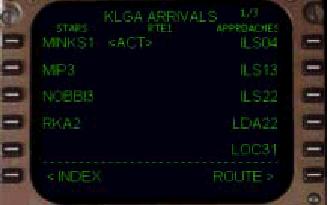
The “<ACT>” prompt indicates that the MINKS1 arrival is the currently selected and active arrival in the route.
"<ACT>" プロンプトが表示され、MINKS1 アライバルが現在選択されており、ルート上のアクティブアライバルになっています
To change the selected arrival procedure, press one of the left LSKs abeam the name of the desired arrival.
アライバルプロシージャーの選択の変更は望みのアライバルの名前の横の左の LSK を押します
The transition procedure for an active STAR can also be change by re-selecting the active arrival.
アクティブ STAR のためのトランジッションプロシージャーはアクティブアライバルの再選択により変更することもできます
When re-selected, the available STAR transitions are presented once again for selection.
再選択した時、可能な STAR トランジッションはもう一度選択のために提供されます
If making a change to the selected STAR, the FMC automatically removes the old STAR waypoints and adds the new waypoints to the LEGS page.
もし STAR の選択を変更したならば、FMC は自動的に古い STAR ウェイポイントを削除し、LEGS ページに新しいウェイポイントを追加します
The FMC also joins the arrival to the active route if a waypoint in the active route is part of the STAR.
FMC はもしアクティブルートのウェイポイントが STAR の一部ならばアクティブルートへのアライバルも接続します
If the route contains no common points with the STAR, the FMC presents a ROUTE DISCONTINUITY that would have to be closed manually on the LEGS page.
もしルートが STAR の共通でないポイントを含むならば、FMC は ROUTE DISCONTIVUITY ( ルートの途切れ ) を出します。LEGS ページでマニュアルでクローズをしなければなりません

As an example, lets change the MINKS1 arrival transition into KLGA from GVE to FAK.
例として KLGA 空港の MINKS1 アライバルトランジッションを GVE から FAK に変更してみましょう
To do this, press the DEP ARR key to display the arrival page and re-select the MINKS1 arrival by pressing the 1L LSK.
これを行うには、DEP ARR キーを押してアライバルページを表示し、1L LSK を押して MINKS1 アライバルを再選択します
All of the available transitions are presented for the STAR.
STAR のために利用可能なトランジッションの全てが表示されます
Press the 2L LSK abeam “FAK” to make the change in transition points.
"FAK" の真横の 2L LSK を押し、トランジッションポイントの変更を行います
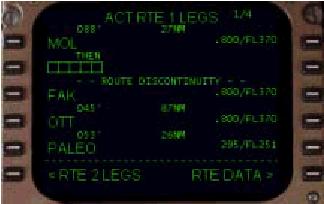
When the LEGS page is displayed, a discontinuity in the route is presented because FAK is not on the original route.
LEGS ページが表示された時、ルートのディスコンティニュイティーが提供されます。なぜなら FAK はオリジナルルート上にないからです
To close the discontinuity, line select FAK into the scratchpad (by pressing the 3L LSK) and then press the 2L LSK to join the routes.
ディスコンティニュイティーをクローズするため、スクラッチパッドに FAK をラインセレクトして入力し ( 3L LSK を押します ) 、2L LSK を押してルートをつなぎます

