Saving STAR Transition Procedures
The previous example showed how to save a basic STAR procedure.
前の例で基本の STAR プロシージャーの保存方法について見ました
The example STAR we used did not have any transition routes.
どのトランジッションルートも持っていない STAR の例です
Just one route constituted the STAR procedure.
ひとつだけルートは STAR プロシージャーを構成しました
Now we will explain how to save a STAR that has multiple transition procedures leading to the common STAR routing.
共通の STAR ルートに導かれるたくさんのトランジッションプロシージャーを持っている STAR の保存方法について説明しましょう
STARs that contain one or more transition procedures always have a common route that makes up the basic STAR.
ひとつまたはもっとたくさんのトランジッションプロシージャーをすでに含む STAR は基本の STAR を仲介にすることにより共通のルートを持ちます
This common route shall be programmed as a basic STAR, just as we did with SID programming.
この共通のルートはちょうど SID のプログラミングを行ったように基本の STAR はプログラムされるでしょう
Then the transition routes are saved separately using the “< SAVE STAR TRANS” option in the SAVE ROUTE menu.
トランジッションルートは SAVE ROUTE メニューの "< SAVE STAR TRANS" オプションを使用することにより別々に保存されます
To demonstrate how STAR transitions are saved, let’s look at a STAR that contains transition routes.
STAR トランジッションを保存する方法のデモで、トランジッションルートを含む STAR について見てみましょう
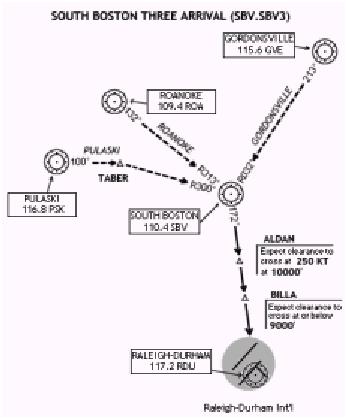
The STAR shown here is the SOUTH BOSTON THREE arrival into KRDU.
STAR は KRDU 空港の SOUTH BOSTON THREE アライバルがあります
This arrival has three different transition routes that join the common STAR routing over SBV VOR.
このアライバルは SBV VOR の向こうで共通の STAR ルートに接続する 3 つの異なるトランジッションを持ちます
To begin programming this STAR, start by programming the basic STAR procedure.
この STAR のプログラミングを始めるにあたり、基本の STAR プロシージャーのプログラミングから開始しましょう
Looking at the arrival chart, we find that all three transitions (from GVE, ROA and PSK) feed into the SBV VOR.
アライバルチャートを見てください。すべての 3 つのトランジッション ( GVE , ROA , PSK から ) が SBV VOR に見つかります
After the SBV VOR the STAR is the same regardless of what transition is used.
SBV VOR のあと、STAR はトランジッションが何を使うかに関係無く同じです
Therefore we will program SBV and all subsequent waypoints as the basic STAR.
ゆえに、基本の STAR としての SBV と全ての続くウェイポイントをプログラムします
The STAR should be saved at the “SBV5”.
STAR は "SBV5" として保存します
After programming the basic STAR, begin programming each transition individually.
基本の STAR のプログラミングの後、それぞれのトランジッションを個々にプログラミングを始めます
Place the waypoints that make up the transition in the LEGS page so that only the transition waypoints are listed.
トランジッションウェイポイントだけを表示するために LEGS ページ上にトランジッションのウェイポイントを置きます
Then proceed to the SAVE ROUTE menu and find the “< SAVE STAR TRANS” prompt abeam the 2L LSK on page 2.
そのあと SAVE ROUTE メニューにすると、ページ 2 の 2L LSK の真横に "< SAVE STAR TRANS" プロンプトが見つかります
Pressing the 2L LSK opens up the FILENAME data box at the 5L LSK.
2L LSK を押して 5L LSK に FILENAME データボックスを開きます
The format to save STAR transitions is “STAR.TRANSITION”.
STAR トランジッションの保存のためのフォーマットは "STAR.TRANSITION" です
For example, if you were programming the PULASKI transition, you type “SBV5.PSK” into the scratchpad.
たとえば、もし PULASKI トランジッションをプログラミングした場合はスクラッチパッドに "SBV5.PSK" と入力します
With the name of the transition in the scratchpad, press the 5L LSK to transfer it into the FILENAME data box.
スクラッチパッドにトランジッションの名前を入れ、5L LSK を押して FILENAME データボックスに送ります
Then press the 6L LSK to save it to disk.
6L LSK を押してディスクに保存します
Once an arrival transition is programmed, the next time you access the STAR on the arrival page the FMC presents you with the transition options.
いったんアライバルトランジッションがプログラムされたら、次の時に FMC のアライバルページで STAR を呼び出せばトランジッションオプションもいっしょに表示されます
To solidify your understanding of STAR programming, let’s outline all the steps required to program the SBV5 arrival into KRDU.
STAR のプログラミングの理解を固めるため、KRDU 空港の SBV5 アライバルのプログラムに必要な全てのステップについてやってみましょう

