091
Saving STAR (with Transitions) Example
STAR ( トランジッションを持つ ) の保存の例
This example demonstrates how to program
the SOUTH BOSTON FIVE arrival into KRDU (Raleigh-Durham,
NC, USA).
この例は KRDU 空港の SOUSH BOSTON FIVE アライバルのプログラム方法をデモします
This example demonstrates how to program
both the basic STAR and all transition procedures.
この例は基本の STAR と全てのトランジッションプロシージャーの両方のプログラム方法をデモします
To begin, place your aircraft on runway 23R
at KRDU.
飛行機を KRDU 空港の滑走路 23R に置いて始めましょう
1. Review the STAR and identify the common arrival
waypoints.
STAR と共通のアライバルウェイポイントの識別についてのレビュー
In this case, all points starting with the
SBV VOR are common to the STAR.
このケースでは全てのポイントは STAR の共通の
SBV VOR で始まります
This becomes the basic STAR that should be
programmed first.
これは最初にプログラムされる基本の STAR になります
Since the waypoint crossing restrictions
are conditional, we do not save them with
the STAR.
ウェイポイントの通過時の制限が条件付なのでそれらを
STAR と一緒には保存しません
| ▲ |
On the ROUTE page (RTE1), enter a departure
airport (any will do) and then enter “KRDU”
as the arrival airport.
ROUTE ページ上で ( RTE 1 ) 、出発空港を入力し
( どの空港でも ) 、到着空港に "KRDU"
を入力します
This should clear out any LEGS previously
stored by the FMC.
これは FMC に前に記憶させた、どの LEGS でもかまいません
If it does not, select a different departure
airport and then re-enter KRDU as the arrival
airport.
もし無い場合は、別の出発空港を選択し、到着空港に
KRDU を再度入力してください |
| ▲ |
Press the LEGS key on the FMC keyboard to
call up the LEGS page.
FMC キーボードの LEGS キーを押して
LEGS ページを呼び出します |
| ▲ |
Type “SBV” into the scratchpad and then
press the 1L LSK.
スクラッチパッドに "SBV"
と入力し、1L
LSK を押します |
| ▲ |
Type “ALDAN” into the scratchpad and then
press the 2L LSK.
スクラッチパッドに "ALDAN"
と入力し、2L
LSK を押します |
| ▲ |
Type “BILLA” into the scratchpad and then
press the 3L LSK.
スクラッチパッドに "BILLA"
と入力し、3L
LSK を押します |
| ▲ |
Type “RDU” into the scratchpad and then
press the 4L LSK.
スクラッチパッドに "RDU"
と入力し、4L
LSK を押します |
| ▲ |
Press the 6R LSK to ACTIVATE the route, and
then press the EXEC key.
6R LSK を押してルートを ACTIVATE にし、EXEC
キーを押します |
| ▲ |
Press the MENU key followed by the 5R LSK
to access the SAVE ROUTE menu.
MENU キーを押して、続いて 5R LSK を押して
SAVE ROUTE メニューを呼び出します |
| ▲ |
Press the 4L LSK to SAVE LEGS AS STAR/APP.
4L LSK を押して SAVE LEGS AS STAR/APP
にします |
| ▲ |
Type “SBV5” into the scratchpad and press
the 5L LSK to enter the STAR name into the
FILENAME data block.
スクラッチパッドに "SBV5"
と入力し、5L
LSK を押して STAR 名を FILENAME データブロックに入力します |
| ▲ |
Press the 6L LSK to save the STAR to disk.
6L LSK を押して STAR をディスクに保存します |
2. After programming the basic STAR procedure
we can now program the transitions.
基本の STAR プロシージャーをプログラミングした後、トランジッションのプログラムを行うことができます
There are three transitions to program for
this STAR.
この STAR のために 3 つのトランジッションのプログラムがあります
We will program the PSK transition first,
followed by the ROA and GVE.
最初に PSK トランジッションをプログラムし、続けて
ROA , GVE を行います
When programming transitions, only program
the waypoints that are part of the transition
and not part of the common STAR.
トランジッションプログラミングのとき、トランジッションの部分と共通の
STAR の部分ではない ウェイポイントだけプログラムします
| ▲ |
Press the LEGS key on the FMC keyboard to
return to the LEGS page.
FMC キーボードの LEGS キーを押して
LEGS ページに戻ります |
| ▲ |
Press the 4L LSK followed by the 1L LSK.
4L LSK を押して、続けて 1L LSK を押します
This clears the LEGS page of waypoints from
previous programming.
これで前のプログラミングからウェイポイントの
LEGS ページがクリアされます |
| ▲ |
Type “PSK” into the scratchpad and press
the 1L LSK.
スクラッチパッドに "PSK"
と入力し、1L
LSK を押します |
| ▲ |
Press the DEL key on the FMC keyboard and
then press the 3L LSK.
FMC キーボードの DEL キーを押して、3L LSK
を押します
This removes the remaining waypoint from
previous programming.
これで前のプログラミングから残っていたウェイポイントが外されます |
| ▲ |
Press the EXEC key to execute the changes.
EXEC キーを押して変更を実行します
PSK should now be the only waypoint listed
on the LEGS page.
PKS は LEGS ページにひとつだけウェイポイントとして表示されます |
| ▲ |
Type “TABER” into the scratchpad and press
the 2L LSK.
スクラッチパッドに "TABER"
と入力して
2L LSK を押します |
| ▲ |
Press the EXEC key again to execute the changes.
EXEC キーを再び押して変更を実行します |
| ▲ |
Press the MENU key followed by the 5R LSK
to access the SAVE ROUTE menu.
MENU キーを押して、続けて 5R LSK を押し、SAVE
ROUTE メニューを呼び出します |
| ▲ |
Press the NEXT PAGE key on the FMC keyboard
to access page 2.
FMC キーボードの NEXT PAGE キーを押してページ
2 にします |
| ▲ |
Press the 2L LSK to SAVE STAR TRANS.
2L LSK を押して SAVE STAR TRANS にします |
092
| ▲ |
Type “SBV5.PSK” into the scratchpad and
press the 5L LSK to enter the STAR transition
name into the FILENAME data block.
スクラッチパッドに "SBV5.PSK"
と入力し、5L
LSK を押して STAR トランジッション名を
FILENAME
データブロックに入力します |
| ▲ |
Press the 6L LSK to save the STAR transition
to disk.
6L LSK を押して STAR トランジッションをディスクに保存します
|
| ▲ |
Press the LEGS key to return to the LEGS
page.
LEGS キーを押して LEGS ページに戻ります |
| ▲ |
Type “ROA” into the scratchpad and then
press the 1L LSK.
スクラッチパッドに "ROA"
と入力し、1L
LSK を押します |
| ▲ |
Press the 4L LSK followed by the 2L LSK.
4L LSK を押して、続けて 2L LSK を押します |
| ▲ |
Press the DEL key on the FMC keyboard followed
by the 2L LSK.
FMC キーボードで DEL キーを押して、続けて
2L LSK を押します |
| ▲ |
Press the EXEC key to execute the changes.
EXEC キーを押して変更を実行します
ROA should now be the only waypoint listed
on the LEGS page.
ROA は LEGS ページに表示されているただひとつのウェイポイントになります |
| ▲ |
Press the MENU key followed by the 5R LSK
to access the SAVE ROUTE menu.
MENU キーを押して、続けて 5R LSK を押して
SAVE ROUTE メニューを呼び出します |
| ▲ |
On page 2 of the SAVE ROUTE menu press the
2L LSK to SAVE STAR TRANS.
SAVE ROUTE メニューのページ 2 で 2L
LSK を押して
SAVE STAR TRANS にします |
| ▲ |
Type “SBV5.ROA” into the scratchpad and
press the 5L LSK to enter the STAR transition
name into the FILENAME data block.
スクラッチパッドに "SBV5.ROA"
と入力し、5L
LSK を押して STAR トランジッション名を
FILENAME
データブロックに入力します |
| ▲ |
Press the 6L LSK to save the STAR transition
to disk.
6L LSK を押して STAR トランジッションをディスクに保存します
|
| ▲ |
Press the LEGS key to return to the LEGS
page.
LEGS キーを押して LEGS ページに戻ります |
| ▲ |
Type “GVE” into the scratchpad and then
press the 1L LSK.
スクラッチパッドに "GVE"
と入力し、1L
LSK を押します |
| ▲ |
Press the DEL key on the FMC keyboard followed
by the 3L LSK.
FMC キーボードの DEL キーを押して、続けて
3L LSK を押します |
| ▲ |
Press the EXEC key to execute the changes.
EXEC キーを押して変更を実行します
GVE should now be the only waypoint listed
on the LEGS page.
GVE は LEGS ページに表示されているただひとつのウェイポイントになります |
| ▲ |
Press the MENU key followed by the 5R LSK
to access the SAVE ROUTE menu.
MENU キーを押して、続けて 5R LSK を押して
SAVE ROUTE メニューを呼び出します |
| ▲ |
On page 2 of the SAVE ROUTE menu press the
2L LSK to SAVE STAR TRANS.
SAVE ROUTE メニューのページ 2 で 2L
LSK を押して
SAVE STAR TRANS にします |
| ▲ |
Type “SBV5.GVE” into the scratchpad and
press the 5L LSK to enter the STAR transition
name into the FILENAME data block.
スクラッチパッドに "SBV5.GVE"
と入力し、5L
LSK を押して STAR トランジッション名を
FILENAME
データブロックに入力します |
| ▲ |
Press the 6L LSK to save the STAR transition
to disk.
6L LSK を押して STAR トランジッションをディスクに保存します |
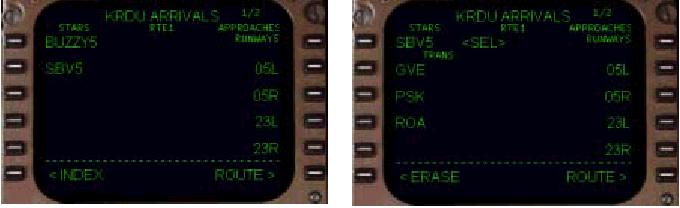
After programming is completed, the next
time you access the KRDU arrival page, the
SBV5 STAR will be listed with all of its
available transitions.
プログラミングが完了したあとは、つぎの時に
KRDU アライバルページを呼び出したら SBV5
STAR には利用可能なトランジッションが全て表示されます
Selection of the STAR (and an optional transition)
places the programmed waypoints into the
LEGS page in the proper sequence.
STAR を選択 ( そして、オプションのトランジッション
) すると、適切な順序で LEGS ページにプロうグラムしたウェイポイントが置かれます