Saving Approach Transitions
Example 2 here demonstrates how to save approach transitions.
例 2 :ここではアプローチトランジッションの保存の方法についてデモを行います
The procedure to save an approach transition is the same as saving SID and STAR transitions.
アプローチトランジッションの保存の手順は SID と STAR トランジッションの保存と同じです
The only difference is the prompt used on the SAVE ROUTE menu to designate the transition type.
ただ違いは、トランジッションタイプの指定で SAVE ROUTE メニューのプロンプトを使用することだけです
In this next example we demonstrate how to save the entire approach procedure as well as all approach transitions.
この次の例では、すべてのアプローチトランジッションと同様にアプローチプロシージャーの全体を保存する方法についてデモします
Example 2: ILS RWY 32 at KPIT (Pittsburgh, PA, USA)
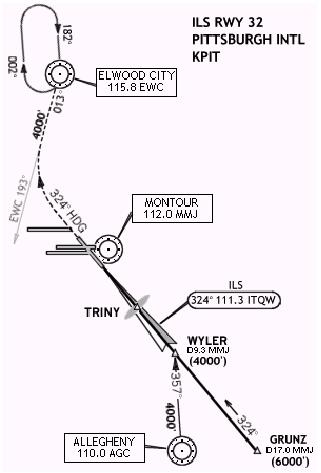
This approach procedure is a bit more complex than the previous example.
このアプローチプロシージャーは前の例よりも少しだけ入り組んでいます
The procedure has 2 waypoints as part of the main approach procedure and 2 transition fixes.
プロシージャーはメインアプローチプロシージャーの部分で 2 つのウェイポイントを持ち、2 つのトランジッションフィックスを持ちます
Standard FMC programming techniques require that the outer marker waypoint be part of the basic approach procedure plus at least the next closest waypoint.
通常の FMC プログラミングテクニックは基本のアプローチプロシージャーの一部のアウターマーカーウェイポイントを追加、少なくとも次の近いウェイポイントを要求します
The WYLER waypoint is close enough to be included in the approach procedure.
WYLER ウェイポイントはアプローチプロシージャーに含むに十分近いです
GRUNZ is more than 10 miles from the runway and therefore shall be a transition procedure.
GRUNZ は滑走路から 10 マイル以上離れており、ゆえにトランジッションプロシージャーになります
The approach plate also lists a transition from the AGC VOR to WYLER.
アプローチプレートもまた AGC VOR から WYLER へのトランジッションを表示します
This is also programmed as an approach transition.
これでアプローチトランジッションもまたプログラムされます
To begin, reposition your aircraft to KPIT.
飛行機を KPIT に置いて始めましょう
Then program the ROUTE page with a departure airport (any) and then “KPIT” as the arrival airport.
ROUTE ページで出発空港 ( どこでも ) と、到着空港に "KPIT" を入力します
Proceed to the LEGS page to begin programming this approach.
LEGS ページでこのアプローチのプログラミングを始めて、続けましょう
Start by programming the basic approach procedure.
基本のアプローチプロシージャーのプログラミングから開始します
Type “WYLER” into the scratchpad and press the 1L LSK.
スクラッチパッドに "WYLER" と入力し、1L LSK を押します
Then type “TRINY” into the scratchpad and press the 2L LSK.
スクラッチパッドに "TRINY" と入力し、2L LSK を押します
This takes care of the two approach waypoints.
これは 2 つのアプローチウェイポイントに気をつけてください
To place the runway in the LEGS listing, press the DEP ARR key and find the KPIT ARRIVAL page.
LEGS の表示に滑走路を置きます。DEP ARR キーを押して KPIT ARRIVAL ページを見つけます
Select runway 32 from the RUNWAY listing using the appropriate LSK.
適当な LSK を使用して RUNWAY 表示から滑走路 32 を選択します
Return to the LEGS page to finish programming the approach.
LEGS ページに戻りアプローチのプログラミングを終了します
The missed approach procedure is a bit more complicated than just going direct to a straight out point.
ミストアプローチプロシージャーはちょうどストレートアウトポイントにダイレクトで行くように少しだけもっと複雑です
It requires that we fly a 324° heading until intercepting a radial.
ラディアルにインターセプトするまでヘディング 324°で飛行するよう要求されます
This version of the FMC cannot handle heading assignments.
FMC のこのバージョンはヘディングアサインメントの扱いはできません
Therefore, we must improvise this portion of the missed approach.
ゆえに、このミストアプローチの部分を即席で作らなければなりません
Since the heading is basically straight out on the localizer, we can create a radial using the ILS identifier.
ヘディングは基本的にローカライザー上をストレートアウトします。そこで ILS 識別を使用したラディアルを作成することができます
The procedure calls for intercepting another radial inbound to EWC VOR.
プロシージャーは EWC VOR にインバウンドするもうひとつのラディアルをインターセプトのために呼び出します
098
Therefore, we can create a place/radial/place/radial waypoint for the FMC to follow that basically gives us the heading required by the procedure.
その結果、FMC のためにプロシージャーで基本的に与えるヘディングの要求を 場所/ラディアル/場所/ラディアル ウェイポイントで作成することができます
Type “ITQW324/EWC193” and press the 4L LSK.
"ITQW324/EWC193" と入力し 4L LSK を押します
“ITQW” is the identifier for the ILS frequency.
"ITQW" は ILS 周波数の識別です
The FMC interprets the ITQW entry to be a point at the end of the runway that it serves.
FMC は ITQW を滑走路の最終のポイントであると解釈します
Therefore, this entry results in a waypoint that is exactly 324° from the end of the runway along the EWC 193° radial.
その結果、この入力は EWC 193°ラディアルに沿って滑走路の終わりから正確に 324°のウェイポイントになります
The final point in the missed approach procedure is the EWC VOR.
ミストアプローチプロシージャーの最終のポイントは EWC VOR です
Type “EWC” into the scratchpad and press the 5L LSK.
スクラッチパッドに "EWC" と入力し、5L LSK を押します
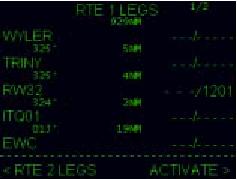
This completes the programming of the basic procedure.
これで基本のプロシージャーのプログラミングが完了です
The resulting LEGS page should look like the picture at right.
その結果の LEGS ページは右の絵のようになります
The ITQ01 waypoint is the intersection created by the two radials we entered.
ITQ01 ウェイポイントは 2 つのラディアルで作成されたインターセクションです
Notice the FMC lists a track of 325°.
FMC が 325°のトラックを表示していることに注意してください
Not bad since the procedure asks for a heading of 324°.
ヘディング 324°の要求ですので、悪くはないです
With the waypoint programming completed, finish up by programming the speed/altitude crossing restrictions.
速度/高度の通過制限のプログラミングの終了でウェイポイントのプログラミングは完了です
Put “4000” in for WYLER, and “4000” in for EWC.
WYLER に "4000" を入力し、EWC に "4000" を入力します
The TRINY waypoint has no altitude restrictions.
TRINY ウェイポイントは高度制限がありません
But you can enter a speed restriction of “170/” since this is the final waypoint prior to landing.
しかし、着陸の前の最終ウェイポイントで "170/" の速度制限を入力することができます
The first missed approach point that we created does not require a speed or altitude.
最初のミストアプローチポイントはスピードまたは高度の要求無しで作成されます
To save the procedure, first ACTIVATE and EXEC the route.
プロシージャーを保存するため、ルートを最初に ACTIVATE にし、EXEC します
Then press the MENU key followed by the 5R LSK.
MENU キーを押して、続けて 5R LSK を押します
Then press the 4L LSK to SAVE LEGS AS STAR/APP.
4L LSK を押して SAVE LEGS AS STAR/APP にします
Type “ILS32” into the scratchpad and press the 5L LSK to enter the approach name into the FILENAME data block.
スクラッチパッドに "ILS32" と入力し、5L LSK を押して FILENAME データブロックにアプローチ名を入力します
Then press the 6L LSK to save the approach to disk.
6L LSK を押してアプローチをディスクに保存します
Now that the basic approach is programmed, we can take care of the approach transitions.
プログラムされた基本のアプローチは、アプローチトランジッションに注意してとることができます
The first one to program is the GRUNZ transition point.
プログラムの最初のひとつは GRUNZ トランジッションポイントです
Press the LEGS key to return to the LEGS page.
LEGS キーを押して LEGS ページに戻ります
Type “GRUNZ” into the scratchpad and press the 1L LSK.
スクラッチパッドに "GRUNZ" と入力し、1L LSK を押します
Then delete all remaining waypoints in the LEGS page so that GRUNZ is the only waypoint listed.
LEGS ページに残ったウェイポイントの全てを削除し、GRUNZ が表示されている唯一のウェイポイントとします
Press the EXEC key to execute the changes.
EXEC キーを押して変更を実行します
Then press the MENU key followed by the 5R LSK to access the SAVE ROUTE menu.
MENU キーを押して、続けて 5R LSK を押して SAVE ROUTE メニューにします
Press NEXT PAGE to access page 2 to find the “< SAVE APP TRANS” prompt.
NEXT PAGE を押してページ 2 にし、"< SAVE APP TRANS" プロンプトを見つけます
Press the 3L LSK to display the FILENAME data block that is formatted to save the approach transition.
3L LSK を押してアプローチトランジッションの保存の時のフォーマットで FILENAME データブロックが表示されます
The format for saving approach transitions is “APPROACHNAME.TRANSITIONNAME”.
アプローチトランジッションのためのフォーマットは "APPROACHNAME.TRANSITIONNAME" です
So for this transition, type “ILS32.GRUNZ” into the scratchpad and press the 5L LSK.
このトランジッションでは、"ILS32.GRUNZ" とスクラッチパッドに入力し、5L LSK を押します
Then press the 6L LSK to save the transition to disk.
6L LSK を押して、トランジッションをディスクに保存します
As always, it is important that the approach name used to save the transition be the same as the basic approach procedure.
いつものように、重要なことは基本のアプローチプロシージャーと同じようにトランジッションの保存のためにアプローチ名が使用されます
Otherwise the FMC will not recognize the transition.
別の方法では、FMC はトランジッションを認めないでしょう
Now program the final transition procedure.
最終のトランジッションプロシージャーをプログラムします
Press the LEGS key to return to the LEGS page.
LEGS キーを押して LEGS ページに戻ります
Type “AGC” into the scratchpad and press the 1L LSK.
スクラッチパッドに "AGC" と入力し、1L LSK を押します
Delete the GRUNZ waypoint so that only AGC is listed on the LEGS page.
GRUNZ ウェイポイントを削除して、AGC のみが LEGS ページに表示されるようにします
Press the EXEC key to execute the changes.
EXEC キーを押して変更を実行します
Return to the SAVE ROUTE menu page 2 and press the “< SAVE APP TRANS” 3L LSK.
SAVE ROUTE メニューのページ 2 にもどって、"< SAVE APP TRANS" 3L LSK を押します
This time type “ILS32.AGC” for the transition name and press the 5L LSK.
このとき "ILS32.AGC" をトランジッション名として 5L LSK を押します
Then press the 6L LSK to save the transition to disk.
6L LSK を押してトランジッションをディスクに保存します
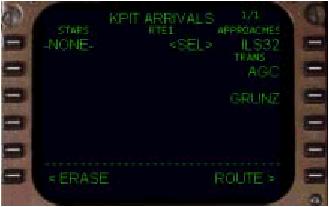
With the basic approach and transitions completed, the next time the KPIT ARRIVAL page is accessed the ILS32 approach will be listing.
基本のアプローチとトランジッションは完了し、次の時に KPIT ARRIVAL ページを表示すると ILS32 アプローチが表示されます
When selected, the approach transitions are offered as well.
選択した時、アプローチトランジッションはうまく提供されます
Selecting a transition adds the transition and all of the approach waypoints to the LEGS page in the proper sequence.
トランジッションを選択すると、トランジッションとアプローチウェイポイントの全てが適切な順序で LEGS ページに追加されます

