STAR Programming
The format for saving STARs is basically the same as for saving SIDs.
STAR の保存のためのフォーマットは基本的に SID の保存と同じです
The only difference is in the extension used for saving the basic STAR file.
ただひとつ違うのは、基本の STAR ファイルを保存する時に使うエクステンション ( 拡張子 ) です
Also, there are no *.rwy transition files to deal with.
*.rwy トランジッションファイルも扱われません
Let’s look at the files saved as a result of the SBV5 STAR programming example from earlier in this manual.
このマニュアルの近くから SBV5 STAR プログラミングの例の結果ファイルが保存されるのを見てみましょう
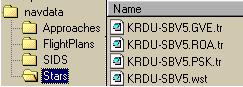
The STAR files share some common formats with the SID files.
STAR ファイルは SID ファイルと共通のフォーマットをいくつか共有しています
Notice that the nomenclature for each file starts the same way with “AIRPORT-STARNAME.”.
それぞれのファイルは同じ方法で "AIRPORT-STARNAME." からファイル名が始まることに注意してください
Also, the STAR transition files have the same “tr” extension.
STAR トランジッションファイルもまた、おなじ "tr" エクステンションを持ちます
These STAR transition files have the same format as the SID transition files and are saved the same way.
これらの STAR トランジッションファイルは SID トランジッションファイルと同じフォーマットで、同じ方法で保存されます
The only new extension here is the *.wst file.
ただひとつ、新しいエクステンションは *.wst です
This is the basic STAR file.
これは基本の STAR ファイルです
It has the same format and function as the basic SID file.
基本の SID ファイルと同じフォーマットで、同じ機能を持っています
Lets take a look at the previously explained SBV5 arrival into KRDU to demonstrate that manually creating STARs is exactly the same as with SIDs.
デモの KRDU の SBV5 アライバルで前に説明したように、マニュアルで作成した STAR は正確に SID と同じです
106
We have set up the route page with KRDU as the arrival airport.
到着空港の KRDU をルートページでセットアップします
We have also programmed all waypoints required for the SBV5 arrival and all of its transitions.
SBV5 アライバルのために要求される全てのウェイポイントとトランジッションの全てもプログラムします
The resulting LEGS page looks like the following.
その結果 LEGS ページは次のようになります
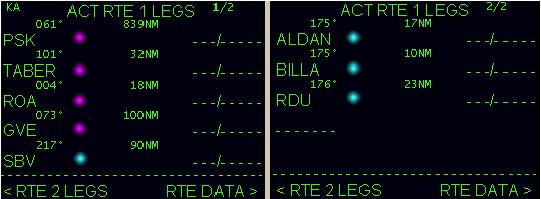
These LEGS are saved using the “SAVE LEGS AS STAR/APP” prompt on the save menu using “SBV5” as the name.
これらの LEGS は "SBV5" の名前を使って保存メニューの "SAVE LEGS AS STAR/APP" プロンプトを使って保存されます
This results in a “KRDU-SBV5.wst” file being placed in the “\STAR” folder.
この結果、"KRDU-SBV5.wst" ファイルが "\STAR" フォルダーに置かれます
That file looks like the following.
ファイルは次のようになっています
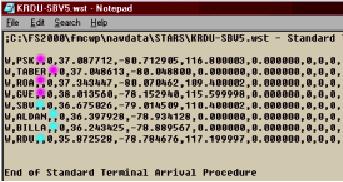
We have used colors again to denote where the waypoints came from.
もう一度ウェイポイントがどこから着たのかわかるようにカラーを使っています
The PINK points are the transition waypoints.
ピンクのポイントはトランジッションウェイポイントです
The BLUE points are the basic STAR waypoints.
青色のポイントは基本の STAR ウェイポイントです
Notice how we programmed the LEGS page logically so that all transition waypoints are grouped together for easy cutting and pasting.
全てのトランジッションウェイポイントが簡単にカットアンドペーストのために一緒にグループ化されて、論理的に LEGS ページにプログラムされていることに注意してください
Once all of the transitions have been removed and saved separately, the basic STAR is left that can be re-saved to contain only the common STAR waypoints.
いったんトランジッションの全てが別々に移され、保存されると、基本の STAR はただひとつの共通の STAR ウェイポイントを含んで再保存されます
Just as with the SID file creation, we open the “KRDU-SBV5.wst” file using Windows Notepad.
SID ファイルの作成の時と同じようにウィンドウズのノートパッドを使って "KRDU-SBV5.wst" ファイルを開きます
We also open up a second instance of Notepad that is blank.
2 つめのブランクのノートパッドも開きます
Cut, paste, and save each transition file the same way we did with the SIDs.
それぞれのトランジッションファイルを SID でやったのと同じ方法でカット、ペースト、保存を行います
The following pictures show how this is done.
これをした結果がしたの絵のようになります
107
Cut out the first transition waypoints and place them in the blank notepad.
最初のトランジッションウェイポイントを切り取り、それらをブランクノートパッドに置きます
Do not forget to COPY and paste the “End of Stan…” line as well.
同様に "End of Stan・・・" 行をコピーアンドペーストすることを忘れないで下さい
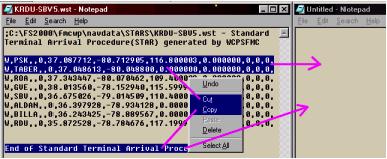
Now SAVE the new waypoints as “KRDU-SBV5.PSK.tr” in the STAR folder.
新しいウェイポイントを "KRDU-SBV5.tr" として STAR フォルダーに保存してください
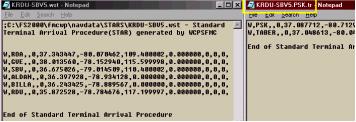
Then cut, paste, and save the remaining transition waypoints with their proper transition names.
そのあと、残ったトランジッションウェイポイントをそれらの適切なトランジッション名でカット、ペースト、保存します
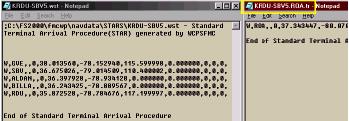
Do not forget to re-save the original *.wst file when finished removing all transition waypoints.
全てのトランジッションウェイポイントを移動し終わった時、オリジナルの *.wst ファイルを保存しなおすことを忘れないで下さい
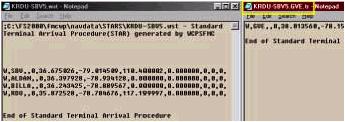
This completes the STAR file creation.
これで STAR ファイルの作成は完了です
The KRDU arrival page shall now have the SBV5 STAR listed with all available transitions.
KRDU アライバルページは全ての利用可能なトランジッションと一緒に SBV5 STAR が表示されます
As with SID transitions, there is no limit to the number of waypoints initially stored in the *.wst STAR file.
SID トランジッションと一緒で、*.wst STAR ファイルに最初に保管するウェイポイントの数の制限は有りません
One good way to quickly program all STARs at an airport is to create and save a STAR file that contains every waypoint necessary to manually program all STAR procedures.
空港の全ての STAR の手早いプログラムのひとつの良い方法は、全ての STAR プロシージャーのマニュアルでプログラムするに必要な全てのウェイポイントを含んで STAR ファイルを作成、保存することです
Then use this file as a database of waypoints for the creation of all STARs and transitions manually using the above procedure.
そのあと、このファイルを使って全ての STAR とトランジッションを上でやった手順を使ってマニュアルで作成するウェイポイントのデータベースとします

