PEDESTAL RADIOS
ペデスタル通信機
All of the radios except for the NAV1 radio are found on the pedestal.
NAV1 を除くすべての通信機はペデスタルにあります
The NAV1 radio is found on the main panel next to the autopilot panel.
NAV1 通信機はメインパネルの、次で説明するオートパイロットの所にあります
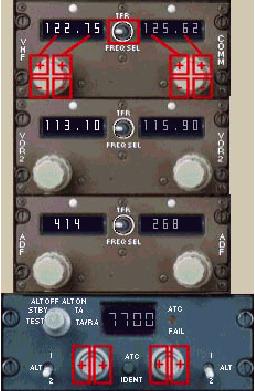
The VHF COMM radio shows how the mouse click areas are arranged for control of the radios.
VHF COMM 通信機のマウスによる操作を見ておいてください
Two frequencies can be tuned into each radio.
それぞれの通信機には2つの周波数の入力があります
However, only one will be active.
そのうちのひとつだけがアクティブになります
The active frequency is determined by moving the FREQ SEL TFR switch and is highlighted using bright white digits.
アクティブ周波数は FREQ SEL TFR スイッチによって決定され、表示されている白色の周波数が明るく表示されます
The VOR2 radio can be tuned manually or the FMC can do this automatically.
VOR2 通信機は手動にて変更することもできますし、FMC から自動に変更させることもできます
If you want to program a frequency into the active window and it changes to something else, it means that the NAV radios are under the control of the FMC.
もしアクティブウィンドウやなにか他の変更で周波数のプログラムをしたいならば NAV 通信機は FMC の制御に任せることを意味します
There is more information on this in the FMC/NAV section.
これについての詳細な説明は FMC/NAV セクションをご覧ください
Changing ADF frequencies is the same as with VHF COMM and VOR2, except that there are three separate mouse areas to control each individual digit.
ADF の周波数変更は3つのそれぞれの数字を個々にマウスでコントロールすることを除いては VHF COMM と VOR2 と同じです。
The Transponder code is adjusted upwards using the “+” mouse areas.
トランスポンダーコードは "+" で描かれているところをマウスで押して合わせます
When the frequency reaches “7” it will roll over to “0”.
トランスポンダーで使用される数字は 0〜7 までです
NAV1 RADIO
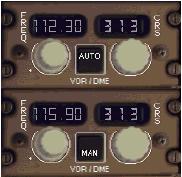
The NAV1 radio is found on the main panel next to the autopilot panel.
NAV1 通信機はメインパネルの次で説明するオートパイロットパネルのところにあります
Mouse click control of the frequency is exactly the same as for the pedestal radios.
ペデスタル通信機と同様にマウスクリックで周波数をコントロールします
Control of the course (CRS) is via simple +/- mouse click boxes located over the knob.
コース設定 ( CRS ) はとてもシンプルでマウスでノブをクリックして +/- します
There is no option to have a standby NAV1 frequency.
スタンバイ周波数は NAV1 には有りません
The operation of this radio is completely different from anything seen on other panels.
この通信機の操作は他のパネルの操作とは違っています
There are two modes of operation for the NAV1 radio:AUTOMATIC and MANUAL mode.
NAV1 通信機には自動と手動の2つの操作モードがあります
The button above the VOR/DME text is used to select the operating mode.
VOR/DME と表示されている上のボタンで操作モードを切り替えます
In the MAN mode, the frequency is selectable by the pilot just as in a normal VOR radio.
手動モードでは周波数はパイロットが標準 VOR 通信機として周波数を選択できます
In the AUTO mode the FMC now has control over the tuning of NAV1.
自動モードでは FMC が NAV1 のチューニングを行います
The frequency dialed in by the pilot while in MAN mode is saved and can be recalled by switching back to MAN mode.
手動モードにおいてパイロットは周波数ダイアルを操作して保存したり手動モードにすることにより呼び出したりできます
The importance of this will be explained in the FMC/NAV section.
これについての重要性は FMC/NAV セクションで説明しています

