FMC DESCRIPTION
The Flight Management Computer ( FMC) is the brain behind navigating the 767 from point A to point B with accuracy.
フライト・マネージメント・コンピューター ( FMC ) は A 地点から B 地点まで正確に航行するための頭脳です
This quick review is meant to get pilots up and running with the FMC without a long and detailed review of every aspect of its operation.
このクイックレビューでは、パイロットが FMC の操作のあらゆる面を 長い時間をかけて詳細にレビューしなくても FMC を扱うことができるようにしています
Those familiar with the operation of a real FMC can skip this section since the FMC found in this panel has almost all of the same capabilities and functions as the FMC in the actual aircraft.
このパネルの中のFMCは 実機のFMCと ほとんど 同じ能力と機能を持っているので、本当のFMCの操作に精通している人は この節は スキップしてもよろしいです
FMC PILOT INTERFACE
The pilot controls the FMC via a keyboard that is called up using a mouse button on the main panel labelled “FMC” or with the key <shift><5>combination.
パイロットは FMC をキーボードによって操作することもでき、メインパネルの FMC と書かれたボタンをマウスでクリックするかキーボードで Shift + 5 を押すことで呼び出すことができます
The keyboard is conveniently located and sized so that it fits on top of the engine gauges and can be used in flight without interfering with the operation of the autopilot or the viewing of the main flight instruments.
キーボードは都合の良いことにエンジンゲージの上にフィットして配置されており、オートパイロットやメインの航法計器の操作の妨げになることは有りません
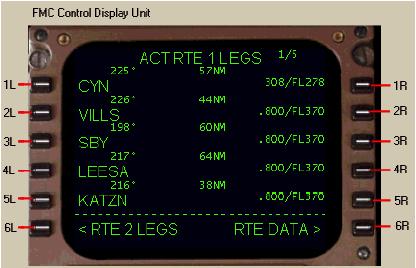
The keyboard has a display called the Control Display Unit (or CDU).
キーボードはコントロールディスプレイユニット ( CDU ) と呼ばれています
The CDU has a series of 6 buttons on each side of the display called “line select keys” (or LSK) for the selection of data on the screen.
CDU はスクリーン上のデータを選択するために使用される 6 つのボタンが両サイドに並んで配置されており、ラインセレクトキー ( LSK ) と呼ばれています
Each button is identified based on location with 1R being the top right button and 6R being the lower right button.
それぞれのボタンは 1R が右側の一番上で、右側の一番下が 6R というように識別されます
The same for the left side with 1L being the top left and 6L being the bottom left.
左側も右側と同じで一番上が 1L で一番下が 6L となります
The bottom row of data on the CDU is called the “scratchpad”.
CDU のデータ表示の一番下の表示行はスクラッチパッドと呼ばれます
The scratchpad is normally blank and is used for the display/input of data.
スクラッチパッドは普通はブランクで、データの表示/入力に使用します
If the FMC generates a message, it is shown in the scratchpad.
FMC がメッセージを発生させた場合は、スクラッチパッドに表示されます
During some operations there are action prompts visible in the scratchpad that can be selected by pressing the adjacent LSK.
いくつかの操作ではスクラッチパッドにアクションプロンプトが現れ、LSK と直接接続され選択・操作ができます
When the pilot presses an LSK the data abeam the LSK is transferred to the scratchpad.
パイロットが LSK を押した時は LSK の真横のデータがスクラッチパッドに送られます
Then the data from the scratchpad can be transferred to any line in the CDU by pressing the corresponding LSK.
それから、スクラッチパッドからのデータは CDU の対応した LSK を押すことによってそれぞれのラインに送ることができます
Data can also be input using the keyboard and then transferred to any line in the CDU by pressing the corresponding LSK.
データはキーボードを使用して入力することも、CDU の対応した LSK を押すことによりそれぞれのラインに送ることもできます