024
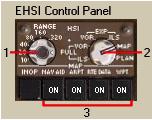
1- EHSI Range Control: When the EHSI is in the MAP mode this knob
controls the range that is displayed in the
EHSI.
EHSI レンジのコントロール:EHSI がマップモードの時、このノブは
EHSI 表示のレンジコントロールになります
Rotating the knob selects the following range
scales: 10, 20, 40, 80, 160 and 320 miles.
ノブを回してレンジスケールを 10, 20, 40,
80, 160, 320 マイルの中から選択します
The grey track line shows the intermediate
mileage for each scale.
グレイのトラックラインはそれぞれの目盛りの中間マイルです
For example, if you are in the 40-mile range
there will be a 20-mile marker on the grey
track scale.
たとえば、もし 40 マイルレンジでは 20 マイルマーカーがグレイトラック目盛りです
2- EHSI Display Control: Controls what is displayed on the EHSI.
EHSI 表示コントロール:EHSI に何を表示させるかをコントロールします
The modes are as follows:
以下のモードがあります
|
PLAN |
- |
Shows a North oriented map of the current
FMC route.
現在の FMC ルートが北向きのマップ表示
In this mode you can <STEP> through
each waypoint on the FMC LEGS page to verify
the integrity of the programmed route.
このモードでは各ウェイポイントの間をプログラムされたルートで正確に確かめられ FMC LEGS ページで
<STEP> 移動できます
This is useful when flight planning or making
route modifications beyond the 320-mile EHSI
range.
これは EHSI の 320 マイルレンジを超えてフライトのプランを立てたりルートを修正したりする時に使うと便利です
|
|
MAP |
- |
Described in detail below, this displays
the current aircraft track and FMC programmed
route.
下の方で詳細が説明されていますが、この表示は現在の飛行機のトラックと
FMC でプログラムされているルートです
It also displays other data based on the
MAP buttons described in #3 below.
マップボタンで表示されるその他の情報表示などについては下の
3. に記述されています
|
|
EXP VOR and ILS |
- |
These modes display an H.S.I. ARC compass
that is heading oriented (unlike the track
oriented MAP mode).
これらのモードは自機のヘディングを元にした
H.S.I ARC コンパスを表示します ( トラックを元にしたマップモードとは違います )
The ARC compass only shows 70 degrees worth
of the compass in a large arc across the
top of the display.
ARC コンパスは表示の上から大きな円周で 70
度の範囲が表示されます
Also displayed is an ILS or VOR course deviation
needle (CDI).
ILS または VOR コース偏差指針も表示されます
( CDI )
The only time the CDI will be active is when
a valid VOR or ILS is tuned in.
CDI は VOR または ILS がチューニングされアクティブになっているときのみ表示されます
If an ILS is tuned in it only displays in
the ILS mode.
もし ISL がチューニングされており ILS モードになっていたら表示されます
If a VOR is tuned in it only displays in
the VOR mode.
もし VOR がチューニングされており VOR
モードになっていたら表示されます
|
|
FULL VOR and ILS |
- |
These modes display an H.S.I. ROSE compass
that is heading oriented (unlike the track
oriented MAP mode).
これらのモードは自機のヘディングを元にした
H.S.I. ROSE コンパスを表示します ( トラックを元にしたマップモードとは違います )
It is the same as the EXP mode except the
entire compass is displayed.
全体のコンパスが表示されていることを除いて
EXP モードと同じ機能です
|
3- MAP Display Buttons: These buttons are used to control the display
of extra data on the EHSI MAP.
マップ表示ボタン:これらのボタンは EHSI マップ上に追加のデータ表示をコントロールするために使います
025
|
NAV AID |
- |
Toggle on/off the display of VORs.
VOR の表示 ON/OFF 切替
When in the 80-mile mode and above only high
altitude capable VORs are displayed.
80 マイルモードで、 VOR が表示できる高度の時に表示されます
Note that this button does not affect the
green auto-tuned VOR symbols.
このボタンはグリーンの VOR シンボルの自動旋回に影響しないことに注意してください
|
|
ARPT |
- |
Toggle on/off the display of airports.
飛行場の表示の ON/OFF 切替
Only larger airports with runways of 4,500
feet and above are displayed.
4,500 フィート以上の滑走路のある大きな飛行場のみ表示されます
|
|
RTE DATA |
- |
Toggle on/off the display of waypoint crossing
times and altitudes.
ウェイポイントの通過時間と通過高度の表示の
ON/OFF 切替
This data is also found in the FMC on the
LEGS RTE DATA page.
このデータは FMC の LEGS RTE DATA ページでも表示されます
|
|
WPT |
- |
Toggle on/off the display of waypoints.
ウェイポイントの表示の ON/OFF 切替
Waypoints are only displayed on the 40-mile
mode and below.
ウェイポイントは 40 マイルモード以下の時に表示されます
If the scale is selected higher than the
40-mile mode the waypoints are not displayed
regardless of switch position.
もしスケールが 40 マイルモード以上が選択されている場合はスイッチの位置に関係無く表示されません
|
|
 |
 |