037
IRS CONTROLS AND INDICATIONS
IRS コントロールと表示について
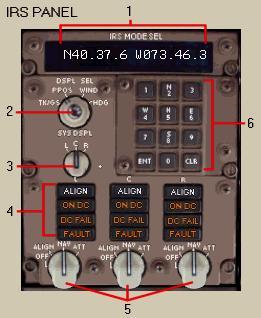
1- IRS Data Window: It displays IRS data based on the DSPL SEL
switch position.
IRS データウィンドウ:DSPL SEL スイッチポジションを基本として
IRS データが表示されます
In this picture you see present lat./long.
co-ordinates of the C IRU (see 2 and 3 below
for why).
この図は現在の C IRU ( 2 と 3 の下 ) 緯度/経度コーディネートを表示しています
2- Display Select Knob: It controls the display of data in the IRS
Data Window.
表示選択ノブ:IRS データウィンドウのデータの表示をコントロールします
|
TK/GS |
- |
Ground TRACK and ground speed for the selected
IRU.
選択された IRU の地上進路と対地速度
|
|
PPOS |
- |
Latitude/longitude position for the selected
IRU.
選択された IRU の緯度/経度ポジション
|
|
WIND |
- |
Wind direction/speed calculated by the selected
IRU.
選択された IRU で計算された風向/風速
|
|
HDG |
- |
True heading for the selected IRU.
選択された IRU の真ヘディング
|
3- System Display Knob: It controls which IRU’s data is displayed
in the IRS Data Window.
システムディスプレイノブ:IRU データウィンドウに表示する
IRU タを選択します
In the picture the Center IRU is selected
and the current PPOS for the C IRU is displayed.
この図では中央の IRU が選ばれていて、現在の
C IRU の PPOS が表示されています
038
4- IRS Mode Annunciators: If the IRU is in NAV mode (fully aligned)
or OFF these annunciators should be blank.
IRS モード呼び出し器:もし IRU が NAV モード
( フルアライン ) または OFF の場合はこれらの呼び出し器は消えています
They illuminate for the following:
それらについては以下で述べています
|
ALIGN |
- |
Comes on steady when IRU selector is in ALIGN
or NAV position during the alignment
period.
IRU セレクターが ALIGN または NAV ポジションでアライメント処理中の場合に安定するまで表示されます
|
|
|
- |
It comes on flashing for one of the following:
以下のように一度だけフラッシュします
Aircraft was moved during alignment, IRS
co-ordinates are significantly different
from previous aircraft position, or no co-ordinates
were entered during the alignment period.
飛行機は IRS コーディネートでは前の飛行機のポジションから違うところにアライメントの間うごきます、またはコーディネートしないことはアライメント処理中に起こります
In this case the pilot must re-initiate the
alignment process.
このケースではパイロットはアライメントプロセスをもう一度はじめなければなりません
|
|
ON DC |
- |
It comes on if the IRU is operating on only
the DC power source.
もし IRU が DC パワーだけが供給されている場合に表示されます
Alignment is not possible when this light
is illuminated.
アライメントはこのランプがついている間は機能しません
|
|
DC FAIL |
- |
The backup DC power source for the IRU has
failed.
IRU のバックアップ DC パワーソースが故障した時に表示されます
IRU will continue to operate normally with
AC power.
IRU は普通 AC パワーを供給されて操作を続けます
|
|
FAULT |
- |
There is a fault in the IRU and it is totally
inoperative.
IRU の異常があるため全体の操作ができません
|
5- IRS Mode Selector Knobs: It selects the mode of operation for the
individual IRUs.
IRS モードセレクターノブ:個々の IRUs の操作モードを選択します
|
OFF |
- |
It removes power from the IRU (alignment
is lost).
IRU からパワーをきります ( アライメントは消えます
)
|
|
|
- |
The ALIGN light illuminates for 30 seconds
during shut down of IRU.
IRU の電源を切ってから 30 秒間 ALIGN ライトが点灯します
|
|
ALIGN |
- |
From the NAV mode you can update the lat./long.
co-ordinates of the IRU by placing
the switch
in this mode, entering the new co-ordinates
and then placing the switch back to
NAV.
ALIGN - NAV モードからこのモードに切り替えて
IRU の緯度/経度コーディネートをアップデートすることができます。NAV
に切り替えてから新しいコーディネートを入力し、このモードにすることによって
|
|
|
- |
This is called a “quick align” and takes
30 seconds.
これは "quick align" と呼ばれ
30
秒で終了します
|
|
|
- |
It only works on the ground with the aircraft
stopped.
地上で飛行機が停止している時のみ働きます
|
|
NAV |
- |
It initiates full alignment and puts IRU
into navigation mode.
IRU をナビゲーションモードにしてフルアライメントをはじめます
|
|
|
- |
Moving the selector from OFF to NAV allows
entry of lat./long. co-ordinates in
the IRS
keypad or the FMC POS INIT page.
緯度/経度コーディネートを IRS キーパッドかまたは
FMC POS INIT ページで入力し OFF から
NAV
へセレクターを動かします
|
|
|
- |
Full alignment takes 2 minutes (in the sim).
フルアライメントは 2 分かかります ( シム内で
)
|
|
ATT |
- |
IRU alignment is lost and put into the “attitude”
mode.
IRU アライメントは失われ、"attitude"
モードになります
|
|
|
- |
Attitude information is displayed on the
EADI.
姿勢情報は EADI に表示されます
|
|
|
- |
Magnetic heading information is available
after entering current magnetic heading
using
the IRS keypad.
磁方位ヘディング情報は現在の磁方位ヘディングを
IRS キーパッドで入力した後利用できるようになります
|
039
6- IRS Keypad: It is used to enter lat./long. or heading
information into the IRS.
IRS キーパッド:緯度/経度またはヘディング情報を
IRS に入力するために使用します
It is only active during alignment (ALIGN
light on) or ATT mode.
アライメント中 ( ALIGH ライトが点灯中 ) または
ATT モードの時にアクティブになります
Pressing keys labelled N, S, E, or W initiate
lat./long. entries.
N, S, E, W キーを押すと緯度/経度の入力がはじめられます
Pressing the H key initiates magnetic heading
entries.
H キーを押すと磁方位ヘディングの入力がはじめられます

