050
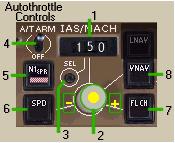
1- Airspeed Window:
対気速度ウィンドウ
It displays the current AFDS target airspeed
or mach.
現在の AFDS ターゲット対気速度またはマッハ速度が表示されます
The selected speed is also displayed on the
airspeed gauge with an amber reference bug.
選択されているスピードは対気速度計にもアンバー色の参照バグで表示されています
The airspeed window is “blanked out” when
VNAV is selected since speed is then controlled
by the FMC.
対気速度ウィンドウは VNAV が選択されていてスピードが
FMC によりコントロールされている時は表示されません
When the airplane is powered up, a speed
of 200 is displayed.
飛行機がパワーアップした時、スピードは 200
と表示されます
2- Airspeed Select Knob:
対気速度セレクトノブ
|
- |
Using the mouse clicks on either side of
the knob you can control the exact airspeed
or mach in the airspeed window.
正確な対気速度またはマッハ速度を対気速度ウィンドウに入れるためにノブの両端をマウスでクリックして使います
|
|
- |
Speed Intervention: When using VNAV the window
is normally blanked because speed is controlled
via the FMC.
スピードの介入:VNAV を使っている時ウィンドウは通常消えています。なぜならスピードは
FMC を介してコントロールされているからです
However, if you press the airspeed select
knob (yellow dot) the airspeed window opens
up and displays the current airspeed.
しかしながら、もし対気速度セレクトノブを押せば
( 黄色のドット ) 対気速度のウィンドウを開いて現在の対気速度を表示させることができます
With the window open you have control of
the airspeed via the window instead of the
FMC.
ウィンドウが開くのといっしょに FMC の代わりに対気速度をウィンドウから入力しコントロールすることができます
Pressing the airspeed knob a second time
closes the window and speed control is transferred
back to the FMC.
対気速度のノブを 2 回目押すとウィンドウは閉じ、スピードコントロールは
FMC に再び戻ります
|
|
- |
Speed intervention is used most often for
temporary speed restrictions.
スピードの介入はとてもしばしばスピードを制限するために使われます
|
3- IAS/MACH Select:
IAS/MACH セレクト
Preessing this button alternates the airspeed
display between Indicated Airspeed and Mach
speed.
このボタンを押すと速度表示が IAS と MACH
スピードに切り替わります
The AFDS uses whatever speed is displayed
in this window as a target.
AFDS が使用するスピードはこのウィンドウの表示をターゲットとします
If a Mach speed is selected, the airspeed
gauge amber bug displays the corresponding
indicated airspeed.
もしマッハスピードが選択されていたら、対気速度計のアンバー色のバグは相当する
IAS が表示されます
4- Autothrottle Arm Switch:
オートスロットルアームスイッチ
|
OFF |
- |
Autothrottle is off. The throttle is pilot
controlled.
オートスロットルは OFF になります。スロットルはパイロットがコントロールします
|
|
|
- |
t disengages autothrottle, if engaged.
もしエンゲージしたらオートスロットルはエンゲージが切れます
|
|
A/T ARM |
- |
The autothrottle is armed to engage with
the selection of a speed mode.
オートスロットルはスピードモードの選択といっしょにアームドにされます
A/T is displayed in the EADI.
EADI に A/T と表示されます
|
Note: The autothrottle cannot be used during single
engine operations.
オートスロットルはシングルエンジンの操作には使うことができません
Even if the switch is in the arm position,
the autothrottle will not engage.
たとえスイッチがアームポジションになっていてもオートスロットルはエンゲージされません
051
5- N1 Mode:
N1 モード
|
- |
When pressed, it engages the autothrottle
in N1 mode.
これを押したときオートスロットルは N1 モードにエンゲージします
The maximum N1 power setting based on current
TRP mode is commanded by the autothrottle.
N1 の最大パワーが現在の TRP モードを元に設定され、オートスロットルにより命令されます
|
|
- |
It is normally used during the takeoff roll
to engage the autothrottle to provide takeoff
power.
通常は離陸の間にエンゲージされオートスロットルは離陸パワーを供給します
It is also used automatically by VNAV for
climb.
上昇のための VNAV によっても自動で使用されます
|
|
- |
N1 is annunciated on the EADI.
N1 は EADI に告知されます
|
6- Speed Mode:
スピードモード
|
- |
When pressed, it engages the autothrottle
in the speed mode.
これを押したときオートスロットルはスピードモードにエンゲージします
The autothrottle sets power to maintain the
airspeed set in the airspeed window.
オートスロットルは対気速度ウィンドウにセットされた対気速度を維持するようにパワーをセットします
|
|
- |
It is normally engaged automatically by the
selection of a pitch mode (such as VERT SPD
or FL CH) or altitude hold mode (ALT HOLD).
通常はピッチモード ( VERT SPD または FL CH
のどちらか ) または高度維持モード ( ALT HOLD
) の選択により自動でエンゲージされます
|
|
- |
SPD is annunciated on the EADI.
SPD は EADI 上に告知されます
|
7- Flight Level Change Mode (FL CH):
フライトレベル変更モード ( FL CH ):
|
- |
It engages the plane in an airspeed-dependant
climb or descent.
飛行機が上昇まはた降下中 airspeed-dependant
します
|
|
- |
It engages the autothrottle in a FL CH mode
that controls power automatically to make
the aircraft climb or descend as required.
FL CH モードでオートスロットルがエンゲージすると、要求された上昇または降下を行うため自動でパワーをコントロールします
|
|
- |
It automatically selects Speed (SPD) as the
vertical mode since pitch is now dependent
on the selected airspeed.
垂直モードでスピード ( SPD ) の自動設定により対気速度が選択される毎にピッチが変化します
|
|
- |
Resets the airspeed window to the current
indicated airspeed.
対気速度ウィンドウをリセットすると現在の対気速度が表示されます
|
|
- |
If a climb is required the TMC is automatically
set to a climb mode (CLB, CLB1 or CLB2 depending
on TRP settings).
もし上昇が TMC に要求されたら自動的に上昇モードにセットされます
( TRP により CLB、CLB1 または CLB2 にセットされる
)
|
|
- |
This mode will fly the airplane to the altitude
set in the ALT window.
このモードは ALT ウィンドウに設定した高度で飛行機を飛ばします
If a climb is required, it gives you climb
power and pitch to maintain the selected
airspeed.
もし、上昇が要求されたら、選択した対気速度を維持するために上昇パワーとピッチが与えられます
If a descent is required it gives you IDLE
thrust and pitch to maintain selected airspeed.
もし、降下が要求されたらスラストは IDLE にされ、ピッチは選択した対気速度を維持するために与えられます
|
|
- |
In a FL CH descent the autothrottle changes
to throttle hold mode (THR HLD) which allows
the pilot to alter the vertical speed of
the descent by adding or removing power.
FL CH モードで降下中、オートスロットルはスロットルホールドモード
( THR HLD ) に変更されます パイロットがパワーの下限をして降下の昇降速度にしたがって
The autothrottle re-engages in the SPD mode
during altitude capture.
オートスロットルは高度をキャプチャーする間、SPD
モードに再エンゲージされます
|
|
- |
FL CH and SPD are annunciated on the EADI.
FL CH と SPD は EADI に告知されます
|
8- Vertical Navigation Mode (VNAV):
垂直ナビゲーションモード ( VNAV )
|
- |
When pressed, it transfers control of the
autothrottle to the FMC.
これを押したとき、オートスロットルのコントロールは
FMC に移ります
|
|
- |
Autothrottle modes are selected automatically
during VNAV engagement.
オートスロットルモードは VNAV エンゲージメントに自動的に選択されます
|
|
- |
The airspeed window blanks out and airspeed
control is via the FMC.
対気速度ウィンドウは消され、FMC により対気速度がコントロールされます
|
|
- |
VNAV is annunciated on the EADI.
VNAV は EADI に告知されます
|
Note: VNAV is explained in depth in the FMC/NAV
section.
VNAV は FMC/NAV セクションでもっと深く説明されています

