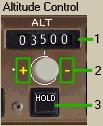
1- Altitude Window:
高度ウィンドウ
055
1- Altitude Window:
高度ウィンドウ
| - | It displays current AFDS target level off
altitude. 現在の AFDS のターゲットレベルオフ高度が表示されます |
|
| - | When in a vertical mode, the AFDS automatically
levels off at the displayed altitude and
enters altitude hold mode. 垂直モードの時 AFDS は表示されている高度に自動的にレベルオフし、高度保持モードになります |
|
| - | When the airplane is powered up, an altitude
of 10,000 is displayed. 飛行機がパワーをあげた時、10,000 フィートの高度が表示されます |
2- Altitude Select Knob:
高度選択ノブ
| - | Press the click areas to change the altitude
in the ALT window. クリックエリアを押すと ALT ウィンドウの高度が変更されます |
|
| - | Changes altitude are in 100-foot increments. 高度は 100 フィートづつ増加して変更されます |
3- Altitude Hold Mode (ALT HOLD):
高度ホールドモード ( ALT HOLD )
| - | When pressed, it commands the AFDS to level
off at the current aircraft altitude. これを押すと AFDS は現在の飛行機の高度でレベルオフするよう命令を出します |
|
| - | The light bar in the HOLD button lights up
automatically any time the AFDS enters ALT
HOLD mode. HOLD ボタンのライトバーは AFDS が ALT HOLD モードになるといつも自動的に点灯します |
|
| - | When climbing or descending to the altitude
in the ALT window, it is not necessary to
press the HOLD button. ALT ウィンドウに設定された高度に上昇または降下したとき HOLD ボタンは押す必要はありません The AFDS will level off and enter ALT HOLD automatically. AFDS はレベルオフして ALT HOLD に自動的にはいります |
Note: VNAV operation causes the ALT HOLD mode to
function differently.
VNAV 操作は違う機能の ALT HOLD モードです
See the FMC/NAV section for more information.
FMC/NAV セクションに詳しい説明があります
 |
 |