FOR FLIGHT SIMULATOR USE ONLY. NOT FOR USE
IN REAL AVIATION. Level-D Simulations 767-300...........Page
38
ENGINES and ENGINE INDICATING (EICAS)
| <<TOPページ | <Level-D 767 メニュー | <マニュアル目次 | <前のページ | >次のページへ |
ENGINES and ENGINE INDICATING (EICAS)
エンジンとエンジンの状態表示器(EICAS)
The 767-300 is powered by two General Electric
CF6-80C2 engines rated at 61,500 pounds of
thrust per engine.
767-300は、1基あたり61,550ポンドの推力を持つGeneral
Electric CF6-80C2を2基搭載しています。
Engine controls include the throttles, fuel
cut-off switches, EEC switches, fire handles,
and the Thrust Rating Panel (TRP).
エンジンのコントロールには、スロットル、燃料カットオフスイッチ、EECスイッチ、消火ハンドル、スラスト定格パネルがあります。
An autothrottle system is available and can
provide automatic power control for all phases
of flight.
オートスロットルシステムはすべてのフライトのすべての局面で利用可能で、必要なパワーを自動的に制御することができます。
The FMC contains performance information
for the engines and co-ordinates with the
autothrottle and TRP to control engine power
for de-rated takeoffs as well as VNAV climb,
cruise and descent.
FMCはエンジン作動に関する情報を含み、定格外離陸、VNAV上昇、巡航飛行、降下に対するエンジンパワーをオートスロットルおよびTRPとともにコントロールします。
Engine Controls
エンジンコントロール
Primary control of engine power is by the
throttles located on the center pedestal
(called up by pressing PDST on the main panel).
エンジンパワーの基本的なコントロールは、中央ペデスタルに配置されたスロットルにより行います。(ペデスタル画面はメインパネルのPDSTボタンを押して呼び出します)
The throttles can be controlled manually
by the pilot or automatically through the
use of the autothrottles.
スロットルはパイロットがマニュアルで操作することもできるし、オートスロットルによって自動的に操作することもできます。
When the autothrottle is in use, the pilot
can still override them by moving the throttles
manually.
オートスロットル使用中でも、パイロットはスロットルを手動で操作することによりオートスロットルを無効にすることができます。
However, the power setting previously commanded
by the autothrottle is always restored when
released.
しかし、オートスロットルにより以前指定されたパワー設定はオートスロットルをリリースすればいつでももとにもどります。
One exception to this is the throttle hold
mode.
このケースには一つ例外があります。それは、スロットルホールドモードです。
Annunciation of "THR HLD" on the
EADI indicates that the autothrottle is temporarily
disconnected from the power levers.
EADIに“THR HLD”の表示が出た場合、オートスロットルがパワーレバーから一時的に切り離されていることを示しています。
This gives the pilot complete control over
power settings.
このとき、パイロットはパワー設定に関係なく完全なコントロールが可能となります。
The use and operation of the autothrottle
is described in more detail in the AFDS section.
オートスロットルの使用と操作については、AFDSの項でさらに詳しく説明します。
Engine Electronic Control (EEC)
エンジン電子コントロール(EEC)
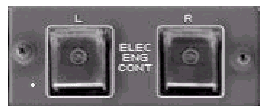
The EEC switches on the overhead control
the electronic engine control system.
頭上パネルにあるEECスイッチは、エンジン電子制御システムをコントロールします。
The EEC acts to limit power settings to prevent
damage to the engines.
EECはエンジンの損傷を防ぐためにエンジンパワーの限界を超えないように作動します。
When the system is ON, pushing the throttles
to the limit results in the maximum power
setting available without causing damage
to the engines.
システムがONのとき、スロットルを限界まで押すとエンジンに損傷を生じない最大出力 が発生します。
This power setting is indicated on the engine
display with an amber line.
このパワー設定はエンジンディスプレイに黄色のラインで表示されます。
With the EEC turned OFF, the power setting
can be set beyond this limit and engine damage
may occur.
EECを切ると、パワー設定はこの限界を超えて設定できますが、エンジンが損傷する可能性があります。
Engine Indicating and Crew Alert System (EICAS)
エンジン計器の表示とクルー警告システム(EICAS)
The two center CRT's on the main panel are
referred to as EICAS screens.
メインパネルの中央にある2つのCRTは、EICASスクリーンとして参照されます。
These screens display all engine data as
well as messages generated by the Crew Alert
System (CAS).
これらのスクリーンディスプレイはすべてのエンジンに関するデータとクルー警告システム(CAS)からのメッセージを表示します。
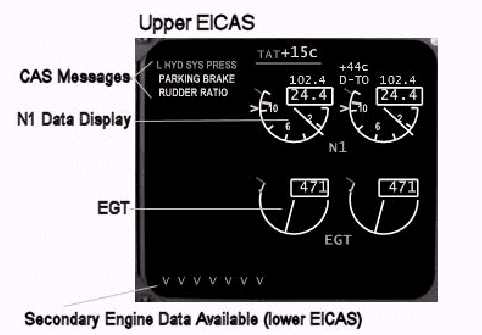
The upper EICAS CRT displays CAS messages
along with N1 and EGT engine data.
上部のEICAS CRTは、エンジンデータN1とEGT(排気ガス温度)の脇に、CASメッセージをを表示します。
This screen is displayed continuously when
then Left Main AC Bus is powered.
このスクリーンは左メインACバスに電力が供給されているときに表示され続けます。
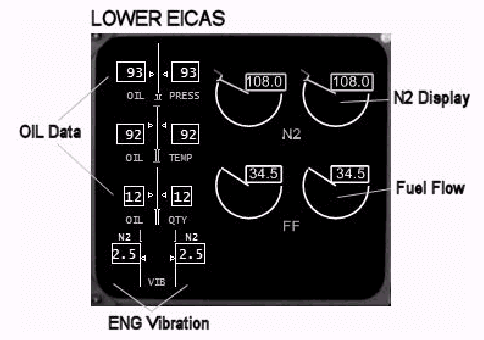
The lower EICAS screen displays secondary
engine data as well as information about
other systems (contained on a separate STATUS
page).
下側のEICASスクリーンは、他のシステムに関する情報(別のSTATUSページに入っているシステム情報)だけでなく2番目のエンジンデータを表示します。
The lower screen is displayed continuously
when the Right Main AC bus is powered.
下側のスクリーンは、右メインACバスに電力が供給されているとき、表示し続けます。
Both screens can be dimmed individually by
using the knobs below the lower EICAS screen.
両方のスクリーンとも、EICASスクリーンの下にあるノブを使って別々に画面の輝度を調整できます。
The STATUS page is available on the lower
EICAS by pressing the STATUS button located
below the EICAS screens.
STATUSページは、下部EICASスクリーンの下にあるSTATUSボタンを押すと有効になります。
The secondary engine data display can be
restored by pressing the ENGINE button located
next to the STATUS button.
2番目のエンジンデータの表示に切り替えるには、STATUSボタンの隣にあるENFGINEボタンを押します。
The lower EICAS screen can be toggled OFF
by reselecting the ENGINE or STATUS button
while the respective screen is displayed.
このように、下部EICASスクリーンは、ENFGINEまたはSTATUスクリーンが表示されているときに、隠れている画面のボタンを再選択することでトグルで切り替えることができます。
Engine indications on the EICAS screen will
change color to indicate parameters that
are in a caution range or exceeding a limit.
EICASのエンジン表示は、警告レベルや制限超過の状態に応じて表示の色が変わります。
Yellow indicates the caution range and red
indicates the limit range.
黄色は警告レベルで、赤は制限レベルを示します。
This convention applies to engine data on
both EICAS screens.
この色彩変化の方式は、両方のEICASスクリーンとも同じです。
Additionally, the N2 gauge on the lower EICAS
displays a magenta index line during engine
start.
さらに、下側のEICASのN2ゲージにはマゼンダ色のインデックスラインが表示されます。
This index line represents the minimum N2
for placing the fuel control switch to RUN.
このインデックスラインは、燃料コントロールスイッチをRUNにするときの最小N2を表します。
Placing the fuel control switch to RUN at
an N2 below the index line may cause start
problems.
N2がこのインデックスラインを超える前に燃料コントロールスイッチをRUNにするのはトラブルのもとと言えます。
Standby Engine Display
予備エンジンディスプレイ
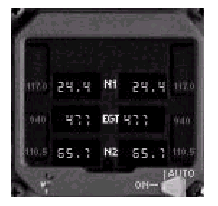
If both EICAS screens fail, important engine
data is still available on the standby engine
gauge.
もし両方のEICASスクリーンが故障しても、重要なエンジンデータは予備エンジンゲージで参照できます。
Located to the left of the EICAS screens,
this gauge displays N1, EGT and N2 data for
each engine.
このゲージはEICASスクリーンの左側にあって、両方のエンジンのN1,EGT,N2データを表示します。
A two-position switch controls the display
of engine data.
AUTOとRUNの2つのポジションを持つスイッチでこの表示をコントロールします。
In the AUTO position the display is blank
when both EICAS screens are operating.
AUTOポジションにすると、EICASスクリーンが有効に機能しているときはブランクになっていますが、
If both EICAS screens fail, engine data is
automatically displayed.
両方のスクリーンに不具合が生じたときは、このゲージに自動的にデータが表示されます。
In the ON position engine data is displayed
at all times.
ONポジションにするとエンジンデータが常に表示されます。
Engine Fuel Control
エンジン燃料コントロール
Fuel control switches located on the throttle
quadrant provide control over two fuel valves
per engine: the Engine Valve and the Spar
Valve.
スロットルクァドラントにある燃料コントロールスイッチは、それぞれのエンジンについている2つのバルブ(エンジンバルブとスパーバルブ)をコントロールします。
The Engine Valve is located in the engine
nacelle.
エンジンバルブは、ナセル(エンジンカバー内)にあります。
The Spar Valve is located in the wing closer
to the fuel tanks.
スパーバルブは、燃料タンク近くの主翼(多分リブ:sparの近く?)の中にあります。
Both valves must open to permit the flow
of fuel to the respective engine.
それぞれのエンジンに燃料を送るためには、この2つのバルブを「開」としなければなりません。
Engine Start Panel
エンジンスタートパネル
The overhead Start Panel provides controls
for engine starting and engine ignition.
頭上にあるスタートパネルは、エンジンのスタート、停止をコントロールします。
Each engine has a start valve and two igniters.
それぞれのエンジンには、スタートバルブと2つの点火装置があります。
The start switch controls the opening and
closing of the respective start valve.
スタートスイッチはそれぞれエンジンのスタートバルブの開閉をコントロールします。
The igniter switch selects which of the two
igniters will be used for the start in either
engine.
点火スイッチは2つの点火装置のうち、どちらの装置を使用するかを選択するのに使います。
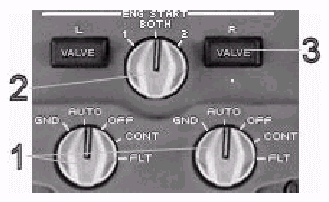
The Start switch is a multi-position switch
with GND, AUTO, OFF, FLT and CONT positions.
スタートスイッチには、GND, AUTO, OFF, FLT,CONTの4つのポジションがあります。
Normally this switch is left in the AUTO
position.
通常このスイッチはAUTOポジションのままとなっています。
Moving the start switch to the GND position
initiates the start by opening the start
valve and energizing the selected igniter(s).
スタートスイッチをGNDにすると、スタートバルブが開き点火装置にパワーが送られ、スタートが開始します。
The switch automatically springs back to
AUTO after engine start.
スイッチはバネ仕掛けになっていて、エンジンスタートの後には自動的にAUTOに戻ります。
The OFF position manually shuts off ignition
and closes the start valve.
手動でOFF位置にすることにより点火装置が切れ、スタートバルブが閉まります。
The FLT position provides ignition to the
engines from both ignition sources (regardless
of igniter switch position) and is usually
used for emergency in-flight engine restarts.
FLT位置は、両方の点火装置を使ってエンジンを起動させます(点火スイッチがどちらの点火装置を使うように指定してあるかには関係ありません)。このモードは普通、フライト中にエンジンを再起動するのに使います。
The CONT position provides ignition to the
engine from only the selected igniter and
is usually used during turbulence or heavy
rain to prevent flameout.
CONT位置は、選択したほうの点火装置からのみエンジン点火を(連続して?)行います。通常、このモードは乱急流や豪雨中に使用されます。
The igniter switch indicates which of the
two igniters in each engine is used for starting
and CONT mode operation.
点火装置指示スイッチにある2つの表示はそれぞれのエンジンのどちらをエンジンスタート時とCONTモードに使用するかを指定します。
When 1 is selected, the number 1 igniter
is used.
1の方に指定すると、NO.1の点火装置を使います。
When 2 is selected, the number 2 igniter
is used.
2の方に指定すると、NO.2の点火装置を使います。
When BOTH is selected, both igniters are
used in each engine.
BOTHを指定すると、それぞれのエンジンに対して両方の点火装置を使います。
Engine Starting
エンジンスタート
Engine starts require the use of bleed air,
electric power and fuel.
エンジンをスタートさせるには、ブリードエア、電力、燃料が必要です。
Bleed air can be supplied by the APU, the
other engine, or an external air source.
ブリードエアはAPUまたは外部エアソースから供給可能です。
The aircraft battery is the minimum electric
requirement for engine start.
エンジンスタートに必要な航空機の電力は必要最小限のものです。
The fuel to each engine is supplied under
pressure via electric fuel pumps.
それぞれのエンジンには電動燃料ポンプからの圧力により燃料が送られます。
In order to supply sufficient pressure for
the engine start, the air conditioning Packs
must be OFF and the isolation valves must
be open.
エンジンスタートに必要な圧力を供給するために、エアコンディションPackをOFF、遮断バルブを開としなければなりません。
A minimum of 25psi duct pressure is required.
このとき圧力は最低25psi(120Pa)必要です。
Placing the engine start switch to GND initiates
the engine start.
エンジンスタートスイッチをGND位置にするとエンジンスタートが始まります。
This action opens the start valve which permits
bleed air to rotate the engine.
この操作でスタートバルブが開き、ブリードエアが送られてエンジンが回転します。
The momentary illumination of the VALVE light
indicates that the start valve has opened.
一瞬、VAVEライトが点灯しますが、このときがスタートバルブが開となったときです。
A magenta index line on the N2 gauge indicates
the minimum N2 for adding fuel.
N2ゲージのマゼンダ色のインデックスラインは燃料供給を開始する最小のN”を示しています。
When N2 is above the index line, the fuel
control switch can be moved to RUN to introduce
fuel into the engine.
N2がこのインデックスラインを超えると、燃料をエンジンに送り込むために燃料コントロールスイッチをRUN位置にすることができます。
Light-off occurs soon after as indicated
by an increase in EGT.
間もなくEGTの上昇により、ライトオフの状態が生じます。
At approximately 50% N2 the start switch
moves back to AUTO and the VALVE light flashes
momentarily as the start valve closes.
N2が約50%になるとスタートスイッチはAUTO位置にもどり、バルブが閉まってバルブライトが一瞬点滅します。
The engine then stabilizes at idle thrust.
ここで、エンジンはアイドル状態で安定します。
Thrust Management (TRP)
スラスト(推力)の管理 (TRP)
A Thrust Management Computer (TMC) provides
guidance for the necessary power settings
required during each phase of flight.
スラストマネジメントコンピュータ(TMC)は、フライトの各局面において必要となるパワー設定を行います。
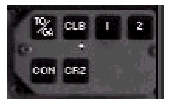
The Thrust Rating Panel (TRP) located above
the gear handle is the main interface for
pilot control of this computer.
このコンピュータを操作するには主として、ギアハンドルの上にあるスラストレーティングパネル(TRP)を使います。
Power setting information from this system
is displayed on the upper EICAS via the N1
gauge using a green index pointer and a digital
display.
このシステムからのパワー設定情報は、緑色のインデックスとデジタル表示により上側のEICASに表示されます。
The settings displayed are reference only
and do not limit engine power available to
the pilot.
設定された表示は参照されるだけであり、またパイロットが利用できるエンジンパワーを制限することはありません。
The maximum power setting available is always
the EEC limit indicated by the amber line
on the N1 gauge.
設定できる最大パワーは常にN1ゲージに黄色で表示されたEEC制限によります。
When the autothrottle is in use, the TRP
power reference is the maximum power available
for use by the autothrottle in the engaged
mode.
オートスロットルを使用中にTRPパワーが示す参照値はエンゲージモードにおけるオートスロットルが利用可能な最大パワーとなっています。
The TRP has the following modes: TO, D-TO,
CLB, CLB1, CLB2, CRZ, CON, and GA.
TRPには次のようなモードがあります。 : TO,
D-TO, CLB, CLB1, CLB2, CRZ, CON, GA
Each mode can be selected using the TRP buttons
(except D-TO which is selected via the FMC).
どのモードもTRPボタンにより選択できます。(D-TOだけは例外でFMCにより選択されます。
TO and D-TO are takeoff power modes.
TOとD-TOモードは離陸モードのパワーです。
CLB, CLB1 and CLB2 are climb power modes.
CRZ is the cruise power mode.
CLB, CLB1 と CLB2は、上昇モードのパワーです。CRZは巡航パワーモードです。
CON is the continuous power mode.
CONは、連続パワーモードです。
GA is the go-around power mode.
GAは、ゴーアランウドパワーモードです。
Takeoff power modes are as follows: Takeoff
power (TO) and de-rated takeoff power (D-TO).
テイクオフパワーモードにはテイクオフパワー(TO)モードとデ・レイテイドテイクオフパワーモード(D-TO)があります。
In the TO mode, the computer calculates the
maximum takeoff power for the current outside
air temperature.
TOモードでは、コンピュータは当該時点の外気温による最大離陸パワーを計算します。
In the D-TO mode, a temperature higher than
current airport temperature (called the assumed
temperature) is used to calculate the reduced
thrust setting.
D-TOモードでは、低減したスラスト設定を計算するために当該時点の空港気温よりも高い気温(仮想気温という)が使われます。
This temperature is entered into the FMC
Takeoff Reference Page which is translated
into a power setting indicated on the EICAS.
この気温はFMCのTakeoff Reference Pageに入力されます。このページはEICAS上に表示されるパワー設定表示に用いられます。
The assumed temperature is calculated primarily
on the basis of aircraft takeoff weight for
a given airport runway.
仮想気温は第一に当該滑走路における航空機の離陸重量に基づいて計算されます。
Higher assumed temperatures translate into
lower power settings and vice-versa.
仮想気温が高いと低いパワーが設定され、仮想気温が低いと高いパワーが設定されます。
Pressing TO on the TRP cancels the D-TO mode.
TRP上のTOを押せば、D-TOモードはキャンセルされます。
Climb power modes are as follows: Full climb
power (CLB), de-rated climb power one (CLB1),
and de-rated climb power two (CLB2).
上昇パワーモードには全上昇パワーモード(CLB)、de-ratedパワーモード1(CLB1)、とde-ratedパワーモード2(CLB2)の3つがあります。
CLB1 and CLB2 offer reduced climb power settings
when full climb power is not required.
CLBモードを必要としない場合には、CLB1とCLB2モードにより低減したパワー設定が可能となります。
CLB2 offers the lowest climb power setting
available that allows the plane to climb
safely after takeoff and meet all obstacle
clearance requirements.
CLB2は飛行機が離陸後安全に上昇し、すべての障害クリアランス必要条件に対処するのに必要な最低の上昇パワーとなります。
Pre-selection of a reduced climb power mode
can be done on the ground using the TRP buttons.
低減上昇パワーモードは、TRPボタンにより地上で事前に選択できます。
Pressing the 1 or 2 button on the TRP results
in a white 1 or 2 displayed next to the green
TO display on the EICAS.
TRP上の1または2を押すとEICAS上の緑色のTOの隣に白の1または2が表示されます。
This indicates that the selected de-rated
CLB mode will engage after takeoff.
これは、離陸後de-rated CLBモードがエンゲージされることを示しています。
This occurs automatically with the selection
of an AFDS vertical mode (FL CH, VNAV, or
V/S).
この状態はFDSの鉛直モード(FL CH, VNAV, またはV/S)を選ぶと自動的に生じます。
CLB1 or CLB2 is then displayed in green on
the EICAS.
またこのとき、EICAS上にはCLB1かCLB2が緑色で表示されます。
If no climb mode is pre-selected, the TRP
commands full climb power (CLB).
もし、事前に上昇モードが選択されていない場合は、TRPは全上昇パワー(CLB)を指定します。
Switching between engaged climb modes is
accomplished via the TRP buttons.
エンゲージした上昇モード間の切替は、TRPボタンにより行います。
If climbing in the full climb mode (CLB),
pressing 1 or 2 engages the CLB1 or CLB2
mode respectively.
全上昇モード(CLB)で上昇中は、1または2を押すことにより、それぞれCLB1、CLB2モードがエンゲージされます。
Subsequent switching between de-rated climb
modes is accomplished by selecting the other
mode button on the TRP.
これに続くde-rated climbモード間の切替は、TRP上の他のモードボタンを押すことによって行います。
However, canceling a de-rated climb mode
is accomplished by selecting the button corresponding
to the presently engaged de-rate mode.
しかしながら、de-rated climbモードのキャンセルは、現在エンゲージされているde-rated
climbモードに対応したボタンを選択することにより行われます。
Pressing CLB in this case will have no effect
on the engaged mode.
この場合、CLBボタンを押してもエンゲージしたモードにはなにも影響を与えません。
For example, if CLB1 is the currently engaged
mode, pressing the 1 button on the TRP switches
to the CLB mode.
たとえば、CLB1が現在エンゲージされている場合、TRPの1ボタンを押すとCLBモードに切り替えられます。
If CLB2 is the currently engaged mode, pressing
the 2 button on the TRP switches to the CLB
mode.
もし、CLB2が現在エンゲージされているとすると、2ボタンを押すとCLBモードに切り替わります。
In the cruise (CRZ) mode, the TRP displays
the maximum cruise power setting available
based on altitude and temperature.
巡航(CRZ)モード中は、TRPはその高度と気温条件下で設定できる最大巡航パワーを提示します。
The CRZ mode is automatically engaged when
leveling off at the pre-programmed FMC cruise
altitude.
航空機が事前にFMCにプログラムしておいた巡航高度に達して水平飛行に移ると巡航(CRZ)モードが自動的にエンゲージされます。
Otherwise, this mode can be engaged manually
by pressing CRZ on the TRP panel.
そのほかTRPパネルのCRZボタンを押して手動でこのモードをエンゲージすることもできます。
When the autothrottle is in use, the CRZ
thrust index represents the maximum power
available for use by the autothrottle in
cruise, even though less power is generally
required to maintain airspeed.
オートパイロットを使用中であれば、たとえ速度を保持するのにより小さいパワーで十分であったとしてもも、巡航中のオートスロットルにより使用可能な最大パワーとなります。
Continuous (CON) and Go-around (GA) power
are the remaining TRP modes.
TRPモードのうち、残りのモードは Continuous
(CON) と Go-around (GA) パワーです。
Pressing the CON key displays the maximum
continuous power setting available for the
current altitude and temperature.
CONキーを押すと当該時点での高度と気温で可能な限りの最大連続パワーとなります。
This mode is generally used during single
engine operations or while in icing conditions.
一般にこのモードは片肺エンジンで飛行中か氷結状態のときのモードです。
The GA mode is automatically engaged when
flaps are selected to 1 while on approach
for landing.
GAモードは着陸アプローチ中、フラップ1が選択されたときに自動的にエンゲージされます。
Pressing the TO/GA button in flight manually
selects the GA mode.
TO/GAボタンを飛行中に押すと手動でGAモードを選択します。
The GA mode displays the maximum go-around
power setting to be used in the event of
a go-around.
GAモードは、ゴーアラウンド中に使用する最大ゴーアラウンドパワーを設定します。
Engine Start Controls
エンジンスタートコントロール
1- Engine Start Switches: Controls engine start valve and ignition.
エンジンスタートスイッチ : エンジンスタートバルブと点火装置をコントロールします。
2- Ignition Selector: Selects the source of ignition for engine
starts and CONT mode.
点火装置セレクタ : エンジンスタートおよびCONTモード時の点火装置用ソースを選択します。
Normally igniter 1 is used on odd-numbered
flights and igniter 2 is used for even-numbered
flights.
普通、フライトナンバーが奇数の時は1を用い、偶数の時は2を用います。
The BOTH position is used for abnormal condition
starts or cold weather operations.
BOTH位置は異常事態時のエンジンスタートか寒冷気候でのオペレーション時に使用します。
3- Start Valve Light: When illuminated, indicates that the start
valve is not in the commanded position.
スタートバルブライト : ここが点灯したときは、スタートバルブが指定の位置にないことを示します。
Illuminates when the start valve is in transit
during engine start.
スタートバルブはエンジンスタート作動過程で点灯します。
Engine Fuel Control
エンジン燃料のコントロール

Engine Electronic Control (EEC) Switches
エンジンの電子コントロールスイッチ
EICAS Upper Display
EICASディスプレイ(上部)
N1 DATA DISPLAY
N1データ表示の詳細
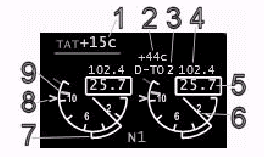
1- TAT Temperature Display: Displays the current outside air temperature
in Celsius.
温度表示 : 現在の機外温度を摂氏で表示します。
2- Assumed Temperature (De-rated Power): Displays the temperature entered into the
FMC Takeoff Reference Page upon which the
reduced thrust calculation is based.
仮想温度(De-rated Powerモード) : FMCのTakeoff
Reference Pageに入力された仮想温度を表示します。推力の低減計算はこの温度に基づいて行われます。
3- Thrust Reference Mode: Displays the current thrust mode as selected
by the TRP.
スラストが参照しているモード : TRPによって選択されている現在のスラストモードを表示します。
A white 1 or 2 in this display indicates
a de-rated climb mode has been pre-selected.
ここに表示される白色の1か2の文字は、事前に選択されているde-rated
climb modeを表します。
4- N1 Thrust Reference (digital): Displays the thrust reference commanded
by the TRP.
N1スラスト基準値(ディジタル表示) : TRPが設定したスラスト基準値を表示します。
5- N1 Digital Display: Displays the current N1 power setting.
N1デジタル表示 : 現時点でのN1パワーを表示しています。
6- N1 Pointer Display: Displays the current N1 power setting in
round dial format.
N1表示指針 : 現時点のN1パワーの状態を円形目盛り上に表示します。
7- Command Thrust Display: This extended arc is called the command
sector.
指定スラスト表示 : N1目盛の外周に展開される円弧は、コマンドセクタといいます。
It shows the difference between current engine
N1 and the commanded N1 based on power lever
position.
コマンドセクタはパワーレバー位置で指定したN1と当該時点のエンジンのN1との差を示しています。
8- N1 Thrust Reference Pointer: Displays the thrust reference commanded
by the TRP.
N1スラスト基準値 : TRPによって設定されたスラスト基準値を表示します。
This pointer shows the same value as the
N1 Thrust Digital Reference.
このスラスト基準値はN1のデジタルで表示されているスラスト基準値と同じ値になります。
9- N1 Limit Pointer: Displays the N1 limit for each engine.
N1限度指針 : それぞれのエンジンに対するN1の限界を示します。
This limit is determined by the EEC which
acts to restrict power to this limit regardless
of the power lever position.
この限界値は、EECにより決定されます。EECはパワーレバーの位置にかかわらず、この限界値にパワーを制限します。
When the EEC is OFF, this line disappears
and engine thrust is unrestricted.
EECがOFFのときは、この線は消え、エンジンスラストは制限されません。
EICAS Lower Display
ECAS ディスプレイ 下側
Standby Engine Display
エンジンデータ予備表示
Thrust Rating Panel (TRP) Controls
エンジン定格パネルコントロール
Powerplant Normal Procedures
動力関係標準操作手順
PREFLIGHT
飛行前
| EEC Switches - ON EECスイッチ−ON Ignition Selector - 1, BOTH or 2 (1=odd days, 2=even days, BOTH= cold weather start) 点火装置セレクタ−1、BOTHまたは2(1=奇数日、2=偶数日、BOTH=寒冷気候スタート時、とします) Start Selectors - AUTO スタートセレクタ−AUTO Fuel Cutoff Switches - OFF 燃料カットオフスイッチ−OFF TRP - Select TO and 1 or 2 for derate climb (if desired) TRP−TO及びderate climbを行う場合は、1または2 Standby Engine Display - AUTO 予備エンジン表示−AUTO |
STARTING
エンジンスタート時
| Pack Switches - OFF パックスイッチ−OFF Pneumatic Pressure - Confirm 25 PSI minimum 空気圧−最低25PSIを確認 Start Selector - GND スタートセレクタ−GND Fuel Cutoff Switch - RUN when above 18% N2 燃料カットオフスイッチ−N2が18%を超えたらRUN at 50% N2: N2が50%になったら Start Selector - Confirm AUTO スタートセレクタ−2番目のエンジンがスタートしてからAUTOになっていることを確認 after second engine start: Pack Switches - AUTO パックスイッチ−AUTO |
IN FLIGHT
飛行中
| Operate thrust levers as required. 必要に応じてスラストレバーを操作 |
POSTFLIGHT
飛行終了後
| Aircraft shutdown: 航空機のシャットダウン Fuel Cutoff Switches - OFF 燃料カットオフスイッチ-OFF |
| <<TOPページ | <Level-D 767 メニュー | <マニュアル目次 | <前のページ | >次のページへ |