FOR FLIGHT SIMULATOR USE ONLY. NOT FOR USE
IN REAL AVIATION. Level-D Simulations 767-300...........Page
51
FLIGHT CONTROLS
| <<TOPページ | <Level-D 767 メニュー | <マニュアル目次 | <前のページ | >次のページへ |
FLIGHT CONTROLS
フライトコントロール
Flight controls on the 767 are broken down
into two groups.
767のフライトコントロールは、2つのグループに分かれています。
Primary flight controls are the elevators,
ailerons and the rudder.
プライマリフライトコントロールは、エレベータ(昇降舵)、エルロン(補助翼)、およびラダー(方向舵)です。
Secondary flight controls are the leading
edge slats, trailing edge flaps, stabilizer
trim, aileron trim, rudder trim, and the
spoilers.
セカンダリフライトコントロールは、前縁スラット、後縁フラップ、スタビライザートリム、エルロントリム、ラダートリム、およびスポイラーです。
Some of these controls have an absolute requirement
for hydraulic power to function.
それらコントロールのいくつかは、その機能のために油圧動力が必須です。
Others have electrically powered alternate
systems to serve as a backup.
他のコントロールは、バックアップとして利用する代替システムに、電子的な動力を使います。
Primary Flight Controls
プライマリフライトコントロール
The elevators, ailerons and rudder are controlled
via the yoke, keyboard or the autopilot.
エレベータ、エルロン、ラダーは、ヨーク(操縦桿)、キーボードあるいは、オートパイロットを介して制御されます。
The movement of flight control surfaces can
be monitored on the lower EICAS STATUS page.
フライトコントロール面(操縦翼面)の動作は、下側のEICAS
STATUSページでモニターできます。
These control surfaces have an absolute requirement
for hydraulic power to function.
それらコントロール面は、機能させるために油圧動力が必須です。
They receive hydraulic power from all three
hydraulic systems in a combination to provide
redundancy in case of partial hydraulic system
failure.
プライマリフライトコントロールは、部分的な油圧システムの故障の場合に冗長性を確保するため、3つ全てが結合した油圧システムから油圧動力を受けます。
If hydraulic power is completely lost due
to a dual engine flameout, a Ram Air Turbine
(RAT) in the center hydraulic system is automatically
deployed.
もし2つのエンジンのフレームアウト(突然の燃焼停止)により油圧動力が完全に失われると、中央油圧システムにあるラムエアタービン(RAT)が、自動的に展開されます。
The RAT provides sufficient hydraulic power
in the center system for movement of all
primary flight controls.
RATは、全てのプライマリフライトコントロールの動作のために、中央システムにあり、十分な油圧動力を提供します。
The RAT can be deployed manually via an overhead
panel switch if required.
RATは、必要に応じてオーバーヘッドパネルスイッチを介し手動で展開することもできます。
A minimum airspeed of 130 knots is required
for the RAT to function properly.
130ノットの最小対気速度が、RATを適切に機能させるために必要です。
The ailerons have an inboard and an outboard
control surface on each wing.
エルロンは、それぞれの翼にある内側制御面と外側制御面を持ちます。
The outboard ailerons are locked out as speed
increases.
外側エルロンは、スピードの増加を抑えます。
This limits the twisting moment on the wings
at higher airspeeds.
速い大気速度時に翼のねじれの動きを抑制します。
The inboard ailerons droop when the trailing
edge flaps are deployed.
内側エルロンは、後縁フラップが展開されると下がります。
This permits greater aileron control and
lift during flap deployment.
これは、より大きなエルロン制御やフラップ展開による揚力を可能にします。
Aileron droop can be observed on the flight
control display on the STATUS page.
エルロンが下がったことは、STATUSページにあるフライトコントロールディスプレイで確認できます。
The distribution of hydraulic power to the
primary flight controls is such that one
hydraulic system is capable of providing
partial control to the essential control
surfaces.
プライマリフライトコントロールへの油圧動力の配分は、1つの油圧システムが重要な制御面に対し部分的な制御を提供できるようになっています。
The elevators and rudder receive hydraulic
power from all three hydraulic systems.
エレベータとラダーは、3つ全ての油圧システムからの油圧動力を受けます。
The ailerons receive hydraulic power as follows:
エルロンは、次ような油圧動力を受けます :
Secondary Flight Controls
セカンダリフライトコントロール
The secondary flight controls are the leading
and training edge flaps, stabilizer trim,
aileron trim, rudder trim and the spoilers.
セカンダリフライトコントロールとは、前縁および後縁フラップ、スタビライザートリム、エルロントリム、ラダートリム、スポイラーを指します。
The spoilers have an absolute requirement
for hydraulic power for normal operation.
スポイラーは、通常のオペレーションのために油圧動力が必須です。
There is no backup system for the spoilers.
スポイラーにはバックアップシステムはありません。
The flaps and stabilizer trim are hydraulically
powered and have electrically powered backup
modes of operation.
フラップとスタビライザートリムは、油圧により動作し、バックアップモードでは電子的な動力になります。
FLAPS
フラップ
The leading edge slats and trailing edge
flaps use hydraulic power from the Center
hydraulic system only.
前縁スラットと後縁フラップは、中央油圧システムのみからの油圧動力を使います。
Flap position is selected by the flap handle
on the pedestal or by the keyboard.
フラップ位置は、ペダスタル上のフラップハンドルもしくはキーボードにより選択します。
Flap positions are indicated on the flap
indicator on the main panel and may be selected
into the following positions: Up, 1, 5, 15,
20, 25, and 30.
フラップ位置は、メインパネル上にあるフラップ表示器に表示され、次の位置が選択可能です:
Up, 1, 5, 15, 20, 25, および 30。
Selecting flaps to 1 moves only the leading
edge slats into position.
フラップ1の選択では、前縁スラットのみ所定の位置に移動します。
The trailing edge flaps begin to move with
the selection of flaps 5.
後縁フラップは、フラップ5を選択することで動き始めます。
The normal takeoff flap setting is 15.
通常の離陸フラップ設定は、15です。
Selection of flaps 5 for takeoff is available
when required for performance.
性能上必要であれば、離陸時にフラップ5を選択することも可能です。
The normal landing flap setting is 30.
通常の着陸フラップ設定は、30です。
Flaps 25 may be used when conditions require
the use of a reduced flap setting (ie. High
winds).
状況的にリデュースドフラップ設定の利用が必要な時(例えば、強風時)、フラップ25も使用できます。
Flaps 20 is used only for a single engine
emergency landing.
フラップ20は、1エンジンによる緊急着陸時のみで使用します。
A flap warning system monitors movement of
both leading and trailing edge flaps when
selected.
フラップワーニングシステムは、前縁および後縁フラップの両方の移動が選択されたときに、モニターします。
If the leading edge slats fail, a LEADING
EDGE caution is activated.
もし、前縁スラットが故障すると、LEADING EDGE
の警告がアクティブになります。
If the trailing edge flaps fail, a TRAILING
EDGE caution is activated.
もし、後縁フラップが故障すると、TRAILING
EDGE の警告がアクティブになります。
If either of these cautions is received,
the alternate flap system may be used to
correct the flap malfunction.
もし、それら警告のどちらかを受信すると、代替フラップシステムがフラップの不調を補うために使います。
Alternate flap controls are available to
move the flaps electrically.
代替フラップコントロールは、フラップを電子的に移動することで可能となります。
The alternate flap controls are located below
the flap indicator on the main panel.
代替フラップコントロールは、メインパネル上にあるフラップ表示器の下に配置されています。
Pressing the LE (leading edge) or TE (trailing
edge) buttons arms the respective flap system
for electric operation.
LE (前縁) or TE(後縁) ボタンを押すと、それぞれのフラップシステムが電子的な手続きにより作動します。
The flaps are then moved into position using
the selector switch.
フラップは、セレクタスイッチが使用する位置に移動します。
Flap load relief is provided when flaps 30
are selected.
フラップロードリリーフは、フラップ30が選択されると使われます。
If the airspeed exceeds the flaps 30 limit,
the flaps automatically retract to 25 until
the airspeed is reduced below the flaps 30
speed limit.
もし、対気速度がフラップ30の限度を超えていると、対気速度がフラップ30のスピード限度以下に減速されるまで、フラップは自動的にフラップ25にリトラクトします。
Flap load relief is not provided when using
the alternate flap controls.
フラップロードリリーフは、代替フラップコントロールを使うときは供給されません。
STABILIZER TRIM
スタビライザートリム
The stabilizer trim system is used by both
the pilot and the autopilot to trim control
forces on the elevators during flight.
スタビライザートリムシステムは、フライト中にトリムコントロールがエレベータを強制するためパイロットとオートパイロットの両方で使われます。
This system uses hydraulic power from the
left and center hydraulic systems.
このシステムは、左および中央油圧システムの油圧動力を使用します。
The pilot moves the trim using the yoke or
keyboard controls.
パイロットは、ヨークやキーボードを使用しトリムを動かします。
The autopilot moves the trim automatically
when engaged in the CMD mode.
オートパイロットは、CMDモードをエンゲージしたとき自動的にトリムを動かします。
Trim position indicators are located on the
pedestal next to the throttle quadrant.
トリム位置表示器は、スロットル1/4のところのペダスタル隣に配置されています。
A stabilizer trim warning system monitors
the stabilizer trim for uncommanded movement.
スタビライザートリム警告システムは、スタビライザートリムが指示していない動作をしていなかモニターします。
An UNSCHEDULED STAB TRIM caution is generated
if movement of the stabilizer trim is detected
without an appropriate command from the pilot
or autopilot.
UNSCHEDULED STAB TRIM 警報は、スタビライザートリムの動作がパイロットやオートパイロットから適切に指示されたものでないことを検知すると、発出されます。
This is a so called "Runaway trim"
condition.
これは、いわゆる"ランウェイトリム"状態と呼ばれます。
To correct this condition, two STAB TRIM
CUT OUT switches located on the pedestal
are used to cut off hydraulic power to the
stabilizer trim system.
この状態を修正するには、スタビライザートリムシステムへの油圧動力を切り離すため、ペダスタル上に配置されている2つのSTAB
TRIM COUT OUTスイッチを使います。
Alternate stabilizer trim controls are available
on the pedestal if the normal trim switches
fail to operate.
もし、通常のトリムスイッチが故障した場合、代替スタビライザトリムコントロールが、ペダスタル上で使用可能です。
Moving the levers labeled STAB and TRIM mechanically
signals trim movement.
STABやTRIMとラベルされたレバーを動かすと、機械的にトリムを動かすよう信号を送ります。
Hydraulic power is required for the stab
trim to move using the alternate trim controls.
油圧動力は、代替トリムコントロールを使用するためのスタブトリムとして必要です。
SPOILERS
スポイラー
The spoilers are a group of flat panels on
the top of the main wing that reduce the
lift on the wing when raised.
スポイラーは、上がるときの翼の揚力を減少させる、主翼上のスラットパネルの集合です。
They are primarily used when a steeper than
normal descent is required and upon touchdown
during landing.
主に、通常よりも急な降下が必要とされる時や着陸中の接地時に使用されます。
Each spoiler panel is powered from one of
the three hydraulic systems such that partial
spoiler deployment is possible on both wings
with multiple hydraulic failures.
それぞれのスポイラーパネルは、3つの油圧システムの1つから動力を得ており、複数の油圧システムが故障になっても両翼において一部スポイラーの展開が可能です。
The spoilers are controlled by a spoiler
handle on the pedestal or by using the keyboard.
スポイラーは、ペダスタル上のスポイラーハンドル、もしくはキーボードを使用することにより制御されます。
The ARMED position provides for automatic
spoiler deployment upon landing to facilitate
the transfer of aircraft weight from the
wings to the landing gear (ie. Prevent a
bounce).
ARMEDの位置は、翼から着陸ギアへ航空機の重量移動を容易にするため、着陸時に自動的にスポイラーを展開するためにあります。(バウンドを防ぐためなど)
System logic re-stows the spoilers if the
aircraft becomes airborne again during a
go預round.
航空機がゴーアラウンドにより再びエアボーンした場合に、システムのロジックはスポイラーを再格納します。
The spoilers are automatically deployed regardless
of position anytime the thrust reversers
are activated.
スポイラーは、スラストリバーサーが有効になるといつでも、自動的にそれぞれの位置に展開されます。
AILERON and RUDDER TRIM
エルロンおよびラダートリム
The aileron and rudder trim controls can
be found on the pedestal.
エルロンとラダートリムコントロールは、ペダスタル上で見つかります。
These controls are used to zero out undesired
control forces in the ailerons and rudder.
それらコントロールは、エルロンとラダーに意図しない力を与えることで0にするために使います。
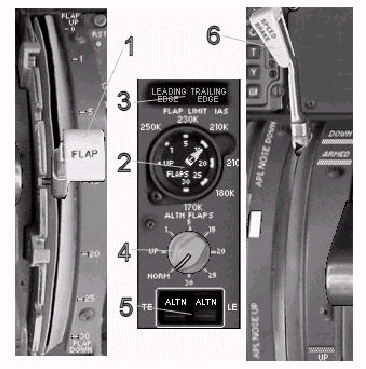
Flap Controls and Indicators
フラップコントロールと表示器
1- Flap Lever: Controlled via the mouse or the keyboard.
フラップレバー : マウスもしくはキーボードで制御します。
2- Flap Indicator: Left and Right pointers indicate actual
flap position for both wings.
フラップ表示器 : 左右のポインタが、両翼の実際のフラップ位置を示します。
3- Flap Cautions: Illuminate when flaps are not in the commanded
position.
フラップ警告 : フラップが指示した位置にない場合点灯します。
4- Alternate Flap Selector: Electrically positions flaps to the selected
position.
代替フラップセレクタ : 選択した位置にフラップを、電子的に移動します。
Selector is active when TE and/or LE ALTN
buttons are pressed.
セレクタは、TE、LE ALTN ボタンの両方もしくは一方が押されるとアクティブになります。
Flap load relief is not provided when selecting
flaps 30 via the alternate selector.
フラップロードリリーフは、代替フラップセレクタを介しフラップ30を選択したときには使われません。
5- TE and LE Alternate Flap Switches: Must be selected for Alternate Flap Selector
to work.
TE と LE 代替フラップスイッチ : 作動せるため代替フラップセレクタを選択しなければなりません。
Note: When using the alternate flap system, the
flap handle should be moved in agreement
with the alternately selected flap setting.
注意 : 代替フラップシステムを使うとき、フラップハンドルは代わりに選択したフラップ設定に一致させて動かす必要があります。
6- Spoiler Control Lever: Controls the movement of the spoiler on
both wings.
スポイラーコントロールレバー : 両翼のスポイラーの動作を制御します。
There are no cockpit indicators to indicate
spoiler position.
コックピットには、スポイラーの位置を表示する表示器はありません。
Stabilizer Trim Controls and Indicators
スタビライザートリムコントロールと表示器
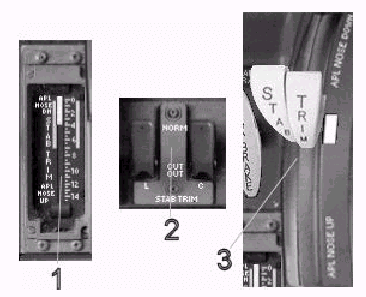
1- Stab Trim Indicator: Displays the current position of the stabilizer
trim.
スタブトリム表示器 : スタビライザートリムの現在位置を表示します。
2- Stab Trim Cut-Out Switches: Used to stop a runaway trim condition.
スタブトリムカットアウトスイッチ : 操作不能時のトリム状態を停止するために使います。
3- Stab Trim Manual Control Levers: Movement of these levers with the mouse
causes the stabilizer trim to move in the
commanded direction.
スタブトリム手動制御レバー : マウスによるそれらレバーの移動は、スタビライザートリムを指定した方向へ移動させることで行います。
Flight Control Indicators
フライトコントロール表示器
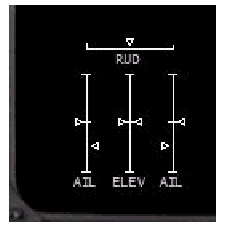
Displayed on the lower EICAS STATUS page.
下側EICAS STATUSページ上に表示されます。
The actual position of each flight control
surface is displayed.
それぞれのフライトコントロール面の実際の位置が表示されます。
Aileron and Rudder Trim Controls
エルロンとラダートリムコントロール
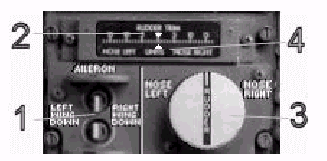
1- Aileron Trim Control Switches: Use the mouse to move the aileron trim left
or right.
エルロントリムコントロールスイッチ : エルロントリムを左右に動かすためにマウスを使います。
2- Aileron Trim Index: A simulator convention used to display the
current amount of aileron trim.
エルロントリムインデックス : シミュレータコンベンションが、エルロントリムの現在値を表示するために使います。
3- Rudder Trim Control Knob: Use the mouse to move the rudder trim left
and right.
ラダートリムコントロールノブ : ラダートリムを左右に動かすためにマウスを使います。
4- Rudder Trim Index: Displays the current amount of rudder trim.
ラダートリムインデックス : ラダートリムの現在値を表示します。
Flight Controls Normal Procedures
フライトコントロールの標準操作手順(ノーマルプロシージャ)
PREFLIGHT
飛行前
| Alternate Flap Selector - NORM 代替フラップセレクタ - NORM LE and TE Switches - ALTN not displayed LE および TE スイッチ - ALTN が表示されないこと Stabilizer Trim - Set 4 units スタビライザートリム - 4 ユニットに設定 Spoilers - DOWN スポイラー - DOWN Throttles - CLOSED スロットル - CLOSED Flaps - UP フラップ - UP STAB TRIM CUTOUT Switches - Guarded NORM STAB TRIM CUTOUT スイッチ - ガード付 NORM Aileron and Rudder Trim - Set 0 エルロンとラダートリム - 0に設定 |
STARTING
始動
| After start: 始動後 : Flaps - Set 5 or 15 フラップ - 5 もしくは 15 に設定 Stabilizer Trim - Set 4 units or as needed スタビライザートリム - 4 ユニット、あるいは必要に応じて設定 Flight Controls - Check proper movement on STATUS screen フライトコントロール - STATUSスクリーンで適切に動作することをチェック |
IN FLIGHT
フライト中
| After takeoff: 離陸後 : Flaps - UP フラップ - UP Approach: アプローチ : Flaps - Set as required when slowing (Set flaps 30 for landing) フラップ - 減速時必要に応じて設定 (着陸時にはフラップ30を設定) Spoilers - ARMED スポイラー - ARMED |
POSTFLIGHT
飛行後
| Flaps - UP フラップ - UP Spoilers - DOWN スポイラー - DOWN Stabilizer Trim - Reset 4 units スタビライザートリム - 4ユニットにリセット Aileron and Rudder Trim - Reset 0 エルロンとラダートリム - 0にリセット |
| <<TOPページ | <Level-D 767 メニュー | <マニュアル目次 | <前のページ | >次のページへ |