FOR FLIGHT SIMULATOR USE ONLY. NOT FOR USE
IN REAL AVIATION. Level-D Simulations 767-300...........Page
69
FLIGHT MANAGEMENT SYSTEM (FMS)
| <<TOPページ | <Level-D 767 メニュー | <マニュアル目次 | <前のページ | >次のページへ |
FLIGHT MANAGEMENT SYSTEM (FMS)
フライトマネージメントシステム
The Flight Management System allows the pilot
to manage the aircrafts vertical and lateral
paths automatically.
フライトマネージメントシステムによって、パイロットは航空機の垂直と水平の経路を自動的に管理する事ができます。
It also provides a resource for aircraft
performance data related to aircraft speed,
altitude, fuel consumption, and power settings.
FMSはさらに、航空機のスピード、高度、燃料消費、パワーセッティングに関連した航空機の性能データ(のためのリソース)を提供します。
The FMS subsystems include: Two Flight Management Computers (FMC), a
Control Display Unit (CDU), the AFDS MCP,
and the EHSI.
FMSには以下のサブシステムが含まれます。:二つのフライト・マネジメント・コンピュータ(FMC)、コントロール・ディスプレイ・ユニット(CDU)、AFDS
MCP、EHSI。
The FMCs provide for aircraft position calculation,
performance management, and three dimensional
navigation based on data input and information
received from supporting systems.
FMCは航空機の位置計算、能力管理、データ入力とサポート・システムから受け取った情報に基づいた3次元ナビゲーションを供給します。
The CDU is the main pilot interface to access
and control information in the FMC.
CDUはパイロットがFMCの情報にアクセスしたりコントロールしたりするための主要なインターフェースです。
The AFDS MCP permits selection of LNAV and
VNAV and performs the operations commanded
by the FMC.
AFDS MCPはLNAV、VNANの選択を可能にし、FMCによって命令された操作を実行します。
The EHSI displays a map of information generated
by the FMC.
EHSIはFMCが生成した情報を地図に表示します。
Control Display Unit (CDU)
コントロール・ディスプレイ・ユニット(CDU)
The CDU is the main pilot interface for control
of the Flight Management Computer.
CDUはフライト・マネジメント・コンピュータをコントロールするためのパイロットの主要なインターフェースです。
The CDU is often times referred to as "the
FMC" since the FMC is not a visible
component of the flight deck.
CDUはしばしば"the FMC"といわれます。というのもFMCは操縦室のなかで目に見える装置ではないからです。
Therefore, references to FMC data input in
this text refer specifically to the use of
the CDU.
それゆえ、このテキスト中でFMCデータ入力に言及する場合は、特にCDUの使用について言及しています。
Due to space constraints, the CDU is located
on a sub panel which can be displayed by
pressing the FMC button on the main panel
or by using the keyboard combination <shift><7>.
スペースの制限から、CDUはサブパネルに配置してあります。それは、メインパネルのFMCボタンを押すか、キーボードの<shift><7>を使用することで表示できます。
When operating in the virtual cockpit, clicking
on the CDU with the mouse brings up the FMC
sub panel.
ヴァーチャル・コックピットを使用している場合は、CDUをマウスクリックすることで、FMCサブパネルが表示されます。
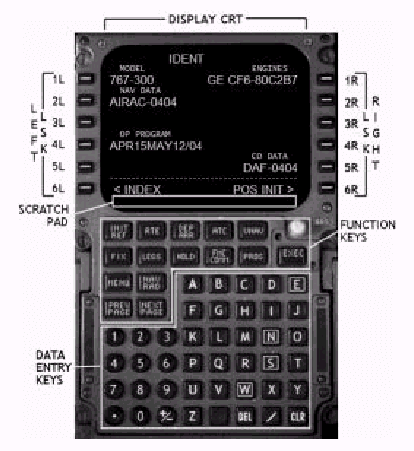
The CDU consists of a CRT screen, line select
keys (LSK), function keys, and data entry
keys.
CDUは、CRTスクリーン、ライン・セレクト・キー(LSK)、ファンクション・キーとデータ・エントリー・キーで構成されます。
The LSKs along the sides of the CDU line
up with data lines on the CRT and are used
to select and input data on the screen.
LSKはCDUの横に沿ってCRT上のデータ・ラインと並んでいます、そしてスクリーン上のデータを選択したり入力したりするために使用されます。
The function keys are used to cycle through
the pages of data contained in the FMC.
ファンクションキーはFMCのデータページを循環するために使用されます。
The data entry keys are used to input data
onto the scratch pad at the bottom of the
CRT screen.
データエントリーキーは、データをCRTスクリーン最下部のスクラッチパッドに入力するために使用されます。
Selection of an LSK when data exists in the
scratchpad transfers the data into the data
line abeam the LSK.
あるLSKを選択すると、スクラッチパッドにデータが存在していたらLSK真横のデータラインに転送されます。
To clear all data entered into the scratchpad,
press and hold the CLR button.
スクラッチパッドに入力された全データをクリアーするためには、CLRボタンを押し続けます。
Individual presses of the CLR button clears
single characters from the scratchpad.
CLRボタンを個々に押すと、スクラッチパッドの文字を一文字ずつクリアーします。
CDU Display and Control
CDU表示とコントロール
The display of FMC data on the CDU screen
follows the following conventions.
CDUスクリーン上のFMCデータ表示は以下の決まりに従います。
Data shown in large type abeam an LSK is
data that has been entered by the pilot or
selected from the FMC database.
LSKの真横に大きな文字で表示されたデータは、パイロットに入力されたデータか、FMCデータベースから選択されたデータです。
Data shown in small type abeam an LSK is
prediction data calculated by the FMC.
LSKの真横に小さい文字で表示されたデータはFMCによって計算された予測値です。
All data pages in the FMC are structured
similarly to the page shown on the left.
FMCの全てのデータページは左側に表示されたページと類似の構造になっています。
Data is structured vertically in left and
right columns and line up with LSKs on both
sides of the CDU.
データはCDUの両側にあるLSKと並んで、右側と左側のカラムに垂直に配置されています。
The data page on the right side is the LEGS
page and is used most often in normal operations.
右側のデータページはLEGSページで、通常のオペレーションではもっとも頻繁に使用されます。
Its data is structures horizontally such
that waypoint information is shown across
an entire line of data.
ウエイポイント情報が一行に表示されるように、水平方向に配置されています。
The LEGS page is explained in greater detail
in later sections and is presented here as
an overview of CDU display conventions only.
LEGSページは後のセクションで非常に詳細に説明されます。ここでは、CDUディスプレイの約束事についての概要を提供しています。
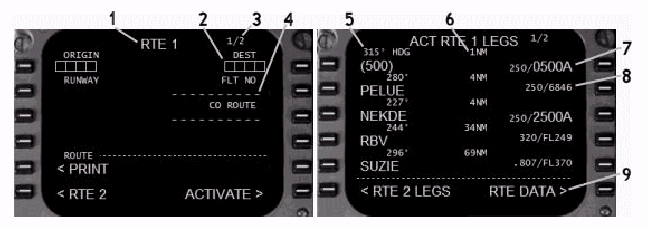
1- Page Title: Identifies the data page displayed on the
CDU.
1-ページタイトル : CDUに表示されているデータページの内容を表示します。
Different data displays are selected by pressing
the function keys.
ファンクションキーを押すと異なるデータ表示が選択されます。
2- Required Data Prompt: Data that is required by the FMC for proper
operation is identified on each page with
box prompts.
2- データ入力要求プロンプト : 適切なオペレーションのためにFMCから要求されるデータには、それぞれのページでBOXプロンプトで明確化されます。
Data is entered into the scratchpad using
the data entry keys and is placed into the
box prompts using the corresponding LSK.
データはデータエントリーキーを用いてスクラッチパッド内に入力されます。対応するLSKを押すことで、BOXプロンプト内にデータを転送されます。
To delete an incorrect entry, press DEL data
entry key followed by the LSK abeam the incorrect
data field.
誤った入力を削除するためには、[DEL]データエントリーキーを押して、引き続いて誤ったデータが入っている領域の真横のLSKを押します。
3- Page Number: Identifies the current page and the number
of data pages available.
3- ページ番号 : 現在のページと利用可能なページ数を表示します。
Cycle through available pages using the NEXT
and PREV PAGE function keys.
NEXTとPREV PAGEファンクションキーで利用可能なページを巡回させます。
4- Optional Data Prompt: Optional data that is not required by the
FMC for proper operation is identified on
each page with dashed prompts.
4- オプションデータプロンプト : 適切な操作としてFMCが要求していないオプショナルデータについては、それぞれのページで破線のプロンプトとして表示されます。
To delete an incorrect entry, press the DEL
data entry key followed by the LSK abeam
the incorrect data field.
誤った入力を削除するためには、DELデータエントリーキーを押して、続いて誤ったデータが入っている領域の真横のLSKを押します。
5- Waypoint Name and Course: The names of waypoints are displayed in
large type since they are manually entered
by the pilot or called up from the FMC database.
5- ウエイポイント名とコース : ウエイポイント名はパイロットがマニュアルで入力したかFMCデータベースから呼び出されたものなので、大きい文字で表示されます。
The predicted magnetic track to each waypoint
is displayed in small type.
各ウエイポイントへの予測された磁針路は小さい文字で表示されます。
An exception is when a heading or specific
track is commanded by a procedure selected
from the FMC database.
例外は、針路や特定の航路がFMCデータベースから手順として命令されている場合です。
The example above shows a commanded heading
(HDG) of 315 ー as part of a selected procedure.
上記の例では、選択された手順の一部として命令された針路(HDG)315が表示されています。
6- Waypoint Distance: Distances between waypoints are displayed
in small type.
6-ウエイポイント距離 : ウエイポイント間の距離は小さな文字で表示されます。
7- Manually Entered Data: Data that has been manually entered by the
pilot is displayed in large type.
7- マニュアル入力データ : パイロットがマニュアル入力したデータは大きな文字で表示されます。
8- Predicted Data: Data that has been calculated by the FMC
is shown in small type.
8- 予測されたデータ : FMCが計算したデータは小さい文字で表示されます。
9- Page Prompts: At the bottom of each screen at the 6L and
6R positions are page prompts.
9- ページプロンプト : 各スクリーン最下部の6Lと6Rの位置はページプロンプトです。
Pressing the corresponding LSK takes calls
up a different page of data or performs the
function specified.
対応するLSKを押すと、異なるデータページを表示するか、指定された機能を実行します。
Keyboard Assist Mode
キーボード・アシスト・モード
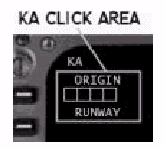
In order to facilitate FMC data entry, a
keyboard assist (KA) mode is available by
pressing on an invisible mouse area on the
CDU CRT next to the 1L LSK.
FMCデータ入力を容易にするために、CDU CRTの1L
LSK隣の見えないマウスクリックエリアを押すことで、キーボードアシスト(KA)モードが利用可能になります。
KA is displayed in the upper left corner
of the CRT when the keyboard assist mode
is turned on.
キーボードアシストモードがオンになると、CRTの左上コーナーにKAと表示されます。
In KA mode, all computer keyboard entries
are sent to the CDU scratchpad.
KAモードでは、全てのコンピューター・キーボード入力がCDUスクラッチパッドに送られます。
This mode is helpful for entering multiple
waypoints contained in a long flight plan.
このモードは長いフライトプランに含まれる複数のウエイポイントを入力するときに役立ちます。
To exit the KA mode, simply press the KA
mouse click area a second time.
KAモードを抜けるには、もう一度KAマウスクリックエリアを押します。
Attempting to control the simulator using
keyboard shortcuts is not possible if the
FMC is left in the KA mode.
FMCがKAモードのままでは、シミュレータをキーボードショートカットを用いてコントロールすることは不可能です。
Therefore, if the simulator is not responding
to keyboard controls, check to ensure the
FMC is no longer in the KA mode.
したがって、シミュレータがキーボードコントロールに反応しない場合は、FMCがKAモードでないことを確認して下さい。
Function Keys Overview
ファンクションキーの概観
The Function Keys provide access to the different
data pages available in the FMC.
ファンクションキーはFMCで利用可能な異なるデータページへのアクセスを提供します。
Pressing a function key displays the first
page of data available for that function.
ファンクションキーを押すとその機能で利用可能な最初のデータページが表示されます。
When viewing subsequent pages of data within
a function (if available), pressing the same
function key again restores the data display
to page one of that function.
その機能の中で(利用可能なら)引き続くデータページを見るときは、同じファンクションキーを再び押すと、その機能のなかの1ページをデータディスプレイに表示します。
The following provides an overview for each
function key.
以下に、各ファンクションキーの概観を説明します。
Note that the FMC COMM and ATC function keys
have no data screens associated with them.
注意 : FMC COMMとATCファンクションキーに関連するデータスクリーンはありません。
Initialization/Reference Index Page (INIT/REF
INDEX)
初期化/リファレンス インデックスページ(INIT/REF
INDEX)
The INIT REF INDEX is available by pressing
the 6L "<INDEX" prompt from
the bottom of any INIT REF page.
INIT REFページで6Lの"<INDEX"を押すと、INIT
REF INDEXが利用可能になります。
The index page provides access to all of
the FMC data pages used for preflight and
data reference.
INDEXページは飛行前やデータ参照として使用される全てのFMCデータページへのアクセスを提供します。
Pressing the INIT REF key calls up one of
the pages listed on the left side of the
CDU based on the following priority:
INIT REFキーを押すと、CDUの左側に並んでいるページのひとつを以下の優先順位に基づいて呼び出します。
The following is a brief explanation of each
INIT REF page available:
以下は、利用可能な各INIT REFページについての簡単な説明です。
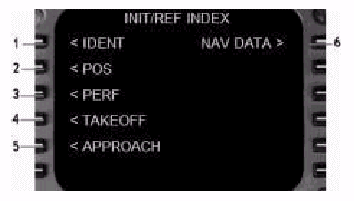
1- IDENT: The identification page shows information
about FMC programs.
1- IDENT : FMCプログラムに関する情報を表示します。
It is the starting point for preflight programming
of the FMC.
ここがフライト前のFMCプログラムのスタート点です
2- POS: The position initialization (POS INIT) page
provides for the entry and display of IRU
position data.
2- POS : ポジション(位置)の初期化(POS
INIT)ページではIRU位置データを入力/表示します。
3- PERF: The performance initialization (PERF INIT)
page is used to enter performance data required
for VNAV calculations.
3- PERF : パフォーマンス(性能)の初期化(PERF
INIT)ページではVNAV計算の為に要求される性能データを入力します。
4- TAKEOFF: The takeoff reference page (TAKEOFF REF)
displays takeoff speeds and thrust information.
4- TAKEOFF : テイクオフ・リファレンス(離陸時参照ページ、TAKEOFF
REF)では離陸時のスピードとスラスト情報を表示します。
5- APPROACH: The approach reference page (APPROACH REF)
displays landing speeds and ILS frequency
information for the selected landing runway.
5- APPROACH : アプローチ・リファレンス(アプローチ参照ページ、APPROACH
REF)では着陸速度や選択された着陸滑走路のILS周波数情報を表示します。
6- NAV DATA: The nav data page provides information on
navigation fixes.
6- NAV DATA : ナビゲーションデータページではナビゲーションFIX情報を提供します。
Identification Page (IDENT)
機体識別ページ(IDENT)
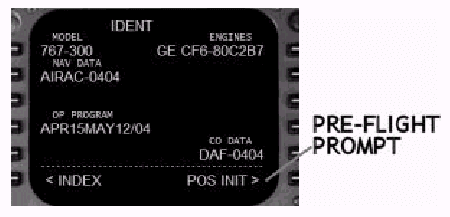
The IDENT page is the starting point for
the preflight of the FMC.
IDENTページはFMCの飛行前のスタート点です。
The data listed on this page cannot be changed
and is for reference only.
このページに表示されているデータは変更できず、参照のためだけのものです。
Since many different models of 767痴 exist,
it is important to confirm that the proper
data has been loaded into the FMC.
767には多くの異なるモデルがあるため、FMCに適切なデータがロードされているかどうかを確認することは重要です。
Check to be sure the MODEL, ENGINES, and
NAV DATA fields are correct for the aircraft.
モデル、エンジン、NAVデータ領域が航空機に対して正しいかを確認してください。
To facilitate preflight data entry, the next
page requiring data entry is prompted for
at the 6R LSK on all INIT REF pages.
飛行前のデータ入力を容易にするために、INIT
REFの全てのページでデータ入力が必要な次のページが6R
LSKに入力要求されます。
Pressing the "POS INIT>" prompt
at the 6R LSK calls up the POS INIT page
without having to return to the index page.
6R LSKにある"POS INIT>"プロンプトを押すと、INDEXページに戻ることなくPOS
INITページが呼び出されます。
Position Initialization Page (POS INIT)
位置初期化ページ(POS INIT)
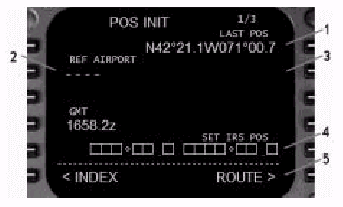
The POS INIT page is used to enter aircraft
position coordinates during alignment of
the IRS.
POS INITページはIRS基準調整中に航空機の位置座標を入力するために使用されます。
The current FMC clock time is displayed but
cannot be changed from this page.
FMC時計の現在時刻が表示されますが、このページでは変更できません。
Second and third POS INIT pages are available
to check current FMC and IRS positions.
POS INITの2ページ目と3ページ目で現在のFMCとIRSの位置を確認することができます。
1- LAST POS: Last aircraft position in lat/long format
is displayed.
前回の位置 : 前回の航空機の位置が緯度/経度のフォーマットで表示されます。
Pressing the 1R LSK transfers the coordinates
displayed to the scratchpad.
1R LSKを押すと、表示された座標をスクラッチパッドに転送します。
2- REF AIRPORT: This field accepts the four character ICAO
airport identifier.
参照空港 : この領域は4レターコードのICAO空港IDを受け入れます。
Type the airport ICAO code into the scratch
pad and press the 2L LSK to enter data into
this field.
空港のICAOコードをスクラッチパッドにタイプ入力し、2L
LSKを押すことで、データをこの領域に入力します。
3- REF AIRPORT POSITION: The lat/long coordinates of the REF AIRPORT
are displayed here when an ICAO code is entered
at the 2L LSK.
参照空港位置 : ICAOコードが2L LSKに入力されると、参照空港の緯度/経度座標がここに表示されます。
Pressing the 2R LSK when coordinates are
present transfers the coordinates displayed
to the scratchpad.
2R LSKを押すと(座標が入っている時)、表示された座標がスクラッチパッドに転送されます。
4- SET IRS POS: These boxes are displayed when the IRS is
in the ALIGN mode and present position coordinates
have not been entered.
IRS POSセット : IRSが基準調整モードにあり、現在の位置座標が入力されていない場合に、ここのBOXが表示されます。
Pressing the 5R LSK when coordinates are
present in the scratchpad transfers the coordinates
to the IRS during alignment.
スクラッチパッドに座標が入っている時に5R
LSKを押すと座標を基準調整中のIRSに転送します。
The coordinates entered are displayed until
IRS alignment is complete.
入力された座標はIRS基準調整が完了するまで表示されます。
5- Preflight Prompt: Press to call up the next data page required
for preflight.
飛行前の入力要求 : 押すと飛行前に要求される次のデータページを呼び出します。
Position Determination
位置決定
The FMC accepts lat/long coordinates in the
following format:
FMCは緯度/経度の座標を以下のフォーマットで受取ります。
For example, pressing the 1R LSK on the pictured
POS INIT page results in N4221.1W07100.7
being transferred to the scratchpad.
例えば、図に表示されているPOS INITページにおいて1R
LSKを押すと、スクラッチパッドにはN4221.1W07100.7と転送されます。
There are four methods available to determine
the aircrafts position for coordinate entry
during IRS alignment:
IRS基準調整中に座標を入力して航空機の位置を決めるために4種類の方法が利用可能です:
1- LAST POS - Use the last position coordinates by pressing
the 1R LSK to transfer the data into the
scratchpad.
前回のポジション- 1R LSKを押してデータをスクラッチパッドに転送することで、前回の位置座標を使用します。
2- REF AIRPORT - Use the airport coordinates by pressing
the 2R LSK (when data is shown) to transfer
the data into the scratchpad.
参照空港- 2R LSK(データが表示されているとき)を押してデータをスクラッチパッドに転送することで、空港の座標を使用します。
3- Charted Coordinates - Third party simulator charts often list
coordinates for airport gates.
チャート座標 - サードパーティーのシミュレーターチャートはしばしば空港ゲート座標がリストされています。
If parked at a gate with known coordinates,
these can be manually entered into the scratchpad
and used for IRS alignment.
座標が分かっているゲートに駐機している場合は、その座標をスクラッチパッドにマニュアル入力し、IRS基準調整に使用します。
The coordinates entered must be in the format
shown above.
入力する座標は上記のフォーマットでなければなりません。
4- <SHIFT><Z> Feature - Pressing this key combination displays
the aircrafts exact position across the top
of the simulator window.
<SHIFT><Z>機能 - このキーの組み合わせを押すと、航空機の正確な位置がシミュレーター窓の上端に表示されます。
The following is an example of what is displayed
and what should be entered into the CDU scratchpad:
以下は、表示された値と、CDUスクラッチパッドに入力されるべき値についてのひとつの例です。
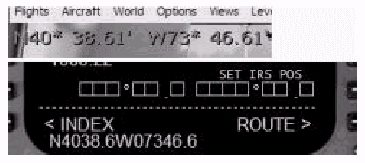
The coordinates displayed by FS2004 need
to be formatted into the format acceptable
to the FMC.
FS2004で表示される座標は、FMCが受け入れられるフォーマットに変更される必要があります。
Notice that ".61" is rounded to
".6".
".61"は".6"に丸められることに注意してください。
Also, the W coordinate of "73"
is entered as "073".
さらに、西経の座標"73"は"073"と入力されます。
This is important since entering "w7346.6"
generates an error message.
これは重要で、"w7346.6"ではエラーメッセージが発生します。
Adding a leading "0" is not required
when the longitude is 100 or above.
最初の"0"は経度が100度以上の場合は不要です。
For example, W101*46.61 would be formatted
as W10146.6 in the FMC.
たとえば、W101*46.61はFMCではW10146.6とフォーマットされます。
Position Reference Pages (POS REF)
位置の参照ページ(POS REF)
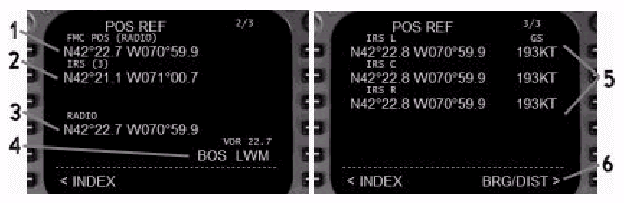
From the POS INIT page, two other pages of
data are available by pressing the NEXT or
PREV PAGE function keys.
POS INITページから、NEXTかPREVページファンクションキーを押すことで、他の2つのデータページを利用可能です。
The position reference (POS REF) pages display
the current positions of the FMC and the
IRUs.
位置の参照(POS REF)ページはFMCとIRUの現在の位置を表示します。
The FMC position is normally determined using
the weighted average of the three IRU positions.
FMC位置は通常三つのIRU位置の加重平均を用いて決められます。
If an IRU fails, the FMC reverts to using
the on-side IRU for position determination.
もしひとつのIRUが故障すると、FMCは位置決定のためにオン側のIRUを使うことに戻ります。
If the on-side IRU is not available, the
FMC uses the center IRU for position determination.
もしオン側のIRUが利用可能でない場合は、FMCは位置決定のためにセンターIRUを使用します。
The IRU position is updated using VOR DME
information when available during flight.
IRU位置はフライト中に利用可能であればVOR
DMEを用いてアップデートされます。
(訳注:これはIRU位置ではなく、FMC位置と思われます)
If a radio update is not available, the FMC
position is the same as the IRU position.
無線アップデートが利用不可能な時は、FMC位置はIRU位置と一致しています。
If the FMC position has not been radio updated
within 12 minutes, an IRS NAV ONLY message
is displayed in the scratchpad.
FMC位置が12分以内に無線アップデートされない場合は、"IRS
NAV ONLY"メッセージがスクラッチパッドに表示されます。
If this message is displayed, check that
both NAV radios are set to AUTO so that the
FMC can auto-tune the radios to receive an
update.
もしこのメッセージが表示されたときは、FMCが無線機を自動チューンし位置のアップデートを受信できるように、両方のNAV無線機がAUTOになっているか確認して下さい。
1- FMC Position: The current position of the FMC is displayed
here.
FMC位置 : 現在のFMC位置がここに表示されます。
The source used to determine the FMC position
is indicated in brackets.
FMC位置決定に使用されるソースデータが括弧内に示されます。
2- IRS Position: The current IRS position being used by the
FMC is displayed here.
IRS位置 : FMCによって利用される現在のIRS位置がここに表示されます。
The IRUs being used to calculate the IRS
position is indicated in brackets.
IRS位置を計算するために使用されるIRUが括弧内に示されます。
3- Radio Position: Displays the current position as determined
by the tuned radios.
無線位置 : 現在チューンされている無線局から決められた位置を表示します。
4- Radio Update Stations: Displays the radio station identifiers used
to determine the radio position.
無線アップデート局 : 無線位置を決めるために使用している無線局名を表示します。
5- L/C/R IRS Position Display: Displays the current latitude/longitude
positions and ground speed for the respective
IRU.
L/C/R IRS位置表示 : 各IRUにおける現在の緯度/経度位置と対地速度を表示します。
6- Bearing/Distance Display: Pressing the 6R LSK displays the IRS position
data in bearing/distance format relative
to the current FMC position.
方位/距離表示 : 6R LSKを押すと、現在のFMC位置に対するIRS位置を方位/距離のフォーマットで表示します。
When information is displayed in the BRG/DIST
format, the 6R LSK prompt changes to "LAT/LON>"
to switch the display back to the latitude/longitude
display format.
情報がBRG/DISTフォーマットで表示されている場合、6R
LSKプロンプトは"LAT/LON>"に変わり、経度/緯度フォーマット表示に戻るためのスイッチになります。
Performance Initialization Page (PERF INIT)
性能初期化ページ(PERF INIT)
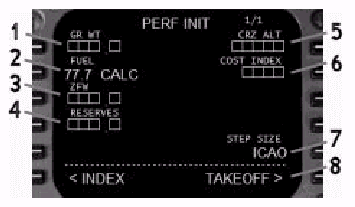
The PERF INIT page contains data used by
the FMC in performance calculations.
PERF INITページはFMCが性能計算に使用するデータを含みます。
The data on this page is required if VNAV
is to be used.
VNAVが使用される場合は、このページのデータが必要です。
1- Gross Weight: The gross weight (in thousands) of the airplane
can be entered here manually or automatically.
総重量 : 航空機の総重量(1000単位)をここにマニュアルか自動的に入力できます。
This data field updates automatically when
the Zero Fuel Weight (ZFW) field is manually
entered.
ゼロ燃料重量(ZFW)がマニュアル入力されると、このデータ領域が自動的にアップデートされます。
Making a manual entry causes data on the
Takeoff page to be deleted.
マニュアル入力すると、Takeoffページのデータが削除されます。
2- Fuel: The fuel weight (in thousands) on board
the aircraft can be set manually or automatically.
燃料 : 航空機に搭載される燃料重量(1000単位)をマニュアルか自動的にセットできます
CALC indicates that the fuel load has been
automatically calculated by the FMC.
CALCは搭載燃料がFMCによって自動的に計算されたことを示します。
3- Zero Fuel Weight: The zero fuel weight (in thousands) of the
aircraft can be entered here manually or
automatically.
ゼロ燃料重量 : 航空機のゼロ燃料重量(1000単位)をここにマニュアルか自動的に入力できます。
This data field updates automatically when
the Gross Weight (GR WT) field is manually
entered.
総重量(GR WT)がマニュアル入力されると、このデータ領域が自動的にアップデートされます。
Making a manual entry causes data on the
Takeoff page to be deleted.
マニュアル入力すると、Takeoffページのデータが削除されます。
4- Reserves: The amount of reserve fuel (in thousands)
is entered manually in this field.
予備燃料(リザーブ) : 予備燃料の量(1000単位)をこの領域にマニュアル入力します。
This value is the minimum fuel required before
a warning is generated by the FMC.
この値は、FMCが警報を発するために必要な最小燃料です。
When the FMC predicts that arrival fuel will
be less than reserves, an INSUFFICIENT FUEL
warning is generated in the scratchpad.
到着時の燃料が予備燃料よりも少ないとFMCが見積もった場合、スクラッチパッドにINSUFFICIENT
FUEL(燃料不足)ワーニングが発生されます。
Fuel calculations on the HOLD page are also
dependant on this value.
HOLDページの燃料計算もまた、この値に依存します。
5- Cruise Altitude: The cruise altitude for the planned route
is entered here.
巡航高度 : プランされたルートの巡航高度をここに入力します。
This field can be updated manually or automatically
by loading a flight plan.
この領域はマニュアルにアップデートするか、またはフライトプランをロードすることで自動的にアップデートできます。
The value in this field is linked to the
CRZ ALT fields on the VNAV Climb and Cruise
pages.
この領域の値は、VNAV ClimbとCruiseページのCRZ
ALT領域の値とリンクします。
The following are examples of valid entries
for this field:
以下は、この領域に対する正しい入力の例です。
6- Cost Index: The FMC Economy (ECON) calculations are
based on the value entered in this field.
コストインデックス : FMCのエコノミー(ECON)計算はこの領域に入力されたデータに基づきます。
The standard value entered is 80.
標準的に入力される値は80です。
Values can range from 0 to 9999.
値は0から9999を入力可能です。
Entering "0" gives maximum range
airspeed and minimum fuel consumption.
0を入力すると、対気速度最大で燃料消費最小となります。
Higher values increase the cruise speed and
fuel consumption for the calculated ECON
speed.
大きな値を入力すると、巡航速度と燃料消費が計算されたECONスピードよりも増加します。
7- Step Size: Displays the step climb value used for VNAV
STEP TO performance calculations.
ステップサイズ : 効率的な計算のためのVNAV STEPに使用されるステップクライム値が表示されます。
ICAO is the standard value and indicates
a step climb size of 2000 feet below FL290
and 4000 feet above FL290.
ICAOは標準値で、ステップクライムサイズはFL290以下は2000ft、FL290より上では4000ftです。
Valid entries range from 0 to 9000 in 1000
foot increments.
適切な入力範囲は0から9000で1000ftの単位です。
When "0" is entered, all VNAV predictions
are based on a constant cruise altitude.
0が入力されると、全てのVNAVの予測は一定巡航高度に基づきます。
8- Preflight Prompt: Press to call up the next data page required
for preflight.
飛行前の入力要求 : 押すと、飛行前に必要な次のデータページを呼び出します。
Takeoff Reference Page (TAKEOFF REF)
離陸参照ページ(TAKEOFF REF)
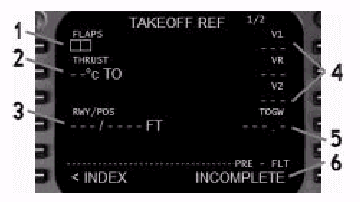
The TAKEOFF REF page is used to enter flap
and thrust information for FMC takeoff performance
calculations.
TAKEOFF REFページはFMCが離陸性能を計算するためのフラップとスラスト情報を入力するために用いられます。
1- Takeoff Flaps: Takeoff flap setting is entered here.
離陸フラップ : 離陸フラップ設定をここに入力します
Valid entries are 5, 15, and 20.
適切な入力は5,15,と20です。
Flaps 15 is standard.
フラップ15が標準です。
Takeoff speeds are recalculated and a TAKEOFF
SPEEDS DELETED message is generated any time
the FLAPS field is updated.
フラップ領域がアップデートされた時はいつも離陸速度が再計算されます。そしてTAKEOFF
SPEEDS DELETEDメッセージが表示されます。
This field is the only TAKEOFF REF field
required to be filled in for proper FMC operation.
この領域は適切なFMC操作のためにTAKEOFF REFページで要求される唯一の領域です。
2- Takeoff Thrust: Optional entry to de-rate calculated takeoff
thrust.
離陸スラスト : 計算された離陸スラストをディレート(減格)するためのオプション入力です。
The value entered here is called the "assumed
temperature". Valid entries are from
0 to 99 ー C.
ここに入力される値は"仮定温度"と呼ばれ、有効な入力は0から99℃です。
No temperature entry results in maximum takeoff
power.
温度を入力しないと、最大離陸出力となります。
The entered temperature and commanded thrust
settings are displayed on the EICAS N1 data
display.
入力された温度と指示されたスラストセッティングは、EICAS
N1データディスプレイに表示されます。
Takeoff speeds and thrust settings are automatically
recalculated anytime the THRUST field is
updated.
スラスト領域がアップデートされるといつも離陸速度とスラストセッティングが自動的に再計算されます。
To delete a temperature entry, press DEL
on the data entry keyboard followed by the
2L LSK.
温度入力を削除するには、データ入力キーボードのDELを押して、引き続いて2L
LSKを押します。
3- Runway/Position: Displays the runway entered in the ROUTE
page on which takeoff data is based.
滑走路/位置 : ROUTEページに入力され、離陸データの基となっている滑走路を表示します。
The optional /POS line is for planned autothrottle
engagement in feet from the runway threshold.
オプションの/POS行はプランされたオートスロットルエンゲージのためにあり、滑走路端からフィート単位で表示されます。
To enter a value, type "/XXXX"
(XXXX is the distance) and press the 4L LSK.
値を入力するためには、"/XXXX"(XXXXは距離)とタイプし4L
LSKを押します。
This value is used by the FMC for a position
update when the autothrottle is engaged during
the takeoff roll.
この値は、FMCが離陸ロール中にオートスロットルがエンゲージされた時の位置をアップデートするために使用されます。
4- Takeoff Reference Speeds: Takeoff Vref speeds are displayed here.
離陸参照速度 : 離陸時Vref速度がここに表示されます。
They may be entered manually or automatically.
マニュアルかまたは自動的に入力されます。
Speeds are automatically entered when a flap
setting has been entered.
フラップセッティングが入力されると速度は自動的に入力されます。
Speeds update anytime performance data or
takeoff data fields are changed.
速度は性能データや離陸データ領域が変更された時にはいつもアップデートされます。
5- Takeoff Gross Weight: Accepts a manually entered value that has
no bearing on FMC data.
離陸総重量 : FMCデータとは無関係ですが、マニュアル入力できます。
6- Preflight Status: The status of FMC preflight programming
is displayed here.
飛行前状態 : FMC飛行前プログラムの状態がここに表示されます。
Takeoff Reference Page 2
離陸参照ページ2
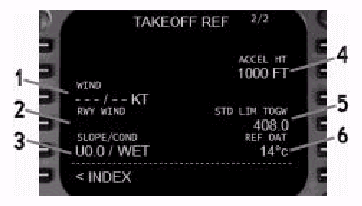
This page contains secondary performance
and reference data.
このページには二次的な性能と参照データを含みます。
1- Wind: Airport wind and speed may be entered here.
風 : 空港の風向きと速度を入力できます。
Entry is XXX/xx where XXX is magnetic direction
and xx is speed in knots.
XXX/xxと入力します。XXXは磁方位でxxはノット単位の風速です。
2- Runway Wind: When the wind is entered at the 3L data
line, the relative wind components for the
selected runway are displayed here.
滑走路風 : 3Lデータラインに風速/風向きが入力されると、選択された滑走路に対する相対的な風の成分がここに表示されます。
H or T is displayed to denote a headwind
or tailwind component.
HまたはTは向かい風/追い風の成分を表します。
L or R is displayed to denote a crosswind
component and relative direction.
LまたはRは横風成分と相対的な方向を表します。
3- Slope and Condition: Runway slope and condition information can
be entered here.
傾きと状態 : 滑走路の傾きと状態の情報をここに入力できます。
The slope may be entered as UX.X or DX.X,
where U and D indicate up or down and X.X
is the slope value.
スロープはUX.XかDX.Xと入力されます。UとDはアップ(上り)とダウン(下り)を、X.Xは傾きの値を表します。
The condition may be entered as /DRY, /D
or /WET, /W.
コンディションは/DRY、/Dか/WET、/Wと入力できます。
4- Acceleration Height: The height at which VNAV begins to accelerate
after takeoff is entered here.
加速高度 : VNAVが離陸後に加速を始める高度をここに入力します。
The default acceleration value is 1000.
加速の初期値は1000です。
Valid entries are from 400 to 9999 feet.
適切な入力は400から9999ftです。
5- Limited Takeoff Gross Weight: The maximum gross weight of the aircraft
is displayed here.
制限離陸総重量 : 航空機の最大総重量がここに表示されます。
6- Reference Temperature: The outside air temperature on which takeoff
performance is based is displayed here.
参照温度 : 離陸性能が基としている外気温度がここに表示されます。
| <<TOPページ | <Level-D 767 メニュー | <マニュアル目次 | <前のページ | >次のページへ |