FOR FLIGHT SIMULATOR USE ONLY. NOT FOR USE
IN REAL AVIATION. Level-D Simulations 767-300...........Page
102
FLIGHT MANAGEMENT SYSTEM (FMS)
| <<TOPページ | <Level-D 767 メニュー | <マニュアル目次 | <前のページ | >次のページへ |
Vertical Navigation (VNAV)
バーティカル(垂直方向の)ナビゲーション(VNAV)
Climb, cruise and descent can be automatically
handled through the use of VNAV in the FMC
and the VNAV function of the AFDS.
上昇、巡航、降下はFMCのVNAVとAFDSのVNAV機能を使用することで自動操縦されます。
Data entered into the PERF INIT pages is
used by the FMC to calculate the vertical
performance of the aircraft.
PERF INITページに入力されたデータが、FMCによって航空機の垂直方向の性能計算に使用されます。
The climb and cruise prediction data found
on the LEGS pages is derived from this information.
LEGSページの上昇と巡航の予測値はこの情報から引き出されます。
When waypoint descent constraints are programmed
into the LEGS pages for an arrival or approach,
the FMC calculates a descent path and generates
descent predictions on the LEGS page as well.
アライバル、アプローチの為に、LEGSページにウエイポイントの降下制限がプログラムされた時は、FMCは降下パスを計算し、LEGSページ上に降下の予測値を同様に生成します。
Pressing the VNAV function key on the CDU
calls up the active VNAV page.
CDUのVNAVファンクションキーを押すと、アクティブなVNAVページが表示されます。
Three VNAV pages are available for the climb,
cruise and descent segments.
上昇、巡航、降下のセグメントに対して3つのVNAVページが利用可能です。
The active page is determined by the phase
of flight.
アクティブページはフライトのフェーズに応じて決められます。
Prior to the top-of-climb (T/C), pressing
the VNAV key displays the VNAV CLB page.
トップ・オブ・クライム(T/C)以前は、VNAVキーを押すとVNAV
CLBページが表示されます。
Between the T/C and the top-of-descent (T/D),
pressing the VNAV key displays the VNAV CRZ
page.
T/Cとトップ・オブ・ディセント(T/D)の間はVNAVキーを押すとVNAV
CRZページが表示されます。
And after the T/D is reached, pressing the
VNAV key displays the VNAV DES page.
T/Dを過ぎてVNAVキーを押すと、VNAV DESページが表示されます。
All pages are available for viewing at any
time by using the NEXT and PREV PAGE function
keys.
NEXTとPREVキーを押すことで、いつでも全てのページを見ることが出来ます。
When VNAV is the active AFDS mode, the EADI
annunciates either VNAV SPD or VNAV PTH.
VNAVがアクティブなAFDSモードのときは、EADI上にVNAV
SPDか、VNAV PTHと表示されます。
The VNAV SPD mode indicates that aircraft
airspeed is being maintained through aircraft
pitch.
VNAV SPDモードとは、航空機の対気速度が航空機のピッチで維持されていることを示します。
This mode is engaged in a VNAV climb or a
VNAV descent (in speed intervention mode).
このモードはVNAVクライムとVNAVディセントでエンゲージされます(スピード・インターベンション・モード中に)
The VNAV PTH mode indicates that the aircraft
airspeed is being maintained using thrust.
VNAV PTHモードは航空機の対気速度がスラストで維持されることを示します。
This mode is engaged during all VNAV level
offs and during a VNAV path descent.
このモードは全てのVNAV・レベルオフと、VNAVパス・ディセント中にエンゲージされます。
VNAV Climb
VNAV上昇
The FMC builds a VNAV climb profile based
on data entered into the VNAV CLB page and
the LEGS pages.
VNAV CLBページとLEGSページに入力されたデータに基づき、FMCはVNAV上昇プロファイルを形成します。
VNAV is engaged after takeoff by depressing
the VNAV MCP button.
離陸後にVNAV MCPボタンを押すことでVNAVがエンゲージされます。
When VNAV is engaged, the FMC commands for
an acceleration to the limiting airspeed
set in the FMC.
VNAVがエンゲージされると、FMCはセットされた制限速度まで加速するように指示します。
The FMC maintains the takeoff speed until
reaching the acceleration height programmed
in the TAKEOFF REF page (1000 feet default).
FMCはTAKEOFF REFFページでプログラムされた加速高度(初期値は1000ft)に達するまで、離陸速度を維持します。
The FMC then commands for an airspeed acceleration
that is initially limited by flap retraction
speed limits.
FMCは次に、最初の制限速度であるフラップ格納の速度制限まで加速するように指示します。
When the flaps are up, the default target
airspeed becomes 250 knots or lower if restricted
by a SID waypoint constriction on the LEGS
page.
フラップアップ後は、初期の目標速度である250Ktか、より低いLEGSページのSIDウエイポイント制限速度になります。
Passing 10,000 feet (default value), the
target airspeed becomes either the economy
climb speed set by the FMC or a manually
selected climb speed.
10,000ft(初期値)を通過すると、目標対気速度はFMCがセットする経済上昇速度か、マニュアルセットされた上昇速度になります。
The economy climb airspeed is based on the
cost index entered on the PERF INIT page.
経済上昇速度は、PERF INITページで入力されたコストインデックスに基づきます。
All VNAV climbs are performed in VNAV SPD
mode at the FMC commanded airspeed using
maximum available power as determined by
the TRP.
全てのVNAV上昇はVNAV SPDモードで実行されます。FMCはTRPが決める利用可能な最大の出力での対気速度を指示します。
The TRP automatically enters a CLB mode after
takeoff when VNAV is engaged.
VNAVがエンゲージされている場合、TRPは離陸後自動的にCLBモードに入ります。
The climb segment lasts until reaching the
FMC programmed cruise altitude.
クライム・セグメントはFMCがプログラムした巡航高度に達するまで続きます。
Intermediate level offs during climb can
occur in two ways: reaching a LEGS page altitude
constraint that is part of a SID, or encountering
an AFDS MCP ALT set lower than the FMC cruise
altitude.
上昇中の中間でレベルオフすることは二通りの方法で発生します:LEGSページのSIDの一部分である高度制限に達するか、FMC巡航高度よりも低くセットされたAFDS
MCP ALTに達するかです。
When a LEGS page altitude constraint is encountered,
the VNAV PTH mode is engaged for the level
off.
LEGSページの高度制限に遭遇した場合、レベルオフの為に、VNAV
PTHモードがエンゲージされます。
The aircraft remains level until the constraint
is cancelled upon passing the constrained
waypoint.
航空機は高度制限されたウエイポイントを通過し、制限がキャンセルされるまで水平飛行を継続します。
The climb then continues in the VNAV SPD
mode toward the FMC cruise altitude.
次にVNAV SPDモードで上昇を継続し、FMC巡航高度に向かいます。
When encountering an MCP ALT set lower than
the FMC cruise altitude, the AFDS ALT HOLD
mode is engaged and speed control is transferred
back to the MCP.
FMC巡航高度よりも低くセットされたMCP ALTに達した場合、AFDS
ALT HOLDモードがエンゲージされ、速度コントロールはMCPに戻されます。
To continue the climb in VNAV, the MCP ALT
must be reset to a higher altitude and VNAV
must be re-engaged by pressing the VNAV MCP
button.
VNAV上昇を継続するためには、MCP ALTをより高い高度に再度設定し、VNAV
MCPボタンを押してVNAVを再度エンゲージしなければなりません。
Temporary airspeed changes needed during
the climb can be handled using the "Speed
intervention" mode on the AFDS MCP.
上昇中に一時的な速度の変更が必要となった場合は、AFDS
MCP上にある"スピード・インターベンション"モードを使用します。
Pressing the airspeed select knob opens up
the airspeed window on the MCP.
対気速度選択ノブを押すと、MCP上の対気速度窓が開きます。
The VNAV climb airspeed is now set by the
MCP value.
VNAV上昇速度はMCPの値にセットされます。
Pressing the airspeed select knob a second
time cancels speed intervention mode and
transfers speed control back to the FMC.
次に対気速度選択のノブを押すと、スピードインターベンションモードがキャンセルされ、速度コントロールがFMCに戻されます。
The top-of-climb (T/C) occurs when the FMC
Cruise altitude is reached.
FMC巡航高度に達するとトップ・オブ・クライム(T/C)となります。
A "T/C" symbol is shown along the
active route to denote the predicted top-of-climb
point.
予測された"T/C"を示すために、アクティブルート上に"T/C"シンボルが表示されます。
When the T/C is reached, the aircraft levels
off in VNAV PTH mode and the VNAV Cruise
page becomes the active VNAV page.
T/Cに達すると航空機はVNAV PTHモードでレベルオフし、VNAV巡航ページがアクティブなVNAVページとなります。
VNAV Cruise
VNAV巡航
When the aircraft levels off at the FMC programmed
cruise altitude, the VNAV PTH mode is engaged
and control over VNAV operation automatically
switches to the Cruise page.
航空機がFMCのプログラムされたクルーズ高度でレベルオフするとき、VNAV
PTHモードがエンゲージされ、VNAV操作のコントロールは自動的に切り替わります。
When the FMC cruise altitude matches the
AFDS MCP ALT, VNAV PTH mode takes priority.
This is the reason that ALT HOLD mode does
not engage in this situation.
The default cruise airspeed set by the FMC
is the economy airspeed based on the cost
index entered on the PERF INIT page.
The cruise speed can be changed by manually
entering a new airspeed in the cruise page,
or by selecting long range cruise via the
"LRP>" prompt on the cruise
page.
Temporary airspeed changes can be handled
using speed intervention mode as described
previously.
Once the VNAV cruise altitude is reached,
altitude changes during the cruise segment
of the flight are handled in cruise climb
or descent mode.
This mode is entered when a new cruise altitude
is entered in the FMC and the AFDS MCP ALT
is set to match.
The aircraft climbs or descends to the newly
selected altitude using VNAV SPD mode.
When the MCP ALT is initially set to a different
altitude, the AFDS remains in the VNAV PTH
mode until the FMC cruise altitude is set
to match.
Also, if the FMC cruise altitude is set to
a different value and the MCP ALT remains
the same, the aircraft remains level in VNAV
PTH until the MCP ALT is set to match.
Temporary airspeed changes needed during
the cruise can be handled using the "speed
intervention" mode on the AFDS MCP.
Pressing the airspeed select knob opens up
the airspeed window on the MCP.
The VNAV cruise airspeed is now set by the
MCP value.
Pressing the airspeed select knob a second
time cancels speed intervention mode and
transfers speed control back to the FMC.
The cruise phase continues until reaching
the top-of-descent (T/D) point.
This point denotes when a descent for approach
and landing begins.
The T/D is calculated by the FMC based on
arrival waypoint altitude constraints set
on the LEGS page.
A "T/D" symbol is shown along the
active route to denote the predicted top-of-descent
point.
When the T/D is reached, the VNAV DES page
becomes the active VNAV page.
VNAV DESCENT
The initial VNAV descent path is calculated
from the T/D to the first waypoint altitude
constraint on the LEGS page.
The initial path is calculated for IDLE thrust
using the airspeed set in the VNAV DES page.
All subsequent descents are calculated as
straight line descents between LEGS page
altitude constraints at the selected speed
and required thrust.
The descent is accomplished in VNAV PTH mode.
In order for the aircraft to begin an automatic
descent upon reaching the T/D, the MCP ALT
must be set to a lower altitude.
If the aircraft reaches the T/D and the altitude
has not been reset, the AFDS enters ALT HOLD
mode.
To restore VNAV control over the descent,
a lower altitude must be selected on the
MCP and the AFDS VNAV button must be pressed.
The default descent airspeed set by the FMC
is the economy airspeed based on the cost
index entered on the PERF INIT page.
The descent airspeed can be changed by manually
entering a new airspeed on the descent page.
The descent speed is also changed by setting
waypoint airspeed constraints on the LEGS
page.
When a waypoint is encountered that has an
airspeed constraint, the DES page airspeed
is changed to this new value.
Temporary airspeed changes can be handled
using speed intervention mode as described
previously.
A descent in speed intervention mode changes
the active VNAV mode from VNAV PTH to VNAV
SPD.
The descent to the first altitude restriction
is accomplished at idle thrust.
When the throttle reaches idle during descent,
the A/T enters THR HOLD mode.
Descent airspeed is monitored by the FMC
to maintain +/- 15 knots of the commanded
airspeed while on the descent path.
If the airspeed exceeds the set speed by
more than 15 knots, a "DRAG REQUIRED"
message is generated in the FMC scratchpad.
This indicates that speed brakes are required
to slow the aircraft down.
If the airspeed is below the set speed by
more than 15 knots, the A/T re-engages in
the SPD mode to add power.
Intermediate level offs during descent can
occur in two ways: reaching a LEGS page altitude
constraint on a STAR/Approach, or encountering
an AFDS MCP ALT set higher than the FMC altitude
constraints.
When a LEGS page altitude constraint is encountered
that requires a level off, the VNAV PTH mode
remains engaged for the level off.
The aircraft remains level until reaching
the last waypoint having the same altitude
restriction, at which point the VNAV PTH
descent continues to the next altitude constraint.
If the MCP ALT is set higher than the altitude
constraints in the LEGS page, the AFDS enters
ALT HOLD mode when the MCP altitude is reached.
To continue a VNAV descent, the MCP ALT must
be reset to a lower value and the AFDS VNAV
button must be pressed.
After the T/D is reached, the EHSI displays
a Vertical Track Indicator (VTI) on the right
side of the display.
The VTI pointer indicates if the aircraft
is high or low on the VNAV descent path.
The pointers range is +/- 400 feet.
Progress page 2 also has a VTK ERROR line
that displays the exact vertical track error
in feet.
Temporary airspeed changes needed during
the descent can be handled using the "speed
intervention" mode on the AFDS MCP.
Pressing the airspeed select knob opens up
the airspeed window on the MCP.
The VNAV descent airspeed is now set by the
MCP value.
Pressing the airspeed select knob a second
time cancels speed intervention mode and
transfers speed control back to the FMC.
The descent phase continues until reaching
the end of descent at the destination airport.
The end of descent is normally the runway
selected for approach.
If a runway is not selected, the E/D is the
last waypoint on the LEGS page that has an
altitude constraint.
VNAV Pages (CLB, CRZ, DES)
Pressing the VNAV function key on the FMC
CDU displays the active VNAV page.
The available pages are climb (CLB), cruise
(CRZ) and descent (DES).
The page displayed when the VNAV function
key is pressed is dependant on the phase
of flight.
All three pages may be viewed at any time
by using the NEXT and PREV PAGE function
keys.
VNAV CLB Page
The VNAV CLB page is primarily used during
the climb segment to control airspeed when
VNAV is in use.
The title of the VNAV CLB page indicates
if the data displayed is active (ACT) or
modified (MOD).
Additionally, if the AFDS is in speed intervention
mode, the title changes to "MCP SPD
CLB" to indicate that speed is controlled
via the MCP.
All modifications to CLB page data require
execution with the EXEC function key prior
to becoming active.
When modifications are made, an "<ERASE"
prompt appears at the 6L LSK.
Pressing the 6L LSK prior to executing the
changes erases all changed data and restores
the display of active data.
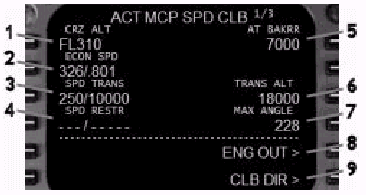
For VNAV to function, a CRZ ALT is required.
All other data boxes are either optional
or display default FMC data.
1- Cruise Altitude: The cruise altitude entered on the PERF
INIT page is displayed here.
To change the target cruise altitude, enter
an altitude into the scratchpad followed
by pressing the 1L LSK.
Valid entries for altitude are XXX, XXXX,
XXXXX, and FLXXX.
The altitude is displayed in feet when below
the TRANS ALT and as flight levels when above.
Changes to the cruise altitude on this page
are carried over to all other pages that
display CRZ ALT.
2- Speed Display: Displays the current target climb airspeed/Mach.
ECON SPD is displayed when economy speed
is in use.
SEL SPD is dispayed when a speed is manually
entered.
To change the current climb speed, type an
IAS or MACH speed into the scratchpad and
press the 2L LSK.
If the entry of both speeds is desired, the
format is xxx/.XXX, where xxx is IAS and
.XXX is MACH.
The FMC commanded airspeed is IAS until the
MACH value is reached.
To restore ECON speed when SEL SPD is displayed,
press the DEL data entry key followed by
the 2L LSK.
If speed intervention mode is in use, the
title page changes to "MCP SPD CLB".
In this mode, airspeed is controlled via
the MCP and cannot be controlled on the VNAV
CLB page.
3- Speed Transition: Displays the FMC transition airspeed and
altitude.
The FMC target climb airspeed is limited
to the value displayed until reaching the
altitude displayed.
The airspeed limit is removed as the aircraft
climbs through the altitude displayed.
The default value is 250 knots until reaching
10,000 feet.
This entry may be changed or deleted manually.
To change the entry, type xxx/XXXXX (xxx=airspeed,
XXXXX=altitude) into the scratchpad and press
the 3L LSK.
To delete the entry, press the DEL data entry
key followed by the 3L LSK.
4- Speed Restriction: This is an optional field for the entry
of an additional FMC climb speed restriction
to altitude.
To make an entry, type xxx/XXXXX (xxx=airspeed,
XXXXX=altitude) and press the 4L LSK.
When an entry is made, the FMC target airspeed
is limited to the value displayed until reaching
the altitude displayed.
To delete the speed restriction, press the
DEL data entry key followed by the 3L LSK.
5- Waypoint Altitude Constraint: Displays the next waypoint altitude constraint
entered into the LEGS page.
If no altitude constraints are entered into
the LEGS page, this field is blank.
When VNAV is engaged, the FMC commanded airspeed
and altitude are constrained to the values
entered on the LEGS page until reaching the
displayed waypoint (AT XXXXX).
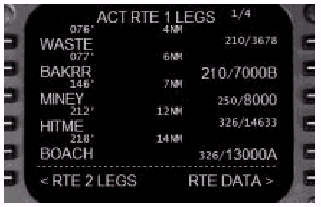
Consider the following example of how VNAV
climb is managed with waypoint constraints.
Airspeed and altitude climb constraints are
entered onto the LEGS page in the right column
of the waypoint data line.
Data displayed in small type are speed and
altitude predictions based on performance.
Data displayed in large type are speed and
altitude constraints.
The constraints are entered manually or by
procedure.
See the LEGS Page section of this manual
for an explanation of how to enter manual
speed and altitude constraints.
The example LEGS page shows that a speed
and altitude constraint of 210/7000B has
been entered at the BAKRR waypoint.
The FMC restricts the commanded VNAV speed
to 210 knots until BAKRR (notice that the
airspeed prediction for WASTE is 210).
The FMC also restricts the VNAV climb to
cross BAKRR at or below 7000 feet.
After passing BAKRR, the VNAV CLB page changes
to "AT MINEY" and "8000"
since the MINEY waypoint has an altitude
constraint of 8000 feet.
The MINEY waypoint is not speed restricted
since the airspeed is displayed as 250 in
small type.
Therefore, after passing the BAKRR waypoint,
VNAV continues a climb to 8000 feet at 250
knots.
After passing MINEY, The VNAV CLB page changes
to "AT BOACH" and "13000"
since the BOACH waypoint has an altitude
constraint of 13000 feet or above.
The BOACH waypoint is not speed restricted
since the speed is displayed in small type.
Notice that the speed prediction is now 326
since the FMC airspeed in this example is
no longer restricted to 250/10000 (the entry
in the SPD TRANS data line on the VNAV CLB
page).
Keep in mind that for a VNAV climb to continue
at each waypoint, the MCP ALT must be set
to a higher altitude than that listed for
a LEGS page constraint.
If the MCP ALT is reached prior to a LEGS
page constraint, the AFDS levels off in ALT
HOLD mode.
In this case, the MCP must be reset to a
higher altitude and VNAV reselected on the
MCP for a VNAV climb to continue.
6- Transition Altitude: Displays the altitude above which the FMC
begins to list altitudes as flight levels.
This value may be manually changed by typing
an altitude into the scratchpad followed
by pressing the 3R LSK.
7- Maximum Angle Speed: Displays the maximum angle of climb speed
based on performance calculations.
This speed is for reference only and cannot
be changed.
8- Engine Out Speed Prompt: When pressed, changes the page to display
engine out data.
9- Climb Direct Prompt: When pressed, removes all speed and altitude
climb constraints entered into the LEGS page.
If VNAV is in use, the FMC continues to climb
until reaching the CRZ ALT or the MCP ALT,
whichever is lower.
VNAV CRZ Page
The VNAV CRZ page is used to control airspeed
and altitude while in the cruise phase with
VNAV engaged.
All airspeed and altitude changes are made
from this page only.
Cruise speed and altitude changes are never
made via the LEGS pages.
The title of the VNAV CRZ page indicates
if the data displayed is active (ACT) or
modified (MOD).
The title page changes to indicate the cruise
speed selected as follows:
All modifications to CRZ page data require
execution with the EXEC function key prior
to becoming active.
When modifications are made, an "<ERASE"
prompt appears at the 6L LSK.
Pressing the 6L LSK prior to executing the
changes erases all changed data and restores
the display of active data.
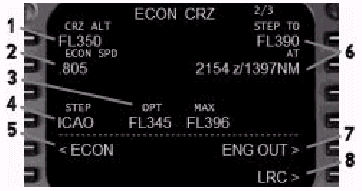
1- Cruise Altitude: The cruise altitude entered on the PERF
INIT page is displayed here.
To change the cruise altitude, enter an altitude
into the scratchpad followed by pressing
the 1L LSK.
Valid entries for altitude are XXX, XXXX,
XXXXX, and FLXXX.
The altitude is displayed in feet when below
the TRANS ALT and as flight levels when above.
Changes to the cruise altitude on this page
are carried over to all other pages that
display CRZ ALT.
After reaching the cruise altitude in VNAV,
all enroute changes in altitude prior to
the T/D are initiated by changing the cruise
altitude on the CRZ page.
Type the new cruise altitude into the scratchpad
and press the 1L LSK to change the CRZ ALT.
Then, select the new target altitude on the
AFDS MCP.
This initiates a VNAV cruise climb or descent
to the new altitude.
If both altitudes (FMC and MCP) are not changed,
VNAV continues in cruise at the previously
programmed altitude.
2- Speed Display: Displays the current target cruise speed.
ECON SPD is displayed when economy speed
is in use.
SEL SPD is displayed when a speed is manually
entered.
LRC SPD is displayed when long range cruise
is selected.
E/O SPD is displayed when the engine out
speed is selected.
To change the current cruise speed, type
an IAS or MACH speed into the scratchpad
and press the 2L LSK.
The format is XXX for IAS and .XXX for MACH.
To restore ECON speed when SEL SPD is displayed,
press the "<ECON" prompt at
the 5L LSK.
If speed intervention mode is in use, the
title page changes to "MCP SPD CRZ".
In this mode, airspeed is controlled via
the MCP and cannot be controlled on the VNAV
CRZ page.
3- Optimum and Maximum Altitudes: Displays the optimum and maximum cruise
altitudes for the aircrafts current gross
weight based on FMC performance data.
4- Step Size: Displays the step climb value used for VNAV
STEP TO performance calculations.
ICAO is the standard value and indicates
a step climb size of 2000 feet below FL290
and 4000 feet above FL290.
Valid entries range from 0 to 9000 in 1000
foot increments.
When "0" is entered, all VNAV predictions
are based on a constant cruise altitude.
5- ECON Prompt: Press the 5L LSK to change the speed display
to economy speed.
6- Step Data: The STEP TO field displays the recommended
step climb altitude based on the step size.
The AT field displays the point at which
a step climb is recommended.
In this example, a step climb is not recommended
until 1397 miles which is predicted to occur
at 2154Z time.
7- Engine Out Prompt: Press the 5R LSK to select the engine out
speed.
8- Long Range Cruise Prompt: Press the 6R LSK to select the long range
cruise speed.
VNAV DES Page
The VNAV DES page is used to make modifications
to the descent path.
This page is primarily used to make VNAV
descent airspeed modifications.
The title of the VNAV DES page indicates
if the data displayed is active (ACT) or
modified (MOD).
Additionally, if the AFDS is in speed intervention
mode, the title changes to "MCP SPD
DES" to indicate that speed is controlled
via the MCP.
If a specific descent airspeed or Mach has
been entered, the page title changes to reflect
the manually entered speed.
All modifications to DES page data require
execution with the EXEC function key prior
to becoming active.
When modifications are made, an "<ERASE"
prompt appears at the 6L LSK.
Pressing the 6L LSK prior to executing the
changes erases all changed data and restores
the display of active data.
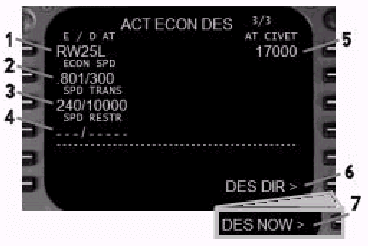
1- End of Descent Waypoint: Displays the name of the waypoint in the
LEGS page with the lowest altitude constraint.
This field is blank if no altitude constraints
have been entered on the LEGS page.
2- Speed Display: Displays the current target descent airspeed/Mach.
This airspeed is used to calculate the VNAV
descent path.
This speed is commanded by the FMC during
the descent until a lower speed is encountered
as part of a LEGS page constraint.
ECON SPD is displayed when economy speed
is in use.
SEL SPD is displayed when a speed is manually
entered.
To change the current descent speed, type
an IAS or MACH speed into the scratchpad
and press the 2L LSK.
If the entry of both speeds is desired, the
format is .XXX/xxx, where XXX is MACH and
xxx is IAS.
The FMC commanded descent airspeed is MACH
until the IAS value is reached.
To restore ECON speed when SEL SPD is displayed,
press the DEL data entry key followed by
the 2L LSK.
If speed intervention mode is in use, the
title page changes to "MCP SPD DES".
In this mode, airspeed is controlled via
the MCP and cannot be controlled on the VNAV
DES page.
3- Speed Transition: Displays the FMC transition airspeed and
altitude.
The FMC target descent airspeed is limited
to the value displayed at or below the altitude
displayed.
The default value is 240 knots at or below
10,000 feet.
This entry may be changed or deleted manually.
To change the entry, type xxx/XXXXX (xxx=airspeed,
XXXXX=altitude) into the scratchpad and press
the 3L LSK.
To delete the entry, press the DEL data entry
key followed by the 3L LSK.
4- Speed Restriction: This is an optional field for the entry
of an additional FMC descent speed restriction
below an altitude.
To make an entry, type xxx/XXXXX (xxx=airspeed,
XXXXX=altitude) and press the 4L LSK.
When an entry is made, the FMC target airspeed
is limited to the value displayed at or below
the altitude displayed.
To delete the speed restriction, press the
DEL data entry key followed by the 3L LSK.
5- Waypoint Altitude Constraint: Displays the next waypoint altitude constraint
entered into the LEGS page.
If no altitude constraints are entered into
the LEGS page, this field is blank.
When VNAV is engaged, the FMC commanded airspeed
and altitude are constrained to the values
entered on the LEGS page until reaching the
displayed waypoint (AT XXXXX).

Consider the following example of how a VNAV
descent path is calculated with waypoint
constraints.
Airspeed and altitude descent constraints
are entered onto the LEGS page in the right
column of the waypoint data line.
Data displayed in small type are speed and
altitude predictions based on performance.
Data displayed in large type are speed and
altitude constraints.
The constraints are entered manually or by
procedure.
The example LEGS page shows an altitude constraint
of 17000 feet at CIVET.
The T/D point and VNAV idle descent path
are calculated based on this first waypoint
constraint.
Since a speed has not been specified at CIVET,
the FMC target airspeed from the VNAV DES
page is shown as 300 in small type.
After passing CIVET, the VNAV DES page changes
to "AT ARNES" and "12000"
since ARNES contains the next descent constraint
of 280/12000.
A VNAV path is calculated for a straight
descent between CIVET (at 17000 feet) and
ARNES (at 12000 feet), such that ARNES is
crossed at 280 knots.
Since no constraint has been entered for
BREMR, the data displayed is prediction data
based on the calculated VNAV path between
CIVET and ARNES.
After passing ARNES, the VNAV DES page changes
to "AT SUZZI" and "9000.
A VNAV path is calculated for a straight
descent between ARNES (at 12000) and SUZZI
(at 9000).
The SPEED TRANS of 240/10000 comes into play
between these two waypoints since the FMC
is predicting an airspeed of 240 at SUZZI.
Keep in mind that for a VNAV DES to continue
at each waypoint, the MCP ALT must be set
to a lower altitude than that listed for
a LEGS page constraint.
If the MCP ALT is reached prior to a LEGS
page constraint, the AFDS levels off in ALT
HOLD mode.
In this case, the MCP must be reset to a
lower altitude and VNAV reselected on the
MCP for a VNAV descent to continue.
6- Descend Now Prompt: This prompt displays before the T/D is reached.
When pressed, begins a descent of 1250 fpm
until reaching the calculated VNAV path.
For the descent to commence, the AFDS MCP
altitude must be set to a lower value.
The AFDS levels off at the higher of the
MCP altitude or the next FMC waypoint constraint.
7- Descend Direct Prompt: This prompt displays after the T/D is reached.
When pressed, deletes all waypoint altitude
constraints on the LEGS page between the
current aircraft altitude and the MCP altitude.
Saving FMC Route DATA (RTE, SID, STAR, APP)
FMCルートデータの保存 (RTE(ルート), SID,
STAR, APP)
Waypoints listed in the LEGS pages may be
saved in the FMC database.
LEGSページにリストされているウエイポイントは、FMCデータベースに保存されています。
The waypoints may be saved as a route to
be used later, or they may be saved as part
of a DEP/ARR database procedure (SID, STAR,
or approach).
ウエイポイントは、後でルートとして使われるために保存されていたり、あるいはDEP/ARRデータベースプロシージャ(SID,
STAR, もしくは アプローチ)の一部として保存されています。
Pressing the MENU function key displays a
menu with a "SAVE ROUTE>" prompt
at the 5R LSK.
MENUファンクションキーを押すと、5R LSKの場所に"SAVE
ROUTE>"プロンプトがメニューに表示されます。

Pressing the 5R LSK displays the SAVE ROUTE
menu.
5R LSKを押すと、SAVE ROUTEメニューが表示されます。
The SAVE ROUTE menu has two pages that display
choices for classifying how the LEGS page
data is to be saved.
SAVE ROUTEメニューには、LEGSページのデータをどのように保存するかを分類するための選択肢を表示する、2つのページがあります。
Use the NEXT and PREV PAGE function keys
to switch between pages.
ページを切り替えるためには、NEXTやPREV PAGEファンクションキーを使います。
The waypoints found on the active LEGS page
are saved when using the SID, STAR and approach
prompts.
有効なLEGSページのウエイポイントは、SID、STARやアプローチのプロンプトを使うことで保存されます。
Waypoints found on the inactive route page
cannot be saved using the SID, STAR and approach
prompts.
有効でないルートページのウェイポイントは、SID、STARやアプローチのプロンプトを使うことはできません。
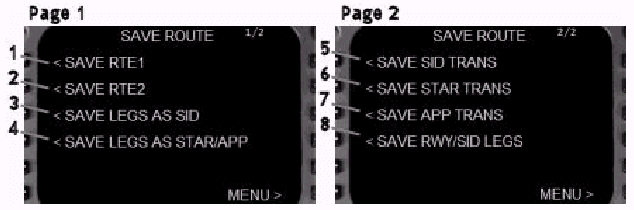
1- Save Route 1: Press the 1L LSK to save RTE page data and
waypoints from RTE1 as a flightplan.
ルート1の保存 : RTE1からRTEページのデータやウェイポイントをフライトプランとして保存するためには、1L
LSKを押します。
When pressed, a data line is displayed at
the 5L LSK for entry of the flight plan name.
LSKが押されると、フライトプラン名を入力するため5L
LSKにデータラインが表示されます。
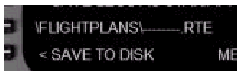
Type the name of the flightplan into the
scratchpad and press the 5L LSK.
フライトプランの名前をスクラッチパッドに入力し、5L
LSKを押します。
The flightplan name can be any combination
of up to 10 letters and numbers.
フライトプラン名は、最大10文字までのアルファベットや数字の任意の組み合わせで入力できます。
The entry of more than 10 characters generates
an "INVALID ENTRY" message in the
scratchpad.
10文字以上を入力すると、スクラッチパッドに"INVALID
ENTRY"メッセージが表示されます。
Once entered, press the "<SAVE TO
DISK" prompt at the 6L LSK to save the
flightplan.
入力後、フライトプランを保存するために6L
LSKの"<SAVE TO DISK"プロンプトを押します。
To recall a saved flightplan, enter the flightplan
name into the CO ROUTE data field found on
the RTE page.
保存したフライトプランを再読み込みするためには、RTEページにあるCO
ROUTEデータフィールドにフライトプラン名を入力します。
This action automatically loads all saved
route information and waypoints.
この動作により自動的に、すべてのルート情報やウェイポイントが読み込まれます。
2- Save Route 2: Press the 2L LSK to save RTE page data and
waypoints from RTE2 as a flightplan.
ルート2の保存 : RTE2からRTEページのデータやウェイポイントをフライトプランとして保存するためには、2L
LSKを押します。
The balance of the procedure is the same
as described for RTE1 above.
プロシージャの決定は、上のRTE1で記述したものと同じです。
3- Save LEGS as SID: Press the 3L LSK to save the waypoints listed
in the active LEGS page as a SID procedure
for the departure airport shown on the RTE
page.
LEGSをSIDとして保存 : アクティブなLEGSページにリストされているウェイポイントを、RTEページに表示されている出発空港のSIDプロシージャとして保存するためには、3L
LSKを押します。
When pressed, a submenu is presented to select
the departure airport runway(s) to which
the SID applies.
LSKが押されると、SIDを適用するための出発空港の滑走路を選択するサブメニューが表示されます。

If the waypoints to be saved are for a SID
that applies to all runways, no action is
required since "<ALL>" is
the default selection.
もし、保存されたウェイポイントが全ての滑走路に割当られるSIDであれば、"<ALL>"がデフォルトの選択であるため何の操作もいりません。
If the SID waypoints apply to 1 specific
runway, press the left side LSK abeam the
desired runway.
もし、SIDのウェイポイントが1つの特定滑走路に割り当てられるものであれば、希望する滑走路横の左側のLSKを押してください。
Type the desired name for the SID into the
scratchpad and press the 6L LSK to enter
it.
スクラッチパッドにSIDの希望する名称を入力し、6L
LSKを押します。
The name can be a combination of up to 10
letters and numbers.
名称は、最大10文字までのアルファベットや数字の組み合わせで入力できます。
Press the "SAVE TO DISK>" prompt
at the 6R LSK to save the SID.
SIDを保存するため6R LSKの"SAVE TO DISK>"プロンプトを押します。
4- Save Legs as STAR or Approach: Press the 4L LSK to save the waypoints listed
in the active LEGS page as a STAR or approach
procedure for the arrival airport shown on
the RTE page.
LEGSをSTARあるいはアプローチとして保存 : アクティブなLEGSページにリストされているウェイポイントを、RTEページに表示されている到着空港のSTARあるいはアプローチプロシージャとして保存するためには、4L
LSKを押します。
When the 4L LSK is pressed and an arrival
runway is not part of the active route, the
waypoints are saved as a STAR.
4L LSKを押し、到着滑走路がアクティブなルートに含まれていない場合、ウェイポイントはSTARとして保存されます。
The following data line appears at the 5L
LSK:
次のデータラインが、5L LSKに表示されます :
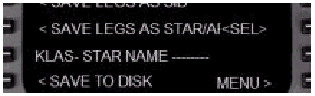
Type the name of the STAR into the scratchpad
and press the 5L LSK to enter it.
スクラッチパッドにSTARの名前を入力し、5L
LSKを押します。
The STAR name can be a combination of up
to 10 letters and numbers.
STAR名は、最大10文字までのアルファベットや数字の組み合わせで入力できます。
Press the "<SAVE TO DISK" prompt
at the 6L LSK to save the STAR.
STARを保存するため、6L LSKの"<SAVE
TO DISK"プロンプトを押してください。
When the 4L LSK is pressed and an arrival
runway appears as a waypoint in the active
route, the waypoints are saved as an approach.
4L LSKを押し、到着滑走路が有効なルートのウェイポイントとして表示されるとき、ウェイポイントはアプローチとして保存されます。
The following data line appears at the 5L
LSK:
次のようなデータラインが、5L LSKに表示されます :
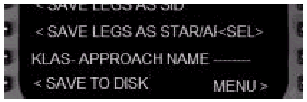
Type the name of the approach into the scratchpad
and press the 5L LSK to enter it.
スクラッチパッドにアプローチの名前を入力し、5L
LSKを押します。
The approach name can be a combination of
up to 10 letters and numbers.
アプローチ名は、最大10文字までのアルファベットや数字の組み合わせで入力できます。
Press the "<SAVE TO DISK" prompt
at the 6L LSK to save the approach.
アプローチを保存するために、6L LSKの"<SAVE
TO DISK"プロンプトを押します。
5- Save SID Transition: Press the 1L LSK to save the waypoints listed
in the active LEGS page as a SID transition.
SIDトランジションの保存 : 有効なLEGSページにリストされているウェイポイントをSIDトランジションとして保存するためには、1L
LSKを押します。
When pressed, a submenu of SIDs available
for the active departure airport is presented.
LSKが押されると、出発空港の利用可能なSIDのサブメニューが表示されます。

This example shows three SIDS already programmed.
この例では、既にプログラムされているSIDが3つ表示されています。
Select the SID to which the transition applies
by pressing the LSK abeam the SID name.
SID名��ctLSKを押し、トランジションを適用するSIDを選択してください。
Type the name of the SID transition into
the scratchpad and press the 6L LSK.
スクラッチパッドにSIDトランジションの名前を入力し、6L
LSKを押します。
The name can be a combination of up to 10
letters and numbers.
トランジション名は、最大10文字までのアルファベットや数字の組み合わせで入力できます。
Press the 6R LSK "SAVE TO DISK>"
prompt to save the SID transition for the
selected SID.
選択したSIDのSIDトランジションを保存するため、6R
LSKの"SAVE TO DISK>"プロンプトを押します。
6- Save Star Transition: Press the 2L LSK to save the waypoints listed
in the active LEGS page as a STAR transition.
STARトランジションの保存 : 有効なLEGSページにリストされているウェイポイントをSTARトランジションとして保存するためには、2L
LSKを押します。
When pressed, a submenu of STARs available
for the active arrival airport is presented.
LSKが押されると、到着空港の利用可能なSTARのサブメニューが表示されます。
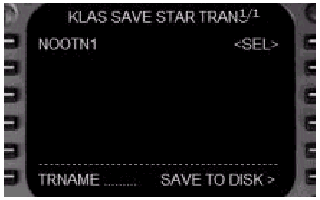
This example shows one STAR already programmed.
この例では、既にプログラムされているSTARが1つ表示されています。
Select the STAR to which the transition applies
by pressing the LSK abeam the star name.
STAR名��ctLSKを押し、トランジションを適用するSTARを選択してください。
Type the name of the STAR transition into
the scratchpad and press the 6L LSK to enter
it.
スクラッチパッドにSTARトランジションの名前を入力し、6L
LSKを押します。
The name can be a combination of up to 10
letters and numbers.
トランジション名は、最大10文字までのアルファベットや数字の組み合わせで入力できます。
Press the 6R LSK "SAVE TO DISK>"
prompt to save the STAR transition for the
selected STAR.
選択したSTARのSTARトランジションを保存するため、6L
LSKの"SAVE TO DISK>"プロンプトを押します。
7- Save Approach Transition: Press the 3L LSK to save the waypoints listed
in the active LEGS page as an approach transition.
アプローチトランジションの保存 : 有効なLEGSページに表示されているウェイポイントをアプローチトランジションとして保存するためには、3L
LSKを押します。
When pressed, a submenu of approaches available
for the active arrival airport is presented.
LSKが押されると、到着空港の利用可能なアプローチのサブメニューが表示されます。
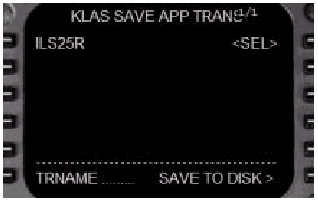
This example shows one approach already programmed.
この例では、既にプログラムされているアプローチが1つ表示されています。
Select the approach to which the transition
applies by pressing the LSK abeam the approach
name.
アプローチ名��ctLSKを押し、トランジションを適用するアプローチを選択してください。
Type the name of the approach transition
into the scratchpad and press the 6L LSK
to enter it.
スクラッチパッドにアプローチトランジションの名前を入力し、6L
LSKを押します。
The name can be a combination of up to 10
letters and numbers.
トランジション名は、最大10文字までのアルファベットや数字の組み合わせで入力できます。
Press the 6R LSK "SAVE TO DISK>"
prompt to save the approach transition for
the selected approach.
選択したアプローチのアプローチトランジションを保存するため、6L
LSKの"SAVE TO DISK>"プロンプトを押します。
8- Save Runway Specific SID Legs: Some SIDs have runway specific transition
waypoints that occur prior to the main SID
waypoints.
滑走路特定のSIDレグの保存 : いくつかのSIDには、メインSIDウェイポイントより前に、滑走路特定のトランジションウェイポイントをもつ場合があります。
This prompt is used to save runway specific
waypoints for a SID with multiple runway
transitions to common waypoints.
このプロンプトは、複数の滑走路トランジションをもつSID用に、滑走路特定ウェイポイントを保存するために使われます。
The name of the runway to which the runway
specific waypoints apply must be entered
into the RTE page.
滑走路特定ウェイポイントを適用する滑走路の名前を、RTEページにおいて入力しなければなりません。
Once the runway specific transition waypoints
are entered on the active LEGS page, press
the 4L LSK to display the SID name selection
submenu (shown previously in #5).
一度、滑走路特定トランジションウェイポイントをアクティブなLEGSページに入力し、SID名を選択するサブメニューを表示するため、4L
LSKを押します。(先の#5で示された手順)
Press the LSK abeam the SID to which the
transition applies to select it.
トランジションを適用するSIDを選択するため、適用するSID��ctLSKを押してください。
Then press the "SAVE TO DISK>"
prompt at the 6R LSK to save the runway transition
for the selected SID.
選択したSIDのための滑走路トランジションを保存するため、6R
LSKの"SAVE TO DISK>"プロンプトを押します。
| <<TOPページ | <Level-D 767 メニュー | <マニュアル目次 | <前のページ | >次のページへ |