FOR FLIGHT SIMULATOR USE ONLY. NOT FOR USE
IN REAL AVIATION. Level-D Simulations 767-300...........Page
154
RADIOS and COMMUNICATION
| <<TOPページ | <Level-D 767 メニュー | <マニュアル目次 | <前のページ | >次のページへ |
RADIOS and COMMUNICATION
無線と通信
Navigation and communication radios are found
on the pedestal, main panel and the overhead.
航法無線や通信無線はペデスタルパネル、メインパネルやオーバヘッドパネルにあります。
An audio panel on the pedestal provides for
control over the audio portion of each radio
and cockpit communications.
ペデスタルにある音声パネルはそれぞれの無線やコックピット通信の音声部分を制御します。
VOR Receivers
VORレシーバ
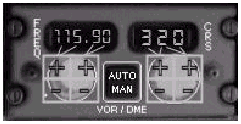
Two VOR receivers are found on the main panel.
2 つの VOR レシーバがメインパネルにあります。
VOR 1 is located on the Captains side of
the AFDS panel.
VOR1 は AFDS パネルの機長側に位置しています。
VOR 2 is located on the First Officers side
of the AFDS and is visible when the FO panel
is displayed.
VOR2 は AFDS の副操縦士側に位置し、FO パネルを表示すると見えるようになります。
Each VOR receiver is capable of both manual
tuning and automatic tuning via the FMC.
それぞれの VOR レシーバは手動チューニングと
FMC からの自動チューニングが可能です。
When the VOR receiver is in the AUTO mode,
the FMC tunes the VOR receiver automatically
to nearby stations for position verification.
VOR レシーバが AUTO モードであるとき FMC
は VOR レシーバを位置確認のため付近の局に自動的にチューニングします。
The VOR can also be remotely tuned by the
FMC using the PROG page. (注. PROG page → NAV RAD page の間違い)
VOR は FMC の NAV RAD ページを使ってリモート的にチューニングされます。
When the VOR is in the MAN mode, the pilot
controls the tuned frequency and course.
VOR が MAN モードの時はパイロットがチューニングする周波数とコースを制御します。
VOR information is displayed on the EHSI
and the RDMI for the on-side VOR receiver.
VOR 情報は EHSI と RDMI の定位置側に表示されます。
On the EHSI, VOR information is displayed
when the full or expanded VOR modes is selected
on the HSI mode control panel.
EHSI 上の VOR 情報は HSI モードコントロールパネルにおいて全円もしくは拡大
VOR モードが選択されると表示されます。
On the RDMI, VOR information is displayed
when the RMI selector needle is pointing
at VOR.
RDMI 上の VOR 情報は RMI 選択矢印を VOR に指したとき表示されます。
The currently tuned VOR frequency and its
identifier is shown in the FMC as well.
現在チューニングされている VOR 周波数やその識別子は同じものが
FMC に表示されます。
ILS Receiver
ILSレシーバ
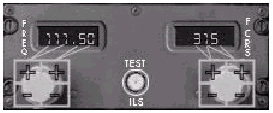
An independent ILS receiver is located on
the pedestal.
独立した ILS レシーバがペデスタルに配置されています。
It is dedicated to tuning ILS frequencies
only.
それは ILS 周波数だけをチューニングする専用のものです。
When tuned to an ILS frequency that is in
range, the ILS information is displayed on
the EADI and EHSI.
ILS 周波数の範囲内にありチューニングされると
ILS 情報が EADI と EHSI に表示されます。
ILS information is also available on the
Standby ADI.
ILS 情報はまたスタンバイ ADI でも利用可能です。
The ILS receiver can be parked by dialing
the frequency down past 108.
ILS レシーバは周波数を 108 を超えてダイアルするとパークにすることができます。
A dashed line represents the parked mode.
破線がパークモードを示しています。
This mode inhibits display of ILS information
on the flight instruments.
このモードは飛行計器上に ILS 情報を表示することを禁止します。
ADF Receiver
ADFレシーバ
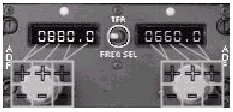
The ADF receiver is located on the pedestal.
ADF レシーバはペデスタル上に配置されています。
This receiver has an active and a standby
frequency displayed.
このレシーバはアクティブおよびスタンバイ周波数を表示しています。
Switching between the active and standby
frequencies is done by pressing the frequency
selection TFR switch.
アクティブとスタンバイ周波数の切替は周波数選択の
TFR スイッチを押すことで行います。
Control for the audio output of the ADF is
provided by the Audio Control Panel.
ADF の音声出力の制御は音声コントロールパネルにより提供されます。
ADF information can be displayed on either
of the two RDMI needles when the respective
RMI selector needle is pointing at ADF.
ADF 情報はそれぞれの RMI 選択矢印が ADF を指している時に
2 つの RDMI 指針のいずれかで表示されます。
VHF Radios
VHF無線
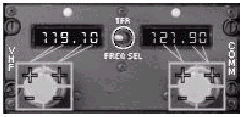
Two VHF radios are installed on the pedestal.
2 つの VHF 無線はペデスタルに取り付けられています。
Each receiver has an active and a standby
frequency displayed.
それぞれのレシーバはアクティブとスタンバイ周波数を表示しています。
Switching between the active and standby
frequencies is done by pressing the frequency
selection TFR switch.
アクティブとスタンバイ周波数の切替は周波数選択の
TFR スイッチを押すことで行います。
Control for the audio output of each radio
is provided by the Audio Control Panel.
各無線の音声出力の制御は音声コントロールパネルにより提供されます。
HF Radios
HF無線
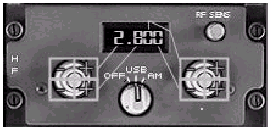
Two HF radios are found on the overhead panel.
2 つの HF 無線はオーバーヘッドパネルにあります。
The receiver is controlled by a rotary switch
with OFF, USB and AM positions.
レシーバは OFF、USB、そして AM ポジションのある回転スイッチで制御します。
The radio is normally left in the OFF position.
無線は通常 OFF ポジションにしておきます。
To turn the HF radio on, place the switch
in the USB or AM position.
HF 無線をオンにするためにはスイッチを USB
や AM ポジションにします。
The audio output from the HF radio is controlled
by the Audio Control Panel.
HF 無線からの音声出力は音声コントロールパネルにより制御されます。
The only frequencies that do not have static
are 5.000, 10.000 and 15.000.
静的でない周波数は、5.000、10.000、15.000だけです。(良い翻訳のわかる方、教えて下さいませ★)
These frequencies broadcast a clock tone.
それら周波数は時刻の発信音を提供しています。
Audio Control Panel
音声コントロールパネル
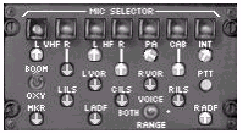
The Audio Control Panel is found on the pedestal.
音声コントロールパネルはペデスタルにあります。
It controls all audio output and transmitter
selections for the radios.
それは無線のための全ての音声出力と送信機の選択を制御します。
To hear all cockpit to ground communications,
turn on the INT audio selector and adjust
the volume as desired.
全てのコックピットからグランドへの通信を聞くためには
INT 音声選択ボタンをオンにし希望のボリュームに調整します。
Cabin Communications Panel
キャビン通信パネル
The Cabin Communications Panel is found on
the overhead panel.
キャビン通信パネルはオーバーヘッドパネルにあります。
Pressing one of the cabin call buttons chimes
the associated Flight Attendant station.
キャビンコールボタンの 1 つを押すと対応するフライトアテンダントステーションのチャイムが鳴ります。
Pressing the FLT INT button allows the pilot
to monitor all interphone communications
within the plane.
FLT INT ボタンを押すとパイロットに飛行機内の全てのインターフォン通信をモニタすることを許可します。
Controls for the interphone are found on
the Audio Control Panel.
インターフォンの制御は音声コントロールパネルに見つかります。
VOR Receiver Controls
VOR レシーバコントロール
ILS Receiver Controls
ILS レシーバコントロール
ADF Receiver Controls
ADF レシーバコントロール
VHF Radio Controls
VHF 無線コントロール
HF Radio Controls
HF 無線コントロール
Audio Control Panel Controls
音声コントロールパネルの制御
RADIOS and COMMUNICATION
無線と交信

Cabin Communications Panel
キャビン通信パネル
This panel can be used for ground and flight
crew interaction without having to select
the Level-D menu.
このパネルは Level-D メニューを選択することなくグランドクルーやフライトクルーとの交信に役立ちます。
The SELCAL buttons across the top have no
function in the sim.
上の方にあるSELCALボタンはシミュレータ上では何の機能もありません。
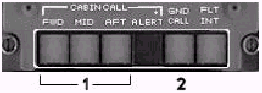
1- Cabin Call - A request from the cabin crew generates
an aural tone and causes one of the CABIN
CALL lights to illuminate.
キャビンコール - キャビンクルーからのリクエストがあるとそのリクエストの音声を生成し
CABIN CALL ライトの 1 つが点灯します。
Pressing the illuminated light displays a
dialogue box to control the flight crew interaction.
点灯したライトを押すとフライトクルーとの交信を制御するダイアログボックスが表示されます。
Select a number in the presented dialogue
box for the desired response to a flight
crew request.
フライトクルーのリクエストへの希望する返答を行うため示されたダイアログボックス内の番号を選択してください。
2- Ground Call - Press the GND CALL button to display a
ground crew interaction box.
グランドコール - グランドクルーとの交信ボックスを表示するため
GND CALL ボタンを押してください。
This box contains the same selections found
in the Level-D "Ground requests"
menu.
このボックスには Level-D "グランドリクエスト"
メニューにあるのと同じ選択肢が含まれています。
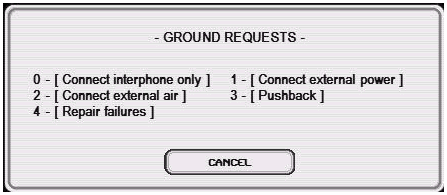
Press the number on the keyboard that corresponds
to the desired interaction.
希望する交信に一致する番号をキーボード上で押してください。
Further dialogue boxes are displayed when
required for each item.
それぞれの項目について必要に応じてさらにダイアログボックスが表示されます。
These interactions are the same as described
previously under "Ground requests".
それら交信は前の "グランドリクエスト"
の章で説明したものと同じです。
Note: When a request is being processed (after
selection), the ground requests menu is not
available until the requested process has
been completed.
注意 : リクエストが処理中(選択後)であると、グランドリクエストメニューはそのリクエストの処理が完了するまで有効になりません。
| <<TOPページ | <Level-D 767 メニュー | <マニュアル目次 | <前のページ | >次のページへ |